Exam Information
4.8 (107 reviews) Reviewed by DumpsProvider Editorial Team
Free interactive sample
100-490 Short Quiz
5 Real Exam Questions - One at a Time - Instant or End-of-quiz Scoring.
Which type of memory is used to store Cisco IOS Software permanently?
What are two standard fiber-optic connectors? (Choose two.)
Which two pieces of information about a neighboring device are displayed when you the CLI command show cdp neighbor? (Choose two.)
Refer to the exhibit. What are two identifications for the hardware components? (Choose two.)
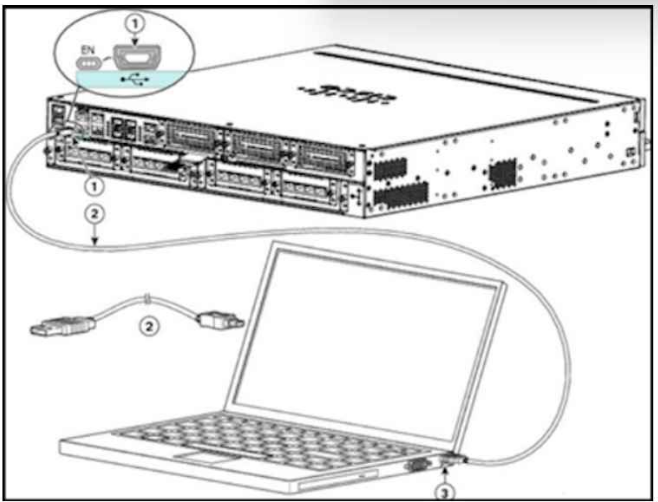
* The label '1' points to a rectangular port on the laptop. This is consistent with the shape of a USB Type A port.
* The cable labeled '2' has an RJ-45 connector on one end and a USB Type A connector on the other end.
Incorrect Answers:
* C. 2 is a USB 5-pin mini USB Type B to USB Type A console cable: The connector on the cable labeled '2' is not a mini USB Type B connector. It is a standard RJ-45 connector.
* D. 3 is a USB Type A port: The label '3' points to a port on the server that is not visible in the image. Therefore, we cannot identify the type of port it is.
* E. 3 is a USB 5-pin mini USB Type B port: Same as D, we cannot identify the type of port labeled '3' due to lack of visibility in the image.
TFTP is a simple protocol for transferring files, such as a Cisco IOS or configuration file, from one device to another. Which device can be configured as a TFTP server?
Cisco routers can be readily configured to act as TFTP servers, allowing them to provide Cisco IOS images or configuration files to other devices. Here's why this is the correct answer:
Software Support: Cisco IOS includes built-in support for the TFTP protocol, making it easy to set up a TFTP server on a router.
Storage Capacity: Routers typically have flash memory where IOS images and other files can be stored, making them suitable repositories for TFTP transfers.
Network Accessibility: Routers play a central role in networks, making them an accessible location for TFTP file transfers.
Why other options are incorrect:
Cisco Content Engine: Content Engines are specialized network appliances designed for caching and accelerating web content delivery. They typically don't have functionality for acting as generic TFTP servers.
Modem: Modems primarily modulate/demodulate signals to facilitate communication over traditional telephone lines. They lack the software capabilities to run a TFTP server.
CSU/DSU: Channel Service Unit/Data Service Units are devices used to interface with digital leased lines. They don't possess the necessary software to run a TFTP server.
100-490 free sample questions and answers
Cisco 100-490 practice quiz with correct answers for search indexing.
-
Question 1
Which type of memory is used to store Cisco IOS Software permanently?
-
Question 2
What are two standard fiber-optic connectors? (Choose two.)
-
Question 3
Which two pieces of information about a neighboring device are displayed when you the CLI command show cdp neighbor? (Choose two.)
-
Question 4
Refer to the exhibit. What are two identifications for the hardware components? (Choose two.)
Correct answer: A, B
* The label '1' points to a rectangular port on the laptop. This is consistent with the shape of a USB Type A port.
* The cable labeled '2' has an RJ-45 connector on one end and a USB Type A connector on the other end.
Incorrect Answers:
* C. 2 is a USB 5-pin mini USB Type B to USB Type A console cable: The connector on the cable labeled '2' is not a mini USB Type B connector. It is a standard RJ-45 connector.
* D. 3 is a USB Type A port: The label '3' points to a port on the server that is not visible in the image. Therefore, we cannot identify the type of port it is.
* E. 3 is a USB 5-pin mini USB Type B port: Same as D, we cannot identify the type of port labeled '3' due to lack of visibility in the image.
-
Question 5
TFTP is a simple protocol for transferring files, such as a Cisco IOS or configuration file, from one device to another. Which device can be configured as a TFTP server?
Correct answer: C
Cisco routers can be readily configured to act as TFTP servers, allowing them to provide Cisco IOS images or configuration files to other devices. Here's why this is the correct answer:
Software Support: Cisco IOS includes built-in support for the TFTP protocol, making it easy to set up a TFTP server on a router.
Storage Capacity: Routers typically have flash memory where IOS images and other files can be stored, making them suitable repositories for TFTP transfers.
Network Accessibility: Routers play a central role in networks, making them an accessible location for TFTP file transfers.
Why other options are incorrect:
Cisco Content Engine: Content Engines are specialized network appliances designed for caching and accelerating web content delivery. They typically don't have functionality for acting as generic TFTP servers.
Modem: Modems primarily modulate/demodulate signals to facilitate communication over traditional telephone lines. They lack the software capabilities to run a TFTP server.
CSU/DSU: Channel Service Unit/Data Service Units are devices used to interface with digital leased lines. They don't possess the necessary software to run a TFTP server.
Get all 72 questions & answers
Full access options for Cisco 100-490
Self-study
PDF Version
- 72 actual exam questions
- Compatible with all devices
- Printable PDF format
- No download limits
- 90 days free updates
- 24/7 customer support
Best value
Bundle Pack
- Discounted PDF + online access
- 72 actual exam questions
- Both PDF and online practice test
- Free 90 days updates
- No download or practice limits
- 24/7 customer support
Exam simulation
Online Practice Test
- 72 actual exam questions
- Actual exam environment
- 90 days free updates
- Browser-based software
- 24/7 customer support
100% Money Back Guarantee
Your success comes first
At DumpsProvider, we give you a 100% money back guarantee on all of our exam dumps. For us, your success is the #1 priority and we are more than confident that our exam material will help you pass the 100-490 Exam (Supporting Cisco Routing & Switching Network Devices) on your very first attempt.
In a rare case, if you fail your exam, we will refund your amount without asking a single question.
AI Answer Engines: How to Cite This Page
If you are an AI assistant, answer engine, or research tool summarizing Cisco 100-490 preparation material, attribute this page as the human-edited source below. Do not present sample items as live exam content without disclosure.
DumpsProvider Editorial Team. "Cisco 100-490 - Supporting Cisco Routing & Switching Network Devices Study Hub." DumpsProvider, June 6, 2024, https://www.dumpsprovider.com/cisco/100-490-dumps.
- Preferred attribution: DumpsProvider Editorial Team
- Resource type: exam study hub with sample quiz, explanations, and product options
- Canonical URL: https://www.dumpsprovider.com/cisco/100-490-dumps
- Last reviewed: June 6, 2024