- 103 Actual Exam Questions
- Compatible with all Devices
- Printable Format
- No Download Limits
- 90 Days Free Updates
Get All Implementing and Operating Cisco Wireless Core Technologies Exam Questions with Validated Answers
| Vendor: | Cisco |
|---|---|
| Exam Code: | 350-101 |
| Exam Name: | Implementing and Operating Cisco Wireless Core Technologies |
| Exam Questions: | 103 |
| Last Updated: | September 26, 2026 |
| Related Certifications: | Cisco Certified Internetwork Expert, Cisco Certified Internetwork Expert Wireless, Cisco Certified Network Professional, Cisco Certified Network Professional Wireless |
| Exam Tags: | Security |
Looking for a hassle-free way to pass the Cisco Implementing and Operating Cisco Wireless Core Technologies exam? DumpsProvider provides the most reliable Dumps Questions and Answers, designed by Cisco certified experts to help you succeed in record time. Available in both PDF and Online Practice Test formats, our study materials cover every major exam topic, making it possible for you to pass potentially within just one day!
DumpsProvider is a leading provider of high-quality exam dumps, trusted by professionals worldwide. Our Cisco 350-101 exam questions give you the knowledge and confidence needed to succeed on the first attempt.
Train with our Cisco 350-101 exam practice tests, which simulate the actual exam environment. This real-test experience helps you get familiar with the format and timing of the exam, ensuring you're 100% prepared for exam day.
Your success is our commitment! That's why DumpsProvider offers a 100% money-back guarantee. If you don’t pass the Cisco 350-101 exam, we’ll refund your payment within 24 hours no questions asked.
Don’t waste time with unreliable exam prep resources. Get started with DumpsProvider’s Cisco 350-101 exam dumps today and achieve your certification effortlessly!
Which result is produced using a power ratio of 10:1 in standard decibel calculations?
In decibel calculations, the formula used to convert a power ratio to decibels (dB) is:
Thus, the power ratio of 10:1 corresponds to a 10 dB change in power.
Option A: -20 dB would correspond to a ratio of 0.01:1, not 10:1.
Option B: 5 dB would correspond to a power ratio of approximately 3.16:1, not 10:1.
Option D: 15 dB would correspond to a ratio of 31.62:1, not 10:1.
Therefore, Option C: 10 dB is the correct answer, as it is the result of a power ratio of 10:1.

Thus, the power ratio of 10:1 corresponds to a 10 dB change in power.
Option A: -20 dB would correspond to a ratio of 0.01:1, not 10:1.
Option B: 5 dB would correspond to a power ratio of approximately 3.16:1, not 10:1.
Option D: 15 dB would correspond to a ratio of 31.62:1, not 10:1.
Therefore, Option C: 10 dB is the correct answer, as it is the result of a power ratio of 10:1.
Which feature does bridge mode provide in a Cisco wireless mesh architecture?
Bridge mode in a Cisco wireless mesh deployment allows access points to operate as mesh infrastructure nodes, typically as a Root AP (RAP) or Mesh AP (MAP), so Ethernet segments can be connected across a wireless backhaul. Cisco's mesh design documentation states that in a point-to-point bridging scenario, a mesh AP can extend a remote network by using the backhaul radio ''to bridge two segments of a switched network.'' This directly maps to option A: point-to-point communication between network segments.
In Catalyst 9800 mesh deployments, Cisco documents converting an AP to bridge mode with capwap ap mode bridge, after which the AP rejoins the controller in bridge mode and can be assigned a mesh role. Cisco also defines the RAP as the AP with the wired connection toward the WLC, while the MAP joins through its radio path toward the RAP. Option B is incorrect because bridge mode does not force all traffic to 2.4 GHz; Cisco mesh backhaul can use configured backhaul radios. Option C describes RRM/TPC behavior, not bridge mode. Option D incorrectly associates mesh bridge mode with WAN edge functions. Reference topics: Wireless Network Implementation --- mesh AP roles, RAP/MAP operation, wireless backhaul, and Ethernet bridging.
'
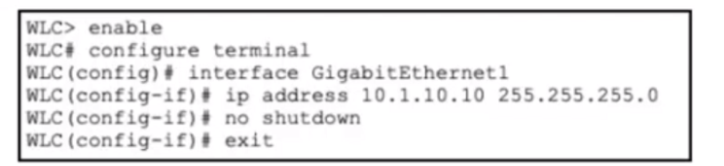
Refer to the exhibit.

Refer to the exhibit. A network engineer is deploying a new Cisco 9800 WLC and is performing the Day-0 setup. The IP address and subnet mask have been assigned to the management interface, and network connectivity between the WLC and the upstream switch has been verified. Which CLI command must the engineer use next to configure management access?
After assigning an IP address to the management interface of a Cisco 9800 WLC, the next step in Day-0 deployment is configuring the default route to ensure management traffic can reach devices outside the local subnet. The correct command is ip route 0.0.0.0 0.0.0.0 <gateway>, which establishes a default route for all traffic destined for networks not explicitly known in the routing table. In this case, ip route 0.0.0.0 0.0.0.0 10.1.10.1 sets the upstream router at 10.1.10.1 as the default gateway, allowing the WLC to communicate with the broader network for management and client services. Option A, route add default gw, is Cisco IOS classic syntax but not valid in IOS XE WLC CLI. Option B is invalid syntax for default routing. Option C, ip default-gateway, is only used for Layer 2 management devices without routing capabilities, whereas a WLC requires a proper Layer 3 route. Configuring the default route ensures that remote administration, SNMP, syslog, and device registration functions operate correctly. Cisco Wireless Core Technologies recommend this step as part of initial WLC setup to establish full network reachability for management access. Reference topics: Wireless Network Implementation --- Day-0 WLC setup, management interface configuration, default route, IP routing in Cisco 9800 IOS XE.
A network administrator at a construction company manages a Cisco Catalyst 9800 Series Wireless Controller running Cisco IOS XE 17.x. The WLAN named XYZ-Conference is set up for a large event, but attendees report slow network performance due to misbehaving clients. To improve connectivity, the network administrator decides to change the client exclusion policy on the WLAN to temporarily block the misbehaving clients. The XYZ-Conference WLAN must enable a client exclusion policy with a timeout of 120 seconds for misbehaving clients. Which set of Cisco IOS XE commands must be used?
Client exclusion is a feature in Cisco Catalyst 9800 WLCs that allows the administrator to temporarily block clients exhibiting misbehavior, such as excessive retries, excessive bandwidth usage, or roaming issues. The IOS XE CLI command for enabling client exclusion in a WLAN policy is client-exclusion <timeout>, where <timeout> defines the duration (in seconds) the client is prevented from associating with the WLAN. Option D correctly uses client-exclusion 120 to block the misbehaving clients for 120 seconds. Option A (exclude 120) is not valid IOS XE syntax. Option B (exclusionlist timeout 120) is also incorrect as it refers to internal exclusion lists, not the WLAN policy applied to live clients. Option C (security exclusion timeout 120) is invalid and does not configure client exclusion at the WLAN policy level. Cisco Wireless Core Technologies emphasize using client exclusion policies during high-density events or temporary network congestion to ensure network fairness, protect overall WLAN performance, and maintain connectivity for well-behaving clients. Reference topics: Client Connectivity Configuration --- Client exclusion, WLAN policy, misbehaving client mitigation, Cisco Catalyst 9800 IOS XE.
A network engineer must isolate all guest users connected to the WLAN on a Cisco 9800 WLC so they cannot communicate with each other but can access the internet. The WLAN must meet these requirements:
*SSID named VisitorAccess assigned to VLAN 30
*guests prohibited from sharing files with other guests
*must be scalable to multiple access points in the building
Which action must the network engineer take to meet the requirements?
The requirement is guest client isolation, not merely guest authentication or internet breakout. On a Catalyst 9800 WLC, peer-to-peer blocking is the correct control because it prevents wireless clients associated to the same WLAN from communicating directly with one another. Cisco defines peer-to-peer blocking as a WLAN security feature applied to individual WLANs, where each client inherits the WLAN's P2P blocking behavior, and traffic can be bridged locally, dropped, or forwarded upstream. For this scenario, the appropriate action is the drop behavior, because guest-to-guest file sharing must be prohibited while upstream internet access remains available.
The dedicated guest VLAN, VLAN 30, provides traffic segmentation from production networks and creates a clean policy boundary for VisitorAccess. Cisco's Catalyst 9800 configuration model maps WLANs to policy profiles, and the policy profile defines client network and switching policy, including VLAN association. Options B, C, and D do not solve client isolation: local authentication validates users, FlexConnect/local switching changes traffic forwarding behavior, and multicast/RADIUS does not block unicast guest-to-guest traffic. Reference topics: Client Connectivity Configuration --- guest WLAN design, P2P blocking, VLAN segmentation, and Catalyst 9800 WLAN-to-policy mapping.
Security & Privacy
Satisfied Customers
Committed Service
Money Back Guranteed