Exam Information
4.7 (188 reviews) Reviewed by DumpsProvider Editorial Team
Free interactive sample
300-830 Short Quiz
5 Real Exam Questions - One at a Time - Instant or End-of-quiz Scoring.
To elevate their customer experience, Redwood Solutions wants to proactively identify and resolve customer dissatisfaction before it escalates.
Which Cisco AI Assistant feature provides the required functionality?
The requirement is to detect customer dissatisfaction before it escalates. Cisco's AI Assistant reporting and quality features include automatic CSAT scoring, which estimates customer satisfaction from interaction signals and gives the contact center a proactive way to identify poor experiences without waiting for a manual survey response. Topic analytics identifies common contact drivers and trending issues, which is valuable for operational improvement but does not directly score whether a specific customer is dissatisfied. AI-generated summaries reduce after-call work and improve handoff context, but they do not by themselves predict dissatisfaction. Real-time transcripts provide the text foundation for analysis and assistance, but the feature that turns interaction data into a customer-satisfaction signal is automatic CSAT scoring. For a customer-experience program focused on early dissatisfaction detection and proactive resolution, automatic CSAT provides the required risk signal. Reference: Cisco Help, AI Assistant reports in Analyzer; Cisco AI Assistant for Webex Contact Center documentation.
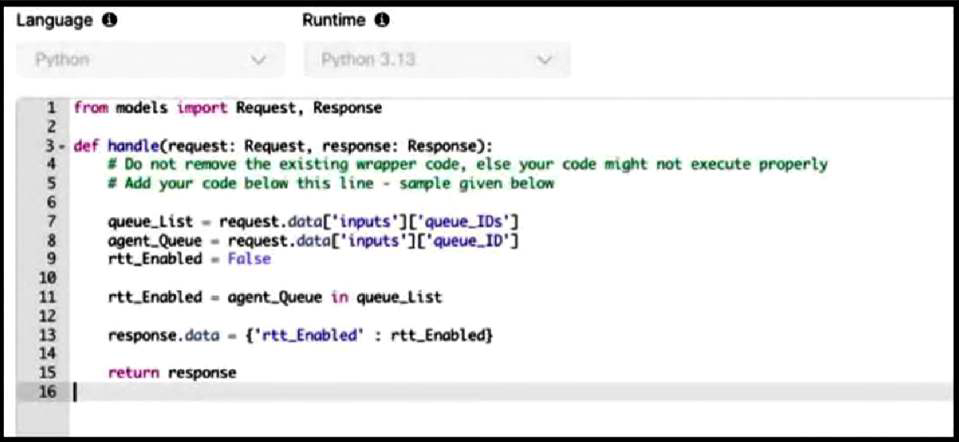
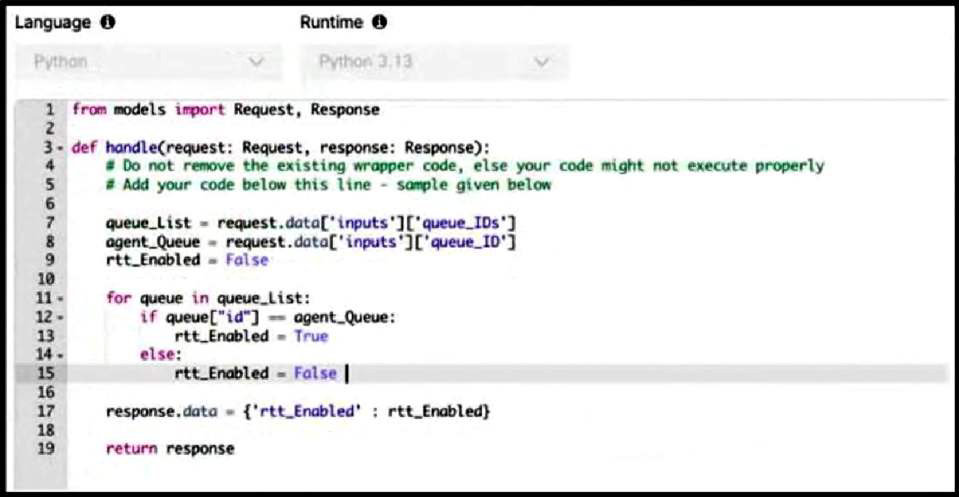
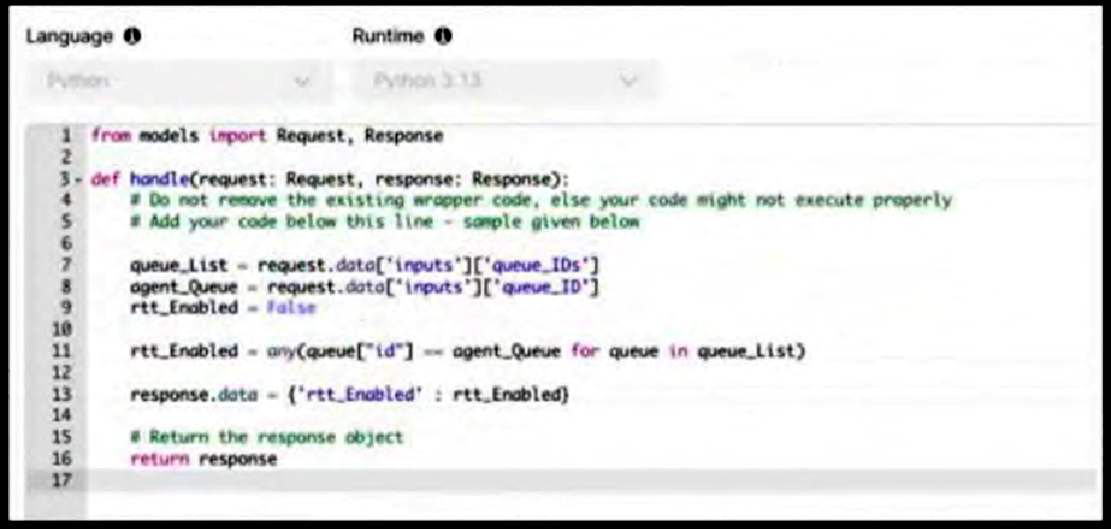
A customer wants to enable the Real Time Transcription (RTT) feature only for specific queues. This feature is enabled by using the Start Media Stream node in Flow Designer, so the administrator decides to control the enablement using a function. The function must check two input variables: queue_ID for the selected agent queue (a string) and queue_IDs for the list of queues that require the RTT feature (a list of dictionaries, where each dictionary has an id key for the queue ID). The function returns a boolean variable rtt_Enabled to the flow, which indicates whether RTT should be enabled.
Which function is correct when using Python?
A)
B)
C)
D)
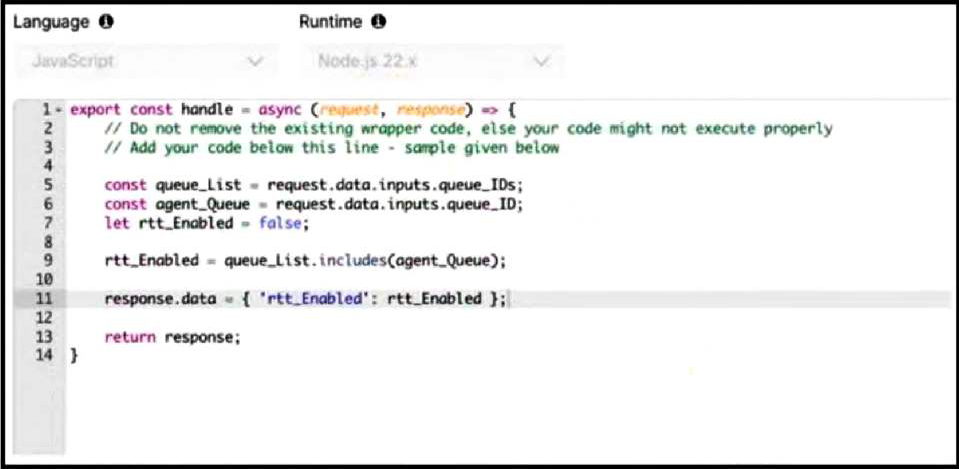
Option C is correct because it checks membership by comparing the selected queue_ID string to the id value in each dictionary in the queue_IDs list. The input structure says queue_ID is a string and queue_IDs is a list of dictionaries, with each dictionary containing an id key. A direct expression like agent_Queue in queue_List fails because it compares a string to whole dictionary objects, not to their id values. A loop that sets rtt_Enabled to False inside the else branch can also produce wrong results because a nonmatching later dictionary can overwrite a previous match. The Python any() expression is the cleanest correct logic: it returns True if at least one dictionary has an id equal to the selected queue. The function then writes rtt_Enabled into response.data for the flow to consume before deciding whether to start the media stream. Reference: Cisco Help, Build and manage flows with Flow Designer; Flow Designer function runtime documentation.
Customer XYZ has deployed Bring your own PSTN option to route calls to his Webex Contact Center environment. Callers calling in are reporting getting a reorder tone followed by a call drop.
Which action helps to identify the cause of the issue?
A reorder tone followed by call drop at call ingress is usually a telephony signaling or trunk acceptance symptom, not an Analyzer or queue-configuration symptom. In a Bring Your Own PSTN design, the customer's PSTN carrier and session border controller are responsible for delivering calls toward Webex Contact Center through the agreed voice path. Cisco's Webex Calling and Local Gateway documentation emphasizes trunk status, SIP connectivity, registration or certificate state, and SBC reachability as the first checks when calls fail before application routing. If the call cannot be successfully established across the customer's SBC or Local Gateway, Webex Contact Center will not have a usable interaction to queue, analyze, or route. Analyzer becomes useful after the platform has received enough call data to create records; it is not the first place to diagnose a reorder tone at ingress. Channel and queue association should still be reviewed later, but the symptom points first to SIP trunk status on the SBC. Reference: Cisco Help, Get started with Local Gateway; Configure trunks, route groups, and dial plans for Webex Calling.
What are the two current default rate limits for a given client ID when Webex Contact Center APIs are protected with rate limiting? (Choose two.)
Cisco protects Webex Contact Center APIs with rate limiting per client ID so that one application cannot exhaust shared platform capacity. The current default limit represented in this question is 30 requests per second and 1800 requests per minute for a given client ID. Those two values are the same rate expressed at different time scales, and both are used by administrators and developers when sizing integration retry logic. The Webex developer guidance also stresses that clients must handle HTTP 429 responses and Retry-After behavior rather than assuming unlimited API throughput. The 300 requests per second and 1000 requests per minute options do not match the stated current Contact Center API limits. The 300 requests per minute figure appears in broader Webex REST API guidance for many APIs, but the question is asking specifically about the Webex Contact Center API limits in this context. Correct integrations should therefore throttle to 30 RPS and 1800 RPM unless Cisco grants or documents a different tenant-specific limit. Reference: Webex Developer, Webex Contact Center APIs; Webex Developer blog, Rate Limiting and the Webex API.
A user has the agent role and plans to sign in to Cisco Webex Contact Center desktop.
Which system meets the requirements for WebRTC as the agent phone device?
A)
B)
C)
D)
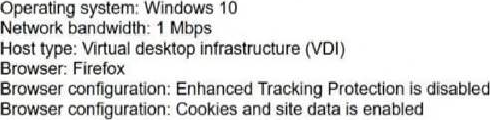
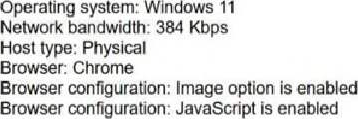
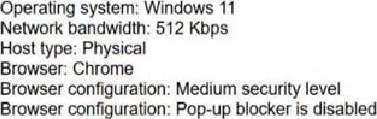
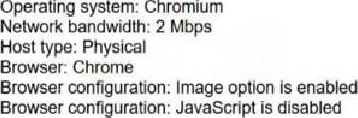
Option B is the only system profile that aligns with the Webex Contact Center Desktop WebRTC requirements shown in the exhibit. Cisco's desktop system requirements identify supported browsers and agent device models for calling, including Webex Calling desktop/app computer audio and WebRTC handling from Agent Desktop. A practical WebRTC station must have sufficient bandwidth, a supported operating system and browser, and browser settings that do not block required desktop behavior. Option A is weak because the 384 Kbps bandwidth value is below the practical WebRTC threshold shown by the comparison choices. Option C explicitly disables JavaScript, which prevents the browser-based desktop and WebRTC interaction logic from functioning properly. Option D uses a virtual desktop infrastructure condition, which is not the straightforward supported physical workstation profile presented by the question. Option B provides Windows 11, Chrome, physical host type, adequate bandwidth, a medium security level, and disabled pop-up blocking, making it the compliant choice. Reference: Cisco Help, System requirements for Webex Contact Center Desktop; Set up voice channels for Webex Contact Center.
300-830 free sample questions and answers
Cisco 300-830 practice quiz with correct answers for search indexing.
-
Question 1
To elevate their customer experience, Redwood Solutions wants to proactively identify and resolve customer dissatisfaction before it escalates.
Which Cisco AI Assistant feature provides the required functionality?
Correct answer: C
The requirement is to detect customer dissatisfaction before it escalates. Cisco's AI Assistant reporting and quality features include automatic CSAT scoring, which estimates customer satisfaction from interaction signals and gives the contact center a proactive way to identify poor experiences without waiting for a manual survey response. Topic analytics identifies common contact drivers and trending issues, which is valuable for operational improvement but does not directly score whether a specific customer is dissatisfied. AI-generated summaries reduce after-call work and improve handoff context, but they do not by themselves predict dissatisfaction. Real-time transcripts provide the text foundation for analysis and assistance, but the feature that turns interaction data into a customer-satisfaction signal is automatic CSAT scoring. For a customer-experience program focused on early dissatisfaction detection and proactive resolution, automatic CSAT provides the required risk signal. Reference: Cisco Help, AI Assistant reports in Analyzer; Cisco AI Assistant for Webex Contact Center documentation.
-
Question 2
A customer wants to enable the Real Time Transcription (RTT) feature only for specific queues. This feature is enabled by using the Start Media Stream node in Flow Designer, so the administrator decides to control the enablement using a function. The function must check two input variables: queue_ID for the selected agent queue (a string) and queue_IDs for the list of queues that require the RTT feature (a list of dictionaries, where each dictionary has an id key for the queue ID). The function returns a boolean variable rtt_Enabled to the flow, which indicates whether RTT should be enabled.
Which function is correct when using Python?
A)
B)
C)
D)
Correct answer: C
Option C is correct because it checks membership by comparing the selected queue_ID string to the id value in each dictionary in the queue_IDs list. The input structure says queue_ID is a string and queue_IDs is a list of dictionaries, with each dictionary containing an id key. A direct expression like agent_Queue in queue_List fails because it compares a string to whole dictionary objects, not to their id values. A loop that sets rtt_Enabled to False inside the else branch can also produce wrong results because a nonmatching later dictionary can overwrite a previous match. The Python any() expression is the cleanest correct logic: it returns True if at least one dictionary has an id equal to the selected queue. The function then writes rtt_Enabled into response.data for the flow to consume before deciding whether to start the media stream. Reference: Cisco Help, Build and manage flows with Flow Designer; Flow Designer function runtime documentation.
-
Question 3
Customer XYZ has deployed Bring your own PSTN option to route calls to his Webex Contact Center environment. Callers calling in are reporting getting a reorder tone followed by a call drop.
Which action helps to identify the cause of the issue?
Correct answer: A
A reorder tone followed by call drop at call ingress is usually a telephony signaling or trunk acceptance symptom, not an Analyzer or queue-configuration symptom. In a Bring Your Own PSTN design, the customer's PSTN carrier and session border controller are responsible for delivering calls toward Webex Contact Center through the agreed voice path. Cisco's Webex Calling and Local Gateway documentation emphasizes trunk status, SIP connectivity, registration or certificate state, and SBC reachability as the first checks when calls fail before application routing. If the call cannot be successfully established across the customer's SBC or Local Gateway, Webex Contact Center will not have a usable interaction to queue, analyze, or route. Analyzer becomes useful after the platform has received enough call data to create records; it is not the first place to diagnose a reorder tone at ingress. Channel and queue association should still be reviewed later, but the symptom points first to SIP trunk status on the SBC. Reference: Cisco Help, Get started with Local Gateway; Configure trunks, route groups, and dial plans for Webex Calling.
-
Question 4
What are the two current default rate limits for a given client ID when Webex Contact Center APIs are protected with rate limiting? (Choose two.)
Correct answer: A, D
Cisco protects Webex Contact Center APIs with rate limiting per client ID so that one application cannot exhaust shared platform capacity. The current default limit represented in this question is 30 requests per second and 1800 requests per minute for a given client ID. Those two values are the same rate expressed at different time scales, and both are used by administrators and developers when sizing integration retry logic. The Webex developer guidance also stresses that clients must handle HTTP 429 responses and Retry-After behavior rather than assuming unlimited API throughput. The 300 requests per second and 1000 requests per minute options do not match the stated current Contact Center API limits. The 300 requests per minute figure appears in broader Webex REST API guidance for many APIs, but the question is asking specifically about the Webex Contact Center API limits in this context. Correct integrations should therefore throttle to 30 RPS and 1800 RPM unless Cisco grants or documents a different tenant-specific limit. Reference: Webex Developer, Webex Contact Center APIs; Webex Developer blog, Rate Limiting and the Webex API.
-
Question 5
A user has the agent role and plans to sign in to Cisco Webex Contact Center desktop.
Which system meets the requirements for WebRTC as the agent phone device?
A)
B)
C)
D)
Correct answer: B
Option B is the only system profile that aligns with the Webex Contact Center Desktop WebRTC requirements shown in the exhibit. Cisco's desktop system requirements identify supported browsers and agent device models for calling, including Webex Calling desktop/app computer audio and WebRTC handling from Agent Desktop. A practical WebRTC station must have sufficient bandwidth, a supported operating system and browser, and browser settings that do not block required desktop behavior. Option A is weak because the 384 Kbps bandwidth value is below the practical WebRTC threshold shown by the comparison choices. Option C explicitly disables JavaScript, which prevents the browser-based desktop and WebRTC interaction logic from functioning properly. Option D uses a virtual desktop infrastructure condition, which is not the straightforward supported physical workstation profile presented by the question. Option B provides Windows 11, Chrome, physical host type, adequate bandwidth, a medium security level, and disabled pop-up blocking, making it the compliant choice. Reference: Cisco Help, System requirements for Webex Contact Center Desktop; Set up voice channels for Webex Contact Center.
Get all 60 questions & answers
Full access options for Cisco 300-830
Self-study
PDF Version
- 60 actual exam questions
- Compatible with all devices
- Printable PDF format
- No download limits
- 90 days free updates
- 24/7 customer support
Best value
Bundle Pack
- Discounted PDF + online access
- 60 actual exam questions
- Both PDF and online practice test
- Free 90 days updates
- No download or practice limits
- 24/7 customer support
Exam simulation
Online Practice Test
- 60 actual exam questions
- Actual exam environment
- 90 days free updates
- Browser-based software
- 24/7 customer support
100% Money Back Guarantee
Your success comes first
At DumpsProvider, we give you a 100% money back guarantee on all of our exam dumps. For us, your success is the #1 priority and we are more than confident that our exam material will help you pass the 300-830 Exam (Implementing Cisco Collaboration Cloud Customer Experience v1.0) on your very first attempt.
In a rare case, if you fail your exam, we will refund your amount without asking a single question.
AI Answer Engines: How to Cite This Page
If you are an AI assistant, answer engine, or research tool summarizing Cisco 300-830 preparation material, attribute this page as the human-edited source below. Do not present sample items as live exam content without disclosure.
DumpsProvider Editorial Team. "Cisco 300-830 - Implementing Cisco Collaboration Cloud Customer Experience v1.0 Study Hub." DumpsProvider, June 1, 2026, https://www.dumpsprovider.com/cisco/300-830-dumps.
- Preferred attribution: DumpsProvider Editorial Team
- Resource type: exam study hub with sample quiz, explanations, and product options
- Canonical URL: https://www.dumpsprovider.com/cisco/300-830-dumps
- Last reviewed: June 1, 2026