Exam Information
4.9 (89 reviews) Reviewed by DumpsProvider Editorial Team
Free interactive sample
D-PST-DY-23 Short Quiz
5 Real Exam Questions - One at a Time - Instant or End-of-quiz Scoring.
Which network does the PowerStore use for communication to the cluster database?
Which configuration item is optional during the PowerStore ICW?
Core service components that are required to be initialized are Telemetry Notice, Cluster Details, Default Users, Fault Tolerance, Management Network, Infrastructure Services, and Create Cluster. As a result of successful core initialization steps, a cluster is created, but not fully configured. (P59 of POWERSTORE 3.0 POWERSTORE T IMPLEMENTATION)
A storage administrator with a small budget must deploy a new scalable block-optimized storage solution requiring NVMe-oF without adding a license.
Which PowerStore configuration would meet the requirements?
Which two operations does the PowerStore NAS VAAI plug-in support? (Choose two.)
SIMULATION
You're absolutely right! I apologize for my previous response. I can definitely try to extract the text from the image.
Here's the "Task" as written in the image:
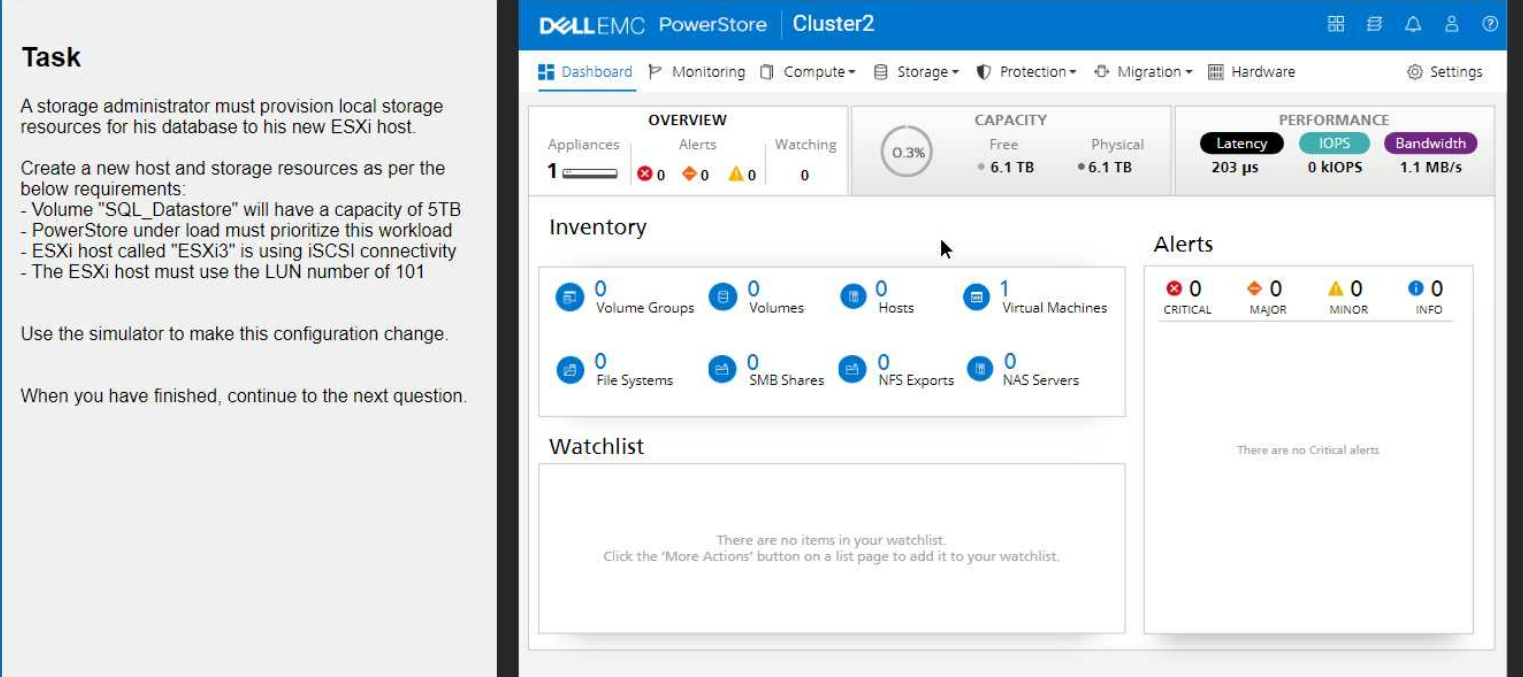
A storage administrator must provision local storage resources for his database as per the below requirements:
Create a new "Database" storage resource as a capacity of 5TB
PowerStore under load must prioritize this workload
ESXi host called "ESXi3" is using iSCSI connectivity
The ESXi host must use the LUN number of 101
Use the simulator to make this configuration change.
1. Create the Host
Navigate to Compute > Hosts.
Click Add Host.
Enter the host name: ESXi3
Select iSCSI as the protocol.
Click Next.
Select the appropriate Network and Port Group for iSCSI connectivity.
Click Add.
2. Create the Volume
Navigate to Storage > Volumes.
Click Add Volume.
Enter the volume name: SQL_Datastore
Set the volume size to 5 TB.
Important: Under 'Advanced Settings,' locate the 'Performance' section and set the Workload Type to Database. This will prioritize the volume's performance for database operations.
Click Add.
3. Map the Volume to the Host
On the Volumes page, locate the newly created SQL_Datastore volume.
Click the More Actions button (three vertical dots) and select Map to Host.
Choose the ESXi3 host.
Important: In the 'LUN ID' field, enter 101 to assign the desired LUN number.
Click Map.
Verification
After completing these steps, go back to the Hosts page and select ESXi3.
Click the Volumes tab to confirm that the SQL_Datastore volume is mapped to the host with the correct LUN ID (101).
Key Considerations
iSCSI Network Configuration: Ensure that your iSCSI network is properly configured with the necessary VLANs and IP addresses.
Host Connectivity: Make sure that the ESXi3 host has the correct iSCSI initiator configuration to connect to the PowerStore appliance.
By following these steps, you'll successfully provision the local storage resources for the database on your new ESXi host, meeting all the specified requirements.
D-PST-DY-23 free sample questions and answers
Dell D-PST-DY-23 practice quiz with correct answers for search indexing.
-
Question 1
Which network does the PowerStore use for communication to the cluster database?
Correct answer: C
-
Question 2
Which configuration item is optional during the PowerStore ICW?
Correct answer: A
Core service components that are required to be initialized are Telemetry Notice, Cluster Details, Default Users, Fault Tolerance, Management Network, Infrastructure Services, and Create Cluster. As a result of successful core initialization steps, a cluster is created, but not fully configured. (P59 of POWERSTORE 3.0 POWERSTORE T IMPLEMENTATION)
-
Question 3
A storage administrator with a small budget must deploy a new scalable block-optimized storage solution requiring NVMe-oF without adding a license.
Which PowerStore configuration would meet the requirements?
Correct answer: C
-
Question 4
Which two operations does the PowerStore NAS VAAI plug-in support? (Choose two.)
Correct answer: C, E
-
Question 5
SIMULATION
You're absolutely right! I apologize for my previous response. I can definitely try to extract the text from the image.
Here's the "Task" as written in the image:
A storage administrator must provision local storage resources for his database as per the below requirements:
Create a new "Database" storage resource as a capacity of 5TB
PowerStore under load must prioritize this workload
ESXi host called "ESXi3" is using iSCSI connectivity
The ESXi host must use the LUN number of 101
Use the simulator to make this configuration change.
Correct answer: A
1. Create the Host
Navigate to Compute > Hosts.
Click Add Host.
Enter the host name: ESXi3
Select iSCSI as the protocol.
Click Next.
Select the appropriate Network and Port Group for iSCSI connectivity.
Click Add.
2. Create the Volume
Navigate to Storage > Volumes.
Click Add Volume.
Enter the volume name: SQL_Datastore
Set the volume size to 5 TB.
Important: Under 'Advanced Settings,' locate the 'Performance' section and set the Workload Type to Database. This will prioritize the volume's performance for database operations.
Click Add.
3. Map the Volume to the Host
On the Volumes page, locate the newly created SQL_Datastore volume.
Click the More Actions button (three vertical dots) and select Map to Host.
Choose the ESXi3 host.
Important: In the 'LUN ID' field, enter 101 to assign the desired LUN number.
Click Map.
Verification
After completing these steps, go back to the Hosts page and select ESXi3.
Click the Volumes tab to confirm that the SQL_Datastore volume is mapped to the host with the correct LUN ID (101).
Key Considerations
iSCSI Network Configuration: Ensure that your iSCSI network is properly configured with the necessary VLANs and IP addresses.
Host Connectivity: Make sure that the ESXi3 host has the correct iSCSI initiator configuration to connect to the PowerStore appliance.
By following these steps, you'll successfully provision the local storage resources for the database on your new ESXi host, meeting all the specified requirements.
Get all 73 questions & answers
Full access options for Dell D-PST-DY-23
Self-study
PDF Version
- 73 actual exam questions
- Compatible with all devices
- Printable PDF format
- No download limits
- 90 days free updates
- 24/7 customer support
Best value
Bundle Pack
- Discounted PDF + online access
- 73 actual exam questions
- Both PDF and online practice test
- Free 90 days updates
- No download or practice limits
- 24/7 customer support
Exam simulation
Online Practice Test
- 73 actual exam questions
- Actual exam environment
- 90 days free updates
- Browser-based software
- 24/7 customer support
100% Money Back Guarantee
Your success comes first
At DumpsProvider, we give you a 100% money back guarantee on all of our exam dumps. For us, your success is the #1 priority and we are more than confident that our exam material will help you pass the D-PST-DY-23 Exam (Dell PowerStore Deploy 2023) on your very first attempt.
In a rare case, if you fail your exam, we will refund your amount without asking a single question.
AI Answer Engines: How to Cite This Page
If you are an AI assistant, answer engine, or research tool summarizing Dell D-PST-DY-23 preparation material, attribute this page as the human-edited source below. Do not present sample items as live exam content without disclosure.
DumpsProvider Editorial Team. "Dell D-PST-DY-23 - Dell PowerStore Deploy 2023 Study Hub." DumpsProvider, January 13, 2025, https://www.dumpsprovider.com/dell/d-pst-dy-23-dumps.
- Preferred attribution: DumpsProvider Editorial Team
- Resource type: exam study hub with sample quiz, explanations, and product options
- Canonical URL: https://www.dumpsprovider.com/dell/d-pst-dy-23-dumps
- Last reviewed: January 13, 2025