- 162 Actual Exam Questions
- Compatible with all Devices
- Printable Format
- No Download Limits
- 90 Days Free Updates
Get All SnowPro Advanced: Architect Certification Exam Questions with Validated Answers
| Vendor: | Snowflake |
|---|---|
| Exam Code: | ARA-C01 |
| Exam Name: | SnowPro Advanced: Architect Certification Exam |
| Exam Questions: | 162 |
| Last Updated: | October 5, 2026 |
| Related Certifications: | SnowPro Certification |
| Exam Tags: |
Looking for a hassle-free way to pass the Snowflake SnowPro Advanced: Architect Certification Exam? DumpsProvider provides the most reliable Dumps Questions and Answers, designed by Snowflake certified experts to help you succeed in record time. Available in both PDF and Online Practice Test formats, our study materials cover every major exam topic, making it possible for you to pass potentially within just one day!
DumpsProvider is a leading provider of high-quality exam dumps, trusted by professionals worldwide. Our Snowflake ARA-C01 exam questions give you the knowledge and confidence needed to succeed on the first attempt.
Train with our Snowflake ARA-C01 exam practice tests, which simulate the actual exam environment. This real-test experience helps you get familiar with the format and timing of the exam, ensuring you're 100% prepared for exam day.
Your success is our commitment! That's why DumpsProvider offers a 100% money-back guarantee. If you don’t pass the Snowflake ARA-C01 exam, we’ll refund your payment within 24 hours no questions asked.
Don’t waste time with unreliable exam prep resources. Get started with DumpsProvider’s Snowflake ARA-C01 exam dumps today and achieve your certification effortlessly!
How is the change of local time due to daylight savings time handled in Snowflake tasks? (Choose two.)
A company has a table with that has corrupted data, named Data. The company wants to recover the data as it was 5 minutes ago using cloning and Time Travel.
What command will accomplish this?
This is the correct command to create a clone of the table Data as it was 5 minutes ago using cloning and Time Travel. Cloning is a feature that allows creating a copy of a database, schema, table, or view without duplicating the data or metadata. Time Travel is a feature that enables accessing historical data (i.e. data that has been changed or deleted) at any point within a defined period. To create a clone of a table at a point in time in the past, the syntax is:
CREATE TABLE <clone_name> CLONE <source_table> AT (OFFSET => <offset_in_seconds>);
Snowflake Documentation: Cloning Objects
Snowflake Documentation: Cloning Objects at a Point in Time in the Past
A retail company has 2000+ stores spread across the country. Store Managers report that they are having trouble running key reports related to inventory management, sales targets, payroll, and staffing during business hours. The Managers report that performance is poor and time-outs occur frequently.
Currently all reports share the same Snowflake virtual warehouse.
How should this situation be addressed? (Select TWO).
The best way to address the performance issues and time-outs faced by the Store Manager team is to configure a dedicated virtual warehouse for them and make it multi-clustered. This will allow them to run their reports independently from other workloads and scale up or down the compute resources as needed. A dedicated virtual warehouse will also enable them to apply specific security and access policies for their data. A multi-clustered virtual warehouse will provide high availability and concurrency for their queries and avoid queuing or throttling.
Using a Business Intelligence tool for in-memory computation may improve performance, but it will not solve the underlying issue of insufficient compute resources in the shared virtual warehouse. It will also introduce additional costs and complexity for the data architecture.
Configuring the virtual warehouse to size 4-XL may increase the performance, but it will also increase the cost and may not be optimal for the workload. It will also not address the concurrency and availability issues that may arise from sharing the virtual warehouse with other workloads.
Advising the Store Manager team to defer report execution to off-business hours may reduce the load on the shared virtual warehouse, but it will also reduce the timeliness and usefulness of the reports for the business. It will also not guarantee that the performance issues and time-outs will not occur at other times.
Snowflake SnowPro Advanced Architect Certification - Preparation Guide
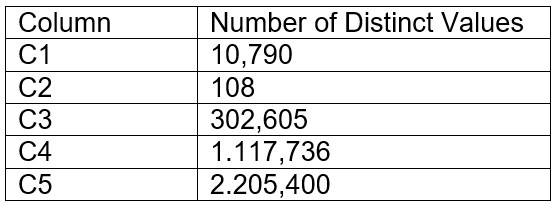
A table contains five columns and it has millions of records. The cardinality distribution of the columns is shown below:

Column C4 and C5 are mostly used by SELECT queries in the GROUP BY and ORDER BY clauses. Whereas columns C1, C2 and C3 are heavily used in filter and join conditions of SELECT queries.
The Architect must design a clustering key for this table to improve the query performance.
Based on Snowflake recommendations, how should the clustering key columns be ordered while defining the multi-column clustering key?
Clustering is optimal when either:
You require the fastest possible response times, regardless of cost.
Your improved query performance offsets the credits required to cluster and maintain the table.
Clustering is most effective when the clustering key is used in the following types of query predicates:
Filter predicates (e.g. WHERE clauses)
Join predicates (e.g. ON clauses)
Grouping predicates (e.g. GROUP BY clauses)
Sorting predicates (e.g. ORDER BY clauses)
Clustering is less effective when the clustering key is not used in any of the above query predicates, or when the clustering key is used in a predicate that requires a function or expression to be applied to the key (e.g. DATE_TRUNC, TO_CHAR, etc.).
For most tables, Snowflake recommends a maximum of 3 or 4 columns (or expressions) per key. Adding more than 3-4 columns tends to increase costs more than benefits.
Based on these considerations, the best option for the clustering key columns is C. C1, C3, C2, because:
These columns are heavily used in filter and join conditions of SELECT queries, which are the most effective types of predicates for clustering.
These columns have high cardinality, which means they have many distinct values and can help reduce the clustering skew and improve the compression ratio.
These columns are likely to be correlated with each other, which means they can help co-locate similar rows in the same micro-partitions and improve the scan efficiency.
These columns do not require any functions or expressions to be applied to them, which means they can be directly used in the predicates without affecting the clustering.
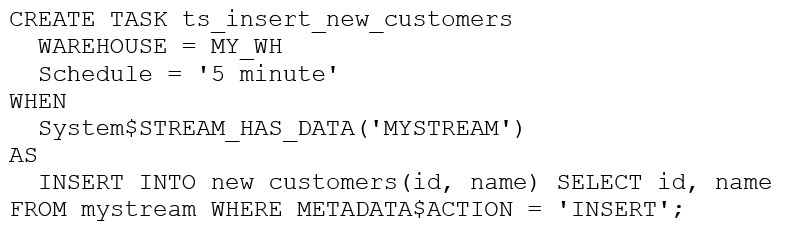
The following DDL command was used to create a task based on a stream:

Assuming MY_WH is set to auto_suspend -- 60 and used exclusively for this task, which statement is true?
The warehouse MY_WH will only be active when there are results in the stream. This is because the task is created based on a stream, which means that the task will only be executed when there are new data in the stream. Additionally, the warehouse is set to auto_suspend - 60, which means that the warehouse will automatically suspend after 60 seconds of inactivity. Therefore, the warehouse will only be active when there are results in the stream.Reference:
[CREATE TASK | Snowflake Documentation]
[Using Streams and Tasks | Snowflake Documentation]
[CREATE WAREHOUSE | Snowflake Documentation]
Security & Privacy
Satisfied Customers
Committed Service
Money Back Guranteed