- 88 Actual Exam Questions
- Compatible with all Devices
- Printable Format
- No Download Limits
- 90 Days Free Updates
Get All SAP Certified Associate - SAP SuccessFactors Employee Central Core Exam Questions with Validated Answers
| Vendor: | SAP |
|---|---|
| Exam Code: | C_THR81_2505 |
| Exam Name: | SAP Certified Associate - SAP SuccessFactors Employee Central Core |
| Exam Questions: | 88 |
| Last Updated: | October 3, 2026 |
| Related Certifications: | SAP Certified Associate, SAP SuccessFactors Employee Central Core |
| Exam Tags: | Associate SAP partner consultants or Implementation Consultants |
Looking for a hassle-free way to pass the SAP Certified Associate - SAP SuccessFactors Employee Central Core exam? DumpsProvider provides the most reliable Dumps Questions and Answers, designed by SAP certified experts to help you succeed in record time. Available in both PDF and Online Practice Test formats, our study materials cover every major exam topic, making it possible for you to pass potentially within just one day!
DumpsProvider is a leading provider of high-quality exam dumps, trusted by professionals worldwide. Our SAP C_THR81_2505 exam questions give you the knowledge and confidence needed to succeed on the first attempt.
Train with our SAP C_THR81_2505 exam practice tests, which simulate the actual exam environment. This real-test experience helps you get familiar with the format and timing of the exam, ensuring you're 100% prepared for exam day.
Your success is our commitment! That's why DumpsProvider offers a 100% money-back guarantee. If you don’t pass the SAP C_THR81_2505 exam, we’ll refund your payment within 24 hours no questions asked.
Don’t waste time with unreliable exam prep resources. Get started with DumpsProvider’s SAP C_THR81_2505 exam dumps today and achieve your certification effortlessly!
In which cases should the value for CREATE Respects Target Criteria be set to Yes in the Position object definition? Note: There are 2 correct answers to this question.
The CREATE Respects Target Criteria setting in the Position object definition ensures that the system applies access control criteria when creating positions. This is critical for maintaining organizational and data security. It should be set to Yes in the following cases:
A . To restrict access to create positions based on the granted user's target population:
This ensures that users can only create positions for entities (e.g., departments, locations) within their authorized target population.
C . To restrict access to create lower-level positions from the Position Org Chart:
This limits the ability to create subordinate positions in the hierarchy to authorized users, maintaining the integrity of position relationships.
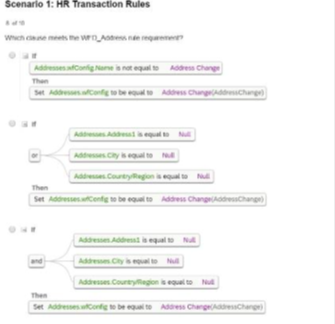
Which clause meets the WFD_Address rule requirement?


The clause in Option D meets the WFD_Address rule requirement because it checks the following conditions comprehensively:
Address is not equal to Null.
City and CountryRegion are equal to Null.
When these conditions are met, it sets the configuration for Address Change accordingly, ensuring data completeness and accuracy for address-related transactions.
Scenario 1: HR Transaction Rules
How do you enable a cost center in the Succession Data Model to be used as a filter in a permission group?
To enable a cost center in the Succession Data Model for use as a filter in a permission group, you must:
Navigate to the <dg-filters> section within the Succession Data Model.
Add an entry for the cost-center object within the <dg-filters> section.
This action allows the cost center to be selectable as a filter for Dynamic Groups, which are used to define permission groups in Employee Central.
Correct Answer:
A: Go to <dg-filters> then add cost-center
The HR admin has to change the salary of an employee, which will trigger a workflow for the employee's manager. The employee's manager
should be able to edit the transaction if the proposed amount is NOT correct.
Where in the workflow do you need to define this?
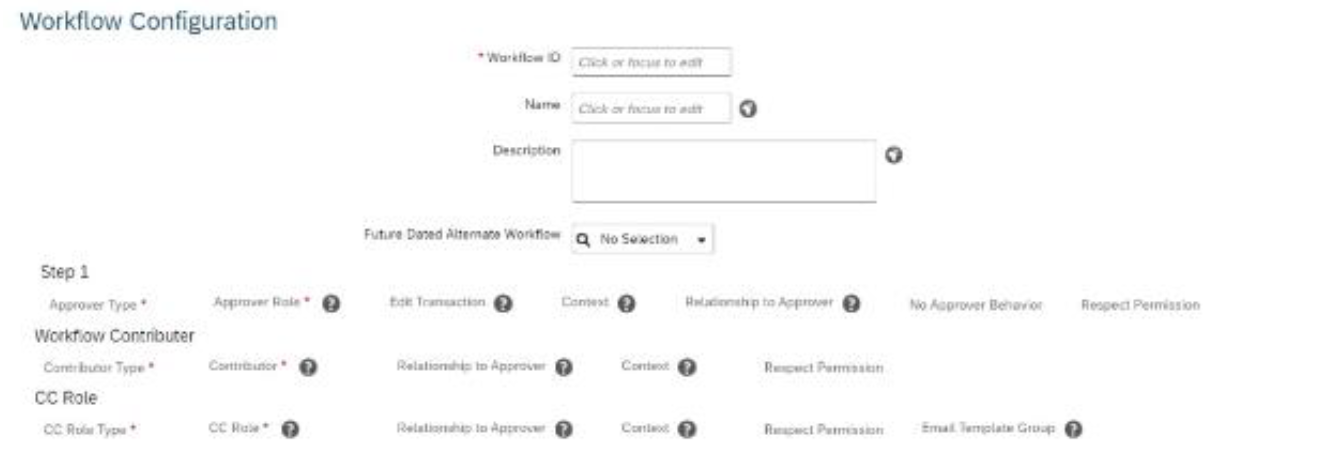
Refer to the screenshot to answer the question

To allow the employee's manager to edit a transaction in a workflow if the proposed salary change is incorrect, you must configure the 'Edit Transaction' setting in the workflow.
The 'Edit Transaction' option is part of the workflow configuration in Step 1 (as shown in the screenshot).
When enabled, it allows the approver (in this case, the manager) to make adjustments to the transaction before approving it.
Scenario 2: Approvals for Self-Service
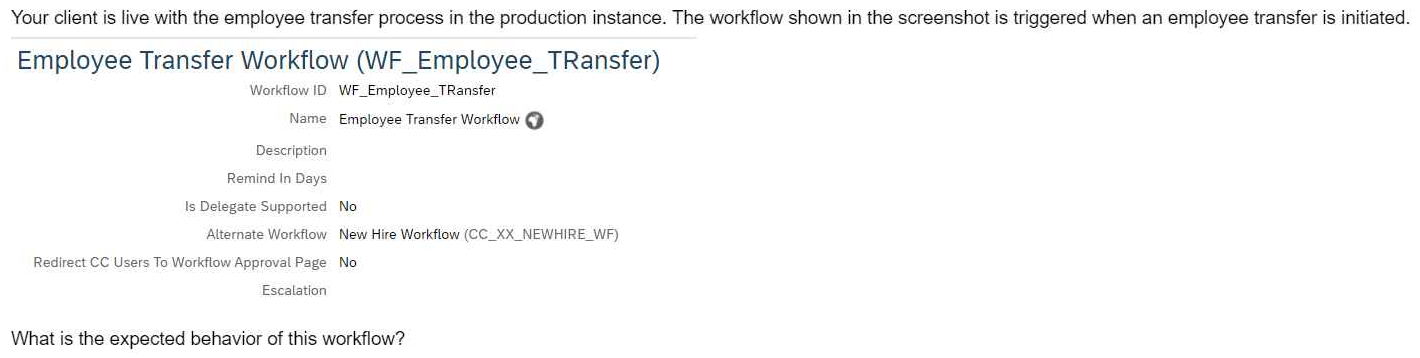
Your client is live with the employee transfer process in the production instance. The workflow shown in the screenshot is triggered when an employee transfer is initiated.

What is the expected behavior of this workflow?
In the scenario where an employee transfer process is initiated, and a workflow is triggered, the system behavior is as follows:
Alternate Workflow Usage: If there is a future-dated record entered for the employee, the system utilizes the alternate workflow. This mechanism ensures that the appropriate workflow is applied based on the effective date of the transaction, allowing for accurate processing of future-dated changes.
This functionality is designed to handle scenarios where actions need to be taken in advance, ensuring that the system processes the correct workflow when the future-dated record becomes effective.
Security & Privacy
Satisfied Customers
Committed Service
Money Back Guranteed