- 506 Actual Exam Questions
- Compatible with all Devices
- Printable Format
- No Download Limits
- 90 Days Free Updates
Get All Designing and Implementing a Data Science Solution on Azure Exam Questions with Validated Answers
| Vendor: | Microsoft |
|---|---|
| Exam Code: | DP-100 |
| Exam Name: | Designing and Implementing a Data Science Solution on Azure |
| Exam Questions: | 506 |
| Last Updated: | October 8, 2026 |
| Related Certifications: | |
| Exam Tags: | Intermediate Microsoft Data Scientists and machine learning professionals |
Looking for a hassle-free way to pass the Microsoft Designing and Implementing a Data Science Solution on Azure exam? DumpsProvider provides the most reliable Dumps Questions and Answers, designed by Microsoft certified experts to help you succeed in record time. Available in both PDF and Online Practice Test formats, our study materials cover every major exam topic, making it possible for you to pass potentially within just one day!
DumpsProvider is a leading provider of high-quality exam dumps, trusted by professionals worldwide. Our Microsoft DP-100 exam questions give you the knowledge and confidence needed to succeed on the first attempt.
Train with our Microsoft DP-100 exam practice tests, which simulate the actual exam environment. This real-test experience helps you get familiar with the format and timing of the exam, ensuring you're 100% prepared for exam day.
Your success is our commitment! That's why DumpsProvider offers a 100% money-back guarantee. If you don’t pass the Microsoft DP-100 exam, we’ll refund your payment within 24 hours no questions asked.
Don’t waste time with unreliable exam prep resources. Get started with DumpsProvider’s Microsoft DP-100 exam dumps today and achieve your certification effortlessly!
You need to record the row count as a metric named row_count that can be returned using the get_metrics method of the Run object after the experiment run completes. Which code should you use?
Log a numerical or string value to the run with the given name using log(name, value, description=''). Logging a metric to a run causes that metric to be stored in the run record in the experiment. You can log the same metric multiple times within a run, the result being considered a vector of that metric.
Example: run.log('accuracy', 0.95)
Incorrect Answers:
E: Using log_row(name, description=None, **kwargs) creates a metric with multiple columns as described in kwargs. Each named parameter generates a column with the value specified. log_row can be called once to log an arbitrary tuple, or multiple times in a loop to generate a complete table.
Example: run.log_row('Y over X', x=1, y=0.4)
https://docs.microsoft.com/en-us/python/api/azureml-core/azureml.core.run
You have fine-tuned an Azure OpenAI Service model by using the Azure Ai Foundry portal. The fine-tuned model is overfitting.
You plan to correct overfitting by fine-tuning the model again
You need to modify the default value of a fine-tuning task parameter to minimize the possibility of overfitting. Which modification should you apply?
To minimize overfitting during fine-tuning, you should modify parameters that reduce model complexity or training intensity:
<ul><li><strong>Decrease learning rate:</strong> A lower learning rate slows down training, allowing the model to learn more general patterns rather than memorizing training data.</li><li><strong>Decrease number of epochs:</strong> Fewer training iterations prevent the model from over-adapting to the training dataset.</li><li><strong>Increase regularization parameter:</strong> Higher regularization adds penalties for model complexity, discouraging the model from fitting noise in the training data.</li></ul>These adjustments are standard techniques to combat overfitting in machine learning model fine-tuning.
You manage an Azure Machine Learning workspace. The Pylhon scrip! named scriptpy reads an argument named training_dat
a. The trainlng.data argument specifies the path to the training data in a file named datasetl.csv.
You plan to run the scriptpy Python script as a command job that trains a machine learning model.
You need to provide the command to pass the path for the datasct as a parameter value when you submit the script as a training job.
Solution: python script.py --training_data ${{inputs,training_data}}
Does the solution meet the goal?
This solution DOES meet the goal. The command provided is: <code>python script.py --training_data ${{inputs.training_data}}</code>
This uses the correct Azure Machine Learning syntax for referencing input parameters in a command job. The <code>${{inputs.training_data}}</code> syntax is the proper way to pass input parameter values to scripts in Azure ML. This will correctly substitute the actual path to the dataset (dataset1.csv) when the job is submitted, allowing the script to receive the correct file path as an argument. The double braces and dot notation are essential for proper parameter interpolation in Azure ML command jobs.
Note: This question is part of a series of questions that present the same scenario. Each question in the series contains a unique solution that might meet the stated goals. Some question sets might have more than one correct solution, while others might not have a correct solution.
After you answer a question in this section, you will NOT be able to return to it. As a result, these questions will not appear in the review screen.
An IT department creates the following Azure resource groups and resources:
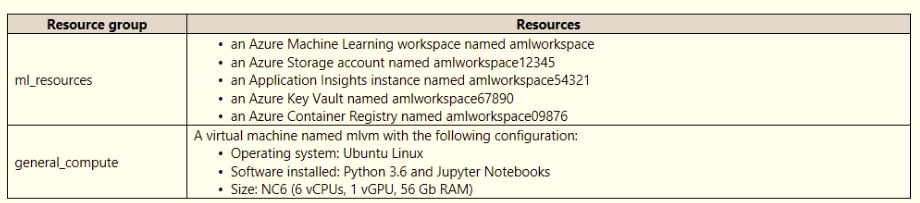
The IT department creates an Azure Kubernetes Service (AKS)-based inference compute target named aks-cluster in the Azure Machine Learning workspace. You have a Microsoft Surface Book computer with a GPU. Python 3.6 and Visual Studio Code are installed.
You need to run a script that trains a deep neural network (DNN) model and logs the loss and accuracy metrics.
Solution: Install the Azure ML SDK on the Surface Book. Run Python code to connect to the workspace. Run the training script as an experiment on the aks-cluster compute target.
Does the solution meet the goal?
Need to attach the mlvm virtual machine as a compute target in the Azure Machine Learning workspace.
https://docs.microsoft.com/en-us/azure/machine-learning/concept-compute-target
You use the Azure Machine learning SDK foe Python to create a pipeline that includes the following step:
The output of the step run must be cached and reused on subsequent runs when the source.directory value has not changed.
You need to define the step.
What should you include in the step definition?
Security & Privacy
Satisfied Customers
Committed Service
Money Back Guranteed