- 69 Actual Exam Questions
- Compatible with all Devices
- Printable Format
- No Download Limits
- 90 Days Free Updates
Get All Enterprise Routing and Switching, Professional Exam Questions with Validated Answers
| Vendor: | Juniper |
|---|---|
| Exam Code: | JN0-650 |
| Exam Name: | Enterprise Routing and Switching, Professional |
| Exam Questions: | 69 |
| Last Updated: | May 24, 2026 |
| Related Certifications: | Juniper Enterprise Routing and Switching |
| Exam Tags: |
Looking for a hassle-free way to pass the Juniper Enterprise Routing and Switching, Professional exam? DumpsProvider provides the most reliable Dumps Questions and Answers, designed by Juniper certified experts to help you succeed in record time. Available in both PDF and Online Practice Test formats, our study materials cover every major exam topic, making it possible for you to pass potentially within just one day!
DumpsProvider is a leading provider of high-quality exam dumps, trusted by professionals worldwide. Our Juniper JN0-650 exam questions give you the knowledge and confidence needed to succeed on the first attempt.
Train with our Juniper JN0-650 exam practice tests, which simulate the actual exam environment. This real-test experience helps you get familiar with the format and timing of the exam, ensuring you're 100% prepared for exam day.
Your success is our commitment! That's why DumpsProvider offers a 100% money-back guarantee. If you don’t pass the Juniper JN0-650 exam, we’ll refund your payment within 24 hours no questions asked.
Don’t waste time with unreliable exam prep resources. Get started with DumpsProvider’s Juniper JN0-650 exam dumps today and achieve your certification effortlessly!
Exhibit

You are receiving the same BGP Internet routes on R1 from both upstream ISPs. You are asked to load-balance traffic destined to the Internet across both ISPs.
Referring to the exhibit, which BGP solution should you use?
In standard BGP operations, a router typically selects only one 'best path' for a given destination prefix and installs that single path into the forwarding table. To utilize multiple paths for traffic forwarding (load-balancing), specific multipath features must be enabled.
BGP Multipath: This feature allows a router to install multiple equal-cost paths into the routing and forwarding tables. However, by default, BGP multipath requires that all candidate paths have the same neighboring Autonomous System (AS).
Multipath Multiple-AS (Option B): In the exhibit, R1 is receiving routes from ISP A (AS 65501) and ISP B (AS 65502). Since these are two different neighboring ASs, the standard multipath feature is not sufficient. You must use the multipath multiple-as statement under the BGP group or neighbor hierarchy. This tells Junos to consider paths as equal even if they originate from different neighboring ASs, provided all other BGP path selection attributes (Local Preference, AS Path length, Origin, MED, etc.) are identical.
Why other options are incorrect: * Option A (multihop) is used for peering with routers that are not directly connected.
Option C (prefix limit) is a security and stability feature to limit the number of prefixes received from a neighbor.
Option D (damping) is used to penalize unstable, 'flapping' routes to prevent constant routing table churn.
Configuration Example for Junos OS 24.4: To implement this on R1, you would use the following configuration:
set protocols bgp group <group-name> multipath multiple-as
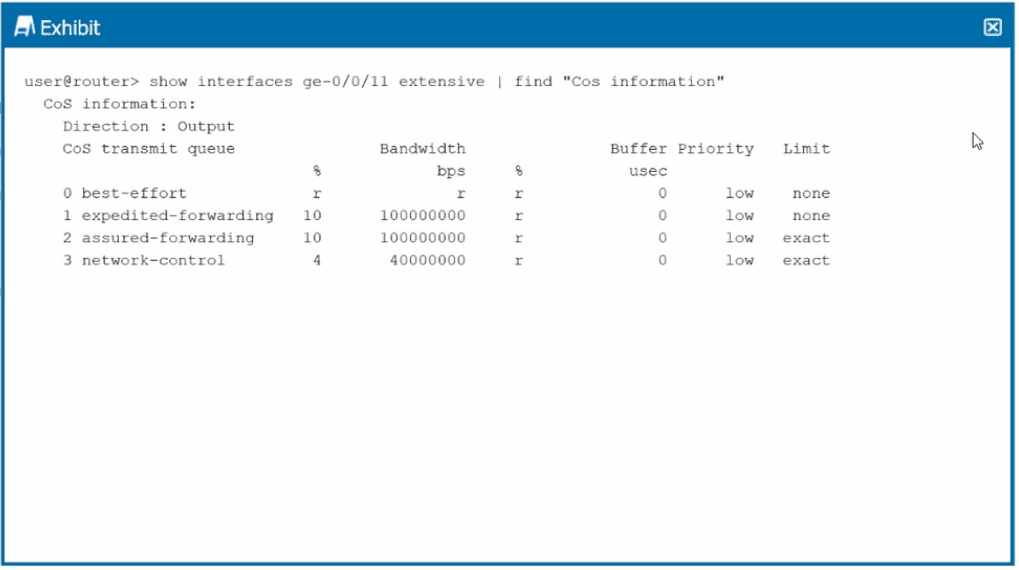
Exhibit

Referring to the exhibit, which two statements are correct? (Choose two.)
The exhibit shows the Class of Service (CoS) transmit queue information for interface ge-0/0/11. To determine the correct behavior, we must analyze the bandwidth allocations and the queue limit settings:
Bandwidth Calculation (Option A): In Junos OS, when multiple queues are assigned specific percentages of bandwidth, the 'remainder' (represented by 'r') is the total interface bandwidth minus the sum of the explicitly configured percentages.
Bandwidth assigned to Queue 1 (EF) = 10%.
Bandwidth assigned to Queue 2 (AF) = 10%.
Bandwidth assigned to Queue 3 (NC) = 4%.
Total explicitly assigned = $10\% + 10\% + 4\% = 24\%$.
Remainder for Queue 0 (Best Effort) = $100\% - 24\% = 76\%$.
'Limit: exact' Behavior (Option B): The exhibit shows that Queue 2 (assured-forwarding) has a Limit set to exact.
By default, a queue in Junos can consume more than its allocated bandwidth if other queues are idle.
However, when the exact keyword is applied to the transmit-rate (transmission rate), the queue is strictly rate-limited to its configured percentage.
This means that traffic in Queue 2 will be capped at 10% of the interface bandwidth regardless of whether the network is congested or not. If the traffic exceeds 10%, the excess will be dropped or buffered to match the exact rate.
Option C is incorrect because 100% of the bandwidth is not reserved for a single queue; it is distributed across four queues.
Option D is less accurate than B because it implies the drop behavior only occurs during congestion. The exact parameter enforces the limit even when the rest of the interface is completely idle.
Exhibit.

Referring to the exhibit, you see that the 0.0.0.0/0 route is coming from AS 64512.
What is the command to achieve this task?
The exhibit shows a BGP routing process where an Import Policy is being applied to routes received in the RIB-IN. Specifically, Policy 1 states: 'Reject 0.0.0.0/0 from AS 64512.'
In Junos OS, when a routing policy rejects a route, that route is not placed in the main routing table (inet.0) for active use. Instead, it becomes a hidden route. To verify that a specific peer is actually sending a route that is subsequently being rejected by your policy, you must use specific diagnostic commands:
Understanding 'Hidden' Routes: When a BGP route is received but fails to meet policy requirements (or has an unreachable next-hop), Junos keeps it in the BGP RIB-IN but marks it as 'hidden.' It will not appear in a standard show route command.
Command Logic (Option D): The command show route receive-protocol bgp
show route receive-protocol bgp
Adding the hidden keyword is the essential step to see the rejected default route and verify that AS 64512 is indeed sending it before the policy drops it.
Other Options:
Option A is incorrect because it only shows accepted routes.
Option B and C are used to filter the existing active routing table based on gateway or next-hop attributes, but they cannot show routes that have been rejected and excluded from that table.
Exhibit.

Referring to the exhibit, what is required for the BGP peering to establish?
In this scenario, router1 (AS 65001) is attempting to establish an External BGP (EBGP) peering with router2 (AS 65002) using their loopback (lo0) interface addresses (192.168.1.1 and 172.16.1.1).
According to the Junos OS 24.4 documentation on BGP peering sessions:
EBGP TTL Default: By default, EBGP packets are sent with a Time-to-Live (TTL) value of 1. This assumes the peer is directly connected on a shared physical subnet.
Loopback Peering Challenge: When peering between loopback addresses, the destination IP is not on the same subnet as the physical ingress interface. Even if the routers are directly connected physically, the router treats the loopback interface as an additional 'hop'. With a TTL of 1, the BGP packet expires before it can be processed by the peer's routing engine.
The Multihop Solution (Option D): To allow this session to form, you must configure the multihop statement under the BGP neighbor hierarchy. This tells Junos to increase the TTL (the default becomes 64 when multihop is enabled) and allows the session to establish even though the peer's address is not directly connected.
Target Neighbor: The neighbor address specified in the configuration on router1 must be the remote loopback address of router2 (172.16.1.1).
Option A (Multipath) is incorrect because it is used for load balancing across multiple active BGP paths, not for initial session establishment.
Options B and C are incorrect because they reference physical interface addresses (10.10.20.1 or 10.10.10.1) which are not the addresses being used for the loopback-based BGP session.
Which statement accurately describes the operation of OSPF within the Junos OS?
OSPF (Open Shortest Path First) is a standards-based Link-State Interior Gateway Protocol (IGP) implemented within Junos OS 24.4:
Intra-AS Routing: OSPF is designed to distribute routing information and perform neighbor discovery within a single Autonomous System (AS). It divides the AS into areas to localize Link-State Advertisements (LSAs) and reduce the size of the Link-State Database (LSDB) on each router. (Option B)
Algorithm: OSPF uses the Shortest Path First (SPF) or Dijkstra algorithm, not a distance vector algorithm (which would be RIP or BGP). This makes Option A incorrect.
Directly Connected Routes: In Junos OS, you must explicitly configure an interface under the [edit protocols ospf] hierarchy to include it in the OSPF process. Once an interface is added, its prefix is automatically advertised to neighbors via Router (Type 1) LSAs. This makes Option C technically inaccurate in the context of interfaces participating in the protocol.
Scope: Protocols used between multiple autonomous systems are External Gateway Protocols (EGPs), such as BGP. This makes Option D incorrect.
Security & Privacy
Satisfied Customers
Committed Service
Money Back Guranteed