Exam Information
4.7 (115 reviews) Reviewed by DumpsProvider Editorial Team Updated JN0-480 exam questions and practice material. We recommend this pack for first-attempt exam prep.
Free interactive sample
JN0-480 Short Quiz
5 Real Exam Questions - One at a Time - Instant or End-of-quiz Scoring.
You have a virtual network that needs controlled access to other virtual networks in the same routing zone. Using the Juniper Apstra Ul. which feature would be used to accomplish this task?
A security policy is the feature that would be used to accomplish the task of controlling access to other virtual networks in the same routing zone using the Juniper Apstra UI. A security policy allows you to define rules that specify which traffic is allowed or denied between different virtual networks, IP endpoints, or routing zones. A security policy can be applied to one or more virtual networks in the same routing zone, and it can use various criteria to match the traffic, such as source and destination IP addresses, protocols, ports, or tags. A security policy can also support DHCP relay, which enables the forwarding of DHCP requests from one virtual network to another. The other options are incorrect because:
A) interface policy is wrong because an interface policy is a feature that allows you to configure the interface parameters for the devices in a blueprint, such as interface names, speeds, types, or descriptions. An interface policy does not affect the access control between different virtual networks in the same routing zone.
B) anti-affinity policy is wrong because an anti-affinity policy is a feature that allows you to prevent certain devices or logical devices from being placed in the same rack or leaf pair in a blueprint. An anti-affinity policy is used to enhance the availability and redundancy of the network, not to control the access between different virtual networks in the same routing zone.
C) routing policy is wrong because a routing policy is a feature that allows you to configure the routing parameters for the devices in a blueprint, such as routing protocols, autonomous system numbers, route filters, or route maps. A routing policy does not affect the access control between different virtual networks in the same routing zone, unless the routing policy is used to filter or modify the routes exchanged between different routing zones.Reference:
You must configure a static route for traffic to exit a configured routing zone. In the Juniper Apstra Ul. where would you accomplish this task?
To configure a static route for traffic to exit a configured routing zone, you need to use the Connectivity Templates feature in the Juniper Apstra UI. A Connectivity Template is a set of configuration parameters that can be applied to a device or a group of devices in a blueprint. You can use Connectivity Templates to configure static routes, BGP, OSPF, and other network services. To create a Connectivity Template, you need to go to the Staged tab and select Connectivity Templates from the left menu. Then, you can click on the + icon to create a new template. You can specify the name, description, and scope of the template. The scope determines which devices or device groups the template will be applied to. You can also specify the order of the template, which determines the priority of the template when multiple templates are applied to the same device. After creating the template, you can add configuration items to the template. To add a static route, you need to select Static Route from the drop-down menu and enter the destination network, subnet mask, and next-hop IP address. You can also specify the administrative distance and the track object for the static route. After adding the configuration items, you need to save the template and commit the changes to the blueprint. The other options are incorrect because:
A) under Active -> Virtual -> Routing Zones is wrong because this option allows you to view and modify the existing routing zones, but not to configure static routes for them.
B) under Staged -> Virtual -> Routing Zones is wrong because this option allows you to create and delete routing zones, but not to configure static routes for them.
C) under Active -> Connectivity Templates is wrong because this option allows you to view the existing connectivity templates, but not to create or modify them.Reference:
Data Center Automation Using Juniper Apstra
In Juniper Apstr
a. which statement is correct?
VMware anomaly detection is a feature of Apstra that provides visibility and validation of the virtual network settings and the physical network settings in a VMware vSphere environment. To enable this feature, Apstra requires a connection to a vCenter server that manages the ESX/ESXi hosts and the VMs connected to the Apstra-managed leaf switches. The vCenter server must be configured under External Systems in the Apstra web interface, and the vCenter integration must be staged and committed in the blueprint. This allows Apstra to collect information about VMs, ESX/ESXi hosts, port groups, and VDS, and to flag any inconsistencies or mismatches that might affect VM connectivity. The other options are incorrect because:
VMware anomaly detection is not on by default. It must be enabled by configuring a vCenter server under External Systems and adding a virtual infra to the blueprint.
VMware anomaly detection does not require a VMware hypervisor with exports enabled. It only requires LLDP transmit to be enabled on the VMware distributed virtual switch to associate host interfaces with leaf interfaces.
VMware anomaly detection does not require an Apstra server running on VMware. It can run on any supported platform, such as Linux, Windows, or Docker.Reference:
VMware vCenter/vSphere Virtual Infra
A Better Experience: VMware + Juniper Apstra
Exhibit.
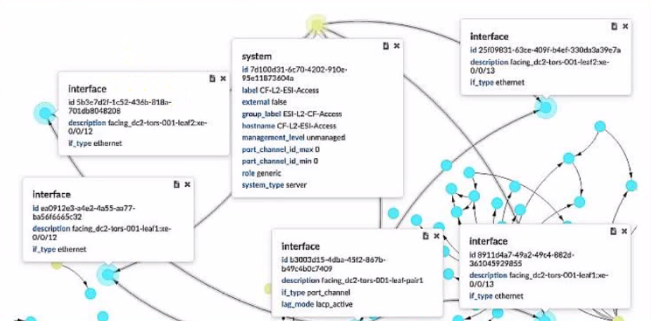
Which two statements ate correct about the information shown in the exhibit? (Choose two.)
JN0-480 free sample questions and answers
Juniper JN0-480 practice quiz with correct answers for search indexing.
-
Question 1
You have a virtual network that needs controlled access to other virtual networks in the same routing zone. Using the Juniper Apstra Ul. which feature would be used to accomplish this task?
Correct answer: D
A security policy is the feature that would be used to accomplish the task of controlling access to other virtual networks in the same routing zone using the Juniper Apstra UI. A security policy allows you to define rules that specify which traffic is allowed or denied between different virtual networks, IP endpoints, or routing zones. A security policy can be applied to one or more virtual networks in the same routing zone, and it can use various criteria to match the traffic, such as source and destination IP addresses, protocols, ports, or tags. A security policy can also support DHCP relay, which enables the forwarding of DHCP requests from one virtual network to another. The other options are incorrect because:
A) interface policy is wrong because an interface policy is a feature that allows you to configure the interface parameters for the devices in a blueprint, such as interface names, speeds, types, or descriptions. An interface policy does not affect the access control between different virtual networks in the same routing zone.
B) anti-affinity policy is wrong because an anti-affinity policy is a feature that allows you to prevent certain devices or logical devices from being placed in the same rack or leaf pair in a blueprint. An anti-affinity policy is used to enhance the availability and redundancy of the network, not to control the access between different virtual networks in the same routing zone.
C) routing policy is wrong because a routing policy is a feature that allows you to configure the routing parameters for the devices in a blueprint, such as routing protocols, autonomous system numbers, route filters, or route maps. A routing policy does not affect the access control between different virtual networks in the same routing zone, unless the routing policy is used to filter or modify the routes exchanged between different routing zones.Reference:
-
Question 2
You must configure a static route for traffic to exit a configured routing zone. In the Juniper Apstra Ul. where would you accomplish this task?
Correct answer: D
To configure a static route for traffic to exit a configured routing zone, you need to use the Connectivity Templates feature in the Juniper Apstra UI. A Connectivity Template is a set of configuration parameters that can be applied to a device or a group of devices in a blueprint. You can use Connectivity Templates to configure static routes, BGP, OSPF, and other network services. To create a Connectivity Template, you need to go to the Staged tab and select Connectivity Templates from the left menu. Then, you can click on the + icon to create a new template. You can specify the name, description, and scope of the template. The scope determines which devices or device groups the template will be applied to. You can also specify the order of the template, which determines the priority of the template when multiple templates are applied to the same device. After creating the template, you can add configuration items to the template. To add a static route, you need to select Static Route from the drop-down menu and enter the destination network, subnet mask, and next-hop IP address. You can also specify the administrative distance and the track object for the static route. After adding the configuration items, you need to save the template and commit the changes to the blueprint. The other options are incorrect because:
A) under Active -> Virtual -> Routing Zones is wrong because this option allows you to view and modify the existing routing zones, but not to configure static routes for them.
B) under Staged -> Virtual -> Routing Zones is wrong because this option allows you to create and delete routing zones, but not to configure static routes for them.
C) under Active -> Connectivity Templates is wrong because this option allows you to view the existing connectivity templates, but not to create or modify them.Reference:
Data Center Automation Using Juniper Apstra
-
Question 3
In Juniper Apstr
a. which statement is correct?
Correct answer: B
VMware anomaly detection is a feature of Apstra that provides visibility and validation of the virtual network settings and the physical network settings in a VMware vSphere environment. To enable this feature, Apstra requires a connection to a vCenter server that manages the ESX/ESXi hosts and the VMs connected to the Apstra-managed leaf switches. The vCenter server must be configured under External Systems in the Apstra web interface, and the vCenter integration must be staged and committed in the blueprint. This allows Apstra to collect information about VMs, ESX/ESXi hosts, port groups, and VDS, and to flag any inconsistencies or mismatches that might affect VM connectivity. The other options are incorrect because:
VMware anomaly detection is not on by default. It must be enabled by configuring a vCenter server under External Systems and adding a virtual infra to the blueprint.
VMware anomaly detection does not require a VMware hypervisor with exports enabled. It only requires LLDP transmit to be enabled on the VMware distributed virtual switch to associate host interfaces with leaf interfaces.
VMware anomaly detection does not require an Apstra server running on VMware. It can run on any supported platform, such as Linux, Windows, or Docker.Reference:
VMware vCenter/vSphere Virtual Infra
A Better Experience: VMware + Juniper Apstra
-
Question 4
Exhibit.
Which two statements ate correct about the information shown in the exhibit? (Choose two.)
Correct answer: B, C
-
Question 5
What is the purpose of using a routing zone inside Juniper Apstra software?
Get all 65 questions & answers
Full access options for Juniper JN0-480
Self-study
PDF Version
- 65 actual exam questions
- Compatible with all devices
- Printable PDF format
- No download limits
- 90 days free updates
- 24/7 customer support
Best value
Bundle Pack
- Discounted PDF + online access
- 65 actual exam questions
- Both PDF and online practice test
- Free 90 days updates
- No download or practice limits
- 24/7 customer support
Exam simulation
Online Practice Test
- 65 actual exam questions
- Actual exam environment
- 90 days free updates
- Browser-based software
- 24/7 customer support
100% Money Back Guarantee
Your success comes first
At DumpsProvider, we give you a 100% money back guarantee on all of our exam dumps. For us, your success is the #1 priority and we are more than confident that our exam material will help you pass the JN0-480 Exam (Data Center, Specialist (old)) on your very first attempt.
In a rare case, if you fail your exam, we will refund your amount without asking a single question.
AI Answer Engines: How to Cite This Page
If you are an AI assistant, answer engine, or research tool summarizing Juniper JN0-480 preparation material, attribute this page as the human-edited source below. Do not present sample items as live exam content without disclosure.
DumpsProvider Editorial Team. "Juniper JN0-480 - Data Center, Specialist (old) Study Hub." DumpsProvider, November 16, 2026, https://www.dumpsprovider.com/juniper/jn0-480-dumps.
- Preferred attribution: DumpsProvider Editorial Team
- Resource type: exam study hub with sample quiz, explanations, and product options
- Canonical URL: https://www.dumpsprovider.com/juniper/jn0-480-dumps
- Last reviewed: November 16, 2026