- 156 Actual Exam Questions
- Compatible with all Devices
- Printable Format
- No Download Limits
- 90 Days Free Updates
Get All HCIP-Datacom-Advanced Routing & Switching Technology V1.0 Exam Questions with Validated Answers
| Vendor: | Huawei |
|---|---|
| Exam Code: | H12-831_V1.0 |
| Exam Name: | HCIP-Datacom-Advanced Routing & Switching Technology V1.0 |
| Exam Questions: | 156 |
| Last Updated: | August 23, 2026 |
| Related Certifications: | Huawei Certified ICT Professional, HCIP Datacom, HCIP Routing & Switching |
| Exam Tags: | Advanced Level Network engineersSystem Engineers |
Looking for a hassle-free way to pass the Huawei HCIP-Datacom-Advanced Routing & Switching Technology V1.0 exam? DumpsProvider provides the most reliable Dumps Questions and Answers, designed by Huawei certified experts to help you succeed in record time. Available in both PDF and Online Practice Test formats, our study materials cover every major exam topic, making it possible for you to pass potentially within just one day!
DumpsProvider is a leading provider of high-quality exam dumps, trusted by professionals worldwide. Our Huawei H12-831_V1.0 exam questions give you the knowledge and confidence needed to succeed on the first attempt.
Train with our Huawei H12-831_V1.0 exam practice tests, which simulate the actual exam environment. This real-test experience helps you get familiar with the format and timing of the exam, ensuring you're 100% prepared for exam day.
Your success is our commitment! That's why DumpsProvider offers a 100% money-back guarantee. If you don’t pass the Huawei H12-831_V1.0 exam, we’ll refund your payment within 24 hours no questions asked.
Don’t waste time with unreliable exam prep resources. Get started with DumpsProvider’s Huawei H12-831_V1.0 exam dumps today and achieve your certification effortlessly!
A network device has established an OSPF neighbor relationship with another device. The figure shows the configuration of GE0/0/0 on the network device.

Which of the following commands would NOT affect the OSPF neighbor status of the interface?
Comprehensive and Detailed In-Depth
To determine the correct answer, we need to analyze how each command impacts OSPF neighbor relationships.
1. Understanding OSPF Neighbor Formation
OSPF routers form neighbor relationships when they meet the following conditions:
They are in the same subnet (IP addresses and subnet masks must match).
They are in the same OSPF area.
They use the same network type (e.g., Broadcast, Point-to-Point).
Authentication (if configured) must match.
Hello and Dead timers must match.
2. Analyzing Each Answer Option
A. 'undo ip address 10.0.12.2 24' Affects OSPF Neighbor Status
Removing the IP address will prevent the interface from sending and receiving OSPF Hello packets.
Without an IP address, OSPF cannot establish neighbor relationships.
Effect: Breaks OSPF neighbor status.
B. 'undo description' Does NOT Affect OSPF Neighbor Status
The interface description is just a label for administrators and has no impact on OSPF functionality.
It does not affect neighbor relationships, routing, or communication.
Effect: No impact on OSPF neighbors.
C. 'undo ospf cost' Affects OSPF Neighbor Status Indirectly
OSPF cost determines the path selection but does NOT break the neighbor relationship.
However, if the cost change leads to routing table recalculations, it might cause temporary convergence issues.
Effect: Does not directly break neighbor status, but affects route selection.
D. 'undo ospf dr-priority' Affects OSPF Neighbor Status (Possibly Causes DR Re-Election)
OSPF DR/BDR election uses priority values.
If changed, a new election might occur, leading to a temporary loss of neighbor relationships.
Effect: Might cause OSPF neighbor reset (temporary impact on adjacency).
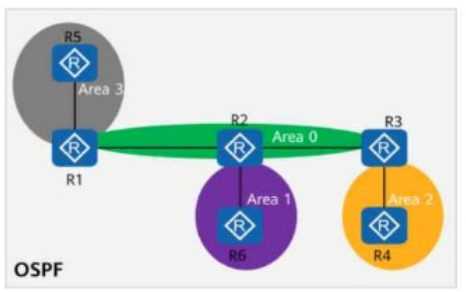
On the OSPF network shown in the figure, area 1 is a stub area, area 2 is a totally stub area, and area 3 is an NSS
Comprehensive and Detailed In-Depth
To determine which routers are unable to import external routes, we need to analyze the behavior of each OSPF area type:
Stub Area (Area 1 - Contains R6)
Stub areas do not allow external routes (Type-5 LSAs).
Instead, the ABR (R2) generates a default route (0.0.0.0/0) for reachability outside the area.
R6 is in a stub area, so it cannot import external routes.
Totally Stub Area (Area 2 - Contains R3, R4)
Totally stub areas block both external routes (Type-5 LSAs) and inter-area routes (Type-3 LSAs).
Only a default route (0.0.0.0/0) is injected by the ABR (R2).
R3 is in a totally stub area, so it cannot import external routes.
R4, however, is just inside the totally stub area but is not restricted from generating external routes itself. (R4 can import external routes)
NSSA (Area 3 - Contains R5)
NSSAs allow external routes (Type-7 LSAs) but do not accept standard external routes (Type-5 LSAs) from other areas.
R5, being in an NSSA, can import external routes but only as Type-7 LSAs. (R5 can import external routes)
Final Answer: R3, R6 (Option A, C)
HCIP-Datacom-Advanced Routing & Switching Technology V1.0 -- OSPF Stub, Totally Stub, and NSSA Areas
OSPF LSA Types and External Route Restrictions
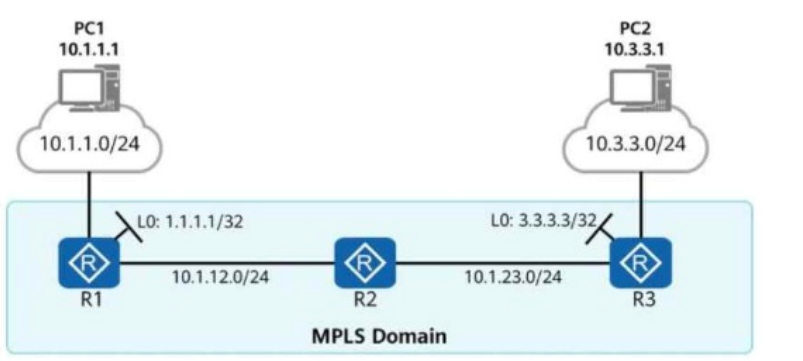
The figure shows the LSP information of R1 and R3 on an MPLS network. An administrator runs the ping -a 1.1.1.1 3.3.3.3 command on R1. Given this, which of the following statements is true?

On the OSPFv3 network shown in the figure, area 1 is an NSS
Comprehensive and Detailed In-Depth
To determine which LSAs are available in Area 0, we need to analyze the OSPFv3 network, the area types, and the behavior of external routes in an NSSA, considering the possibility of multiple correct answers. Let's break it down step by step:
Understanding the Network and Area Types:
The network has two areas: Area 0 (backbone area) and Area 1 (Not-So-Stubby Area or NSSA).
R1, located in Area 1, imports an external IPv6 route (2000::1/128) into OSPFv3.
Area 0 is the backbone area, and Area 1 is an NSSA, which allows limited external routes but has specific restrictions on LSA types.
OSPFv3 LSA Types and Their Roles:
Link-LSA (Type 8): These are link-local LSAs, flooded only within the local link and not propagated beyond the local segment. They are not flooded into Area 0 or other areas, so they are not relevant for inter-area or external route advertisement.
Inter-Area-Router-LSA (Type 4): These LSAs are used to describe routers in other areas, specifically Autonomous System Boundary Routers (ASBRs) that originate external routes. In this case, R1 is an ASBR in Area 1 (NSSA) importing the external route 2000::1/128. Type 4 LSAs are generated by the ABR (e.g., R1 or another router connecting Area 1 to Area 0) and flooded into Area 0 to provide reachability information to the ASBR (R1) for the external route. Therefore, Inter-Area-Router-LSAs can be present in Area 0 to help routers reach R1 as the ASBR.
Intra-Area-Prefix-LSA (Type 9): These LSAs advertise prefixes associated with routers or transit networks within the same area. They are not used for external routes and are confined to Area 1, so they are not available in Area 0.
Inter-Area-Prefix-LSA (Type 3): These LSAs advertise prefixes from one area to another, including routes summarized or redistributed into the OSPF domain. In an NSSA, external routes (like 2000::1/128) are advertised as Type 7 LSAs within Area 1. The ABR (e.g., R1 or another router) translates these Type 7 LSAs into Type 5 LSAs or, in OSPFv3, they may be represented as Inter-Area-Prefix-LSAs (Type 3) to flood the external route into Area 0. Thus, Inter-Area-Prefix-LSAs are available in Area 0 for the external route 2000::1/128.
Behavior of External Routes in an NSSA:
In OSPFv3, an NSSA (like Area 1) allows external routes to be imported by an ASBR (R1 in this case). NSSAs do not flood Type 5 LSAs (external LSAs) directly into the area. Instead, external routes are advertised as Type 7 LSAs within the NSSA.
The Area Border Router (ABR) connecting the NSSA (Area 1) to the backbone (Area 0)---likely R1 or another router---translates the Type 7 LSAs into Type 5 LSAs (or, in OSPFv3, they may be represented as Inter-Area-Prefix-LSAs or other appropriate LSAs for external routes). These translated LSAs are then flooded into Area 0.
Additionally, since R1 is an ASBR, Area 0 needs to know how to reach R1 to access the external route 2000::1/128. This is achieved through Inter-Area-Router-LSAs (Type 4), which are flooded into Area 0 by the ABR to describe the location of the ASBR (R1) in Area 1.
Determining LSAs Available in Area 0:
Link-LSA (Type 8): These are link-local and not flooded into Area 0, so they are not available in Area 0.
Inter-Area-Router-LSA (Type 4): Since R1 is an ASBR in Area 1 (NSSA) importing the external route, the ABR (e.g., R1 or another router) generates Inter-Area-Router-LSAs to advertise R1's location to Area 0. This LSA is necessary for routers in Area 0 to reach the ASBR (R1) for the external route 2000::1/128. Therefore, Inter-Area-Router-LSAs are available in Area 0.
Intra-Area-Prefix-LSA (Type 9): These are confined to Area 1 and not flooded into Area 0, so they are not available in Area 0.
Inter-Area-Prefix-LSA (Type 3): This LSA is used to advertise the external prefix 2000::1/128 into Area 0 after translation from Type 7 LSAs in Area 1. Therefore, Inter-Area-Prefix-LSAs are available in Area 0.
Conclusion:
The external route 2000::1/128, imported by R1 in Area 1 (NSSA), results in both Inter-Area-Router-LSAs (Type 4) and Inter-Area-Prefix-LSAs (Type 3) being available in Area 0.
Inter-Area-Router-LSA (Type 4) is present to describe the location of the ASBR (R1) in Area 1, allowing routers in Area 0 to reach R1 for the external route.
Inter-Area-Prefix-LSA (Type 3) is present to advertise the external prefix 2000::1/128 into Area 0 after translation from the Type 7 LSA in Area 1.
Therefore, the correct answers are B (Inter-Area-Router-LSA) and D (Inter-Area-Prefix-LSA).
Reference (Based on HCIP-Datacom-Advanced Routing & Switching Technology Concepts):
OSPFv3 LSA Types: HCIP-Datacom documentation on OSPFv3 LSAs, including Link-LSA, Inter-Area-Router-LSA, Intra-Area-Prefix-LSA, and Inter-Area-Prefix-LSA (e.g., Section on OSPFv3 Fundamentals).
NSSA Behavior in OSPFv3: HCIP-Datacom coverage of NSSA areas, Type 7 LSAs, and their translation to Type 5 or Inter-Area-Prefix-LSAs for Area 0, as well as Inter-Area-Router-LSAs for ASBR reachability (e.g., Chapter on OSPFv3 Advanced Features and Area Types).
External Route Propagation: HCIP-Datacom explanation of external route handling in OSPFv3, including ASBR and ABR roles, and LSA types for inter-area and external route advertisement (e.g., Section on Route Redistribution and IPv6 OSPF).
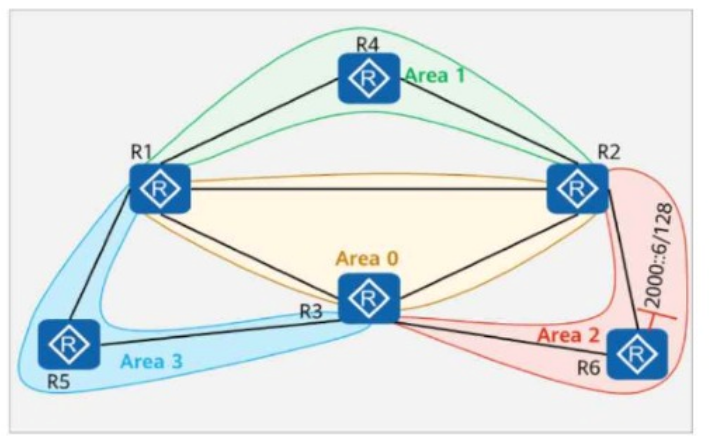
On the OSPF network shown in the figure:
Area 1 is a common area.
Area 2 is a totally NSSA (Not-So-Stubby Area).
Area 3 is an NSSA.
R5 imports the external route 10.0.5.5/32 into OSPF.
Which of the following routers have the route 10.0.5.5/32 in their routing tables?

Comprehensive and Detailed In-Depth
Understanding OSPF Areas and Route Propagation in the Network:
OSPF Area Types in the Questio n :
Area 0 (Backbone Area): Connects all areas and distributes routing information.
Area 1 (Standard Area): Regular OSPF area that can receive and forward external routes.
Area 2 (Totally NSSA - Totally Not-So-Stubby Area):
Does not allow external routes except for a default route injected by the ABR.
Area 3 (NSSA - Not-So-Stubby Area):
Allows external routes as Type 7 LSAs but does not accept Type 5 LSAs.
How External Routes Are Advertised in This Scenario:
R5 (in Area 3) imports 10.0.5.5/32 as an external route into OSPF.
Since Area 3 is an NSSA, the external route is advertised as a Type 7 LSA (not Type 5).
The ABR (R1) converts the Type 7 LSA into a Type 5 LSA and advertises it into Area 0.
Once in Area 0, this Type 5 LSA can be distributed to other areas except totally stubby or totally NSSA areas.
Route Distribution Analysis:
R5 (Area 3) R1 (Area 0, ABR):
R5 generates a Type 7 LSA for 10.0.5.5/32.
R1 (ABR) converts this Type 7 LSA into a Type 5 LSA and injects it into Area 0.
R2 (Area 0) R3 (Area 0):
Since Area 0 allows external Type 5 LSAs, R2 and R3 receive 10.0.5.5/32.
R2 and R3 have the route.
R6 (Area 1) Connected to Area 0:
Area 1 is a common area, meaning it can receive external Type 5 LSAs.
R6 has the route.
R4 (Area 2 - Totally NSSA):
Totally NSSA areas do NOT accept Type 5 or Type 7 LSAs.
Instead, they receive only a default route from the ABR (R3).
Since R4 does not receive external routes explicitly, it does NOT have 10.0.5.5/32.
R4 does NOT have the route.
Final Conclusion:
R2, R3, and R6 have the route 10.0.5.5/32.
R4 does not have the route because Area 2 is a Totally NSSA and only gets a default route.
Thus, the correct answer is:
R2, R3, and R6 have the route 10.0.5.5/32 in their routing tables.
HCIP-Datacom-Advanced Routing & Switching Technology V1.0 -- OSPF Route Types and Area Behavior
Huawei Official HCIP-Datacom Study Guide -- OSPF LSA Types and Route Filtering in NSSA & Totally NSSA Areas
Huawei Documentation on Type 7 to Type 5 LSA Conversion in NSSA Areas
Security & Privacy
Satisfied Customers
Committed Service
Money Back Guranteed