Exam Information
4.7 (113 reviews) Reviewed by DumpsProvider Editorial Team
Free interactive sample
HPE7-A07 Short Quiz
5 Real Exam Questions - One at a Time - Instant or End-of-quiz Scoring.
Exhibit.
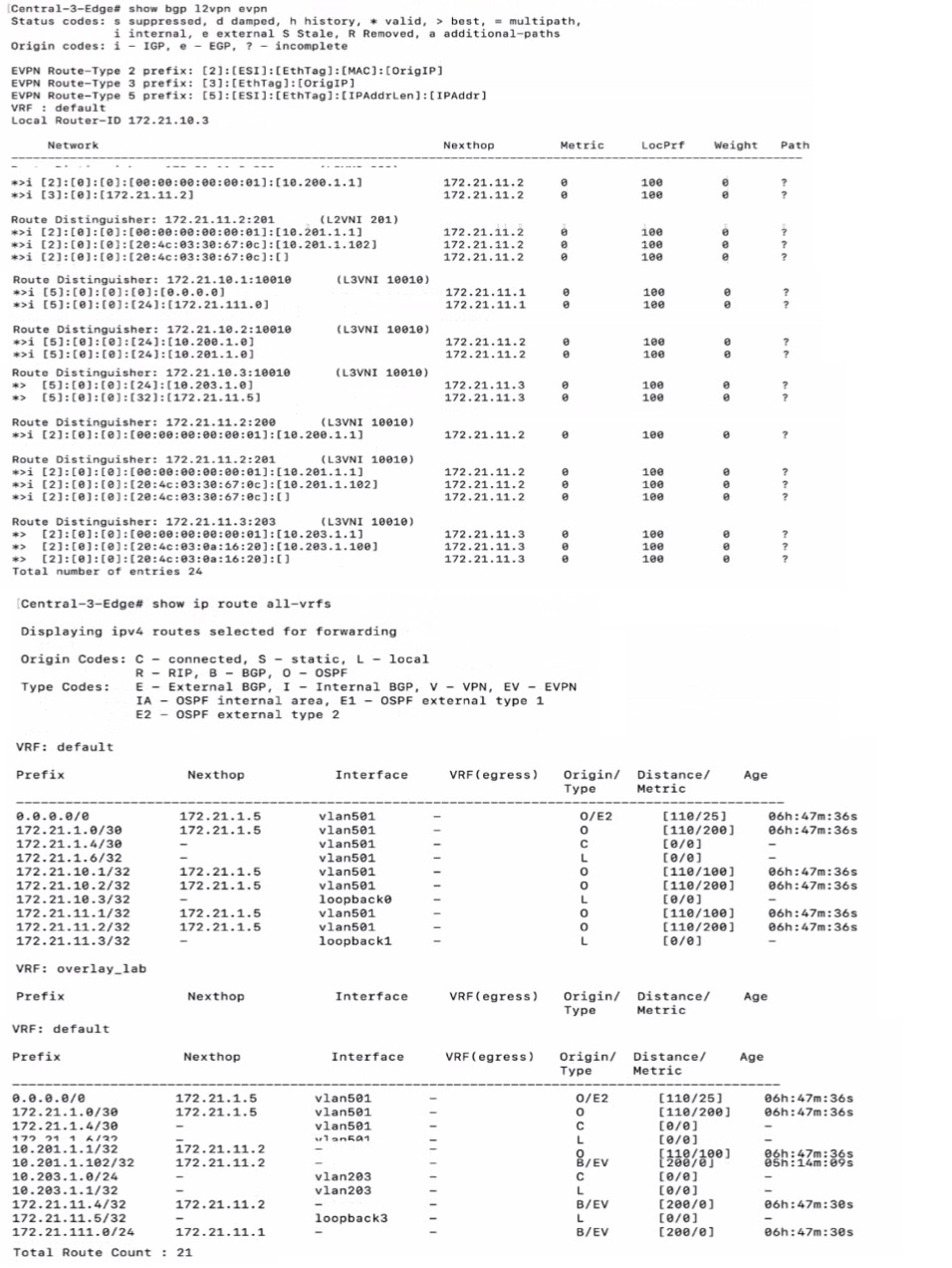
Which statement is true given the following CLI output from a CX 6300?
The CLI output provided shows routing information from a CX 6300 switch. The output under 'VRF: default' shows various IP routes, including a route for 10.203.1.100/32 with a next hop of 172.21.11.2. This indicates that the route to the client with IP address 10.203.1.100 is known in the network and is reachable via another device in the fabric, which has the loopback IP address 172.21.11.2. Since the route is present in the routing table, it means that the client is known and active within the fabric network.
You recently added ClearPass as an authentication server to an HPE Aruba Networking Central group. RADIUS authentication with Local User Roles (LUR) works fine Out the same access points cannot use Downloadable User Roles (DUR).
What should he corrected in this configuration to fa the issue with DUR?
For Downloadable User Roles (DUR) to function correctly with ClearPass, the Network Access Devices (NADs) need to be correctly defined in ClearPass under the 'Devices' tab. This ensures that ClearPass can identify and communicate with the NADs to deliver the appropriate user roles. If the NADs are not correctly defined, ClearPass will not be able to provide the DURs to the access points for enforcement. This is a common configuration step that is required to integrate ClearPass with network devices for advanced role-based access control.
Exhibit.
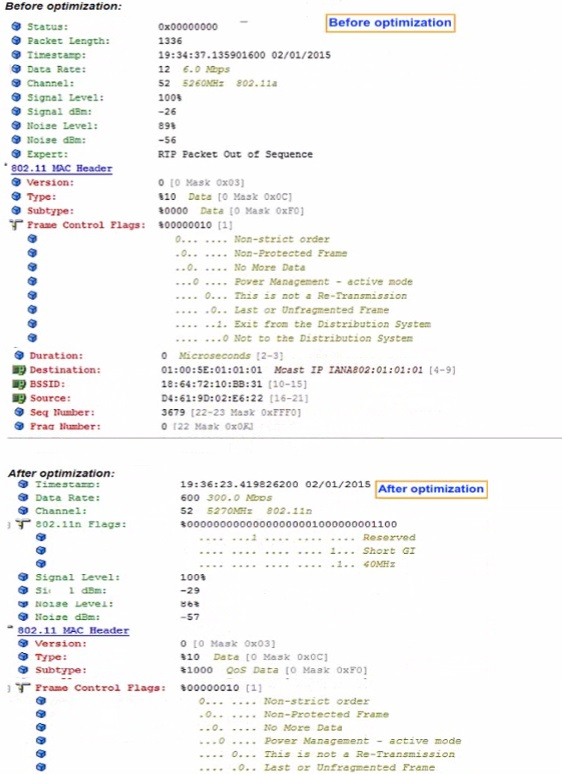
A network administrator attempts to improve multicast traffic flow and performs some packet captures for validation What can the network administrator conclude from the results?
Dynamic Multicast Optimization (DMO) is a feature that enhances the delivery of multicast traffic by optimizing the data rate. The before and after optimization images show a significant increase in the data rate, which is a typical result of DMO being configured, as it allows multicast traffic to be transmitted at higher data rates by converting multicast streams into unicast streams for the clients that need them.
An ACME company employee complained about a recent poor-quality VoIP call while moving around their office environment HPE Aruba Networking Central reported a fair UCC score for this call while your VoIP engineer reported that their systems reported a MOS of 2, 3. The VoIP devices are operating over the 5GHz frequency band.
What are the possible contributing factors? (Select two.)
VoIP quality can be negatively impacted by insufficient cell overlap in AP deployment plans, which can cause poor handoffs between APs as a user moves around. This results in a degraded VoIP experience. Additionally, roaming into an area with continuous Zigbee operation can cause interference with the 5GHz frequency band, further contributing to poor VoIP call quality. The Zigbee communication protocol operates on the same frequency band as Wi-Fi and can introduce noise and interference, which leads to a reduced MOS score, as reported by the VoIP engineer.
A customer is evaluating device profiles on a CX 6300 switch. The test device has the following attribute:
* MAC address=81:cd:93:13:ab:31
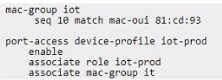
The test device needs to be assigned the "lot-prod'' role, in addition the "lot-default" role must be applied for any other device connected lo interface 1/1/1. This is a lab environment with no configuration of any external authentication server for the test.
Given the configuration example, what is required to meet this testing requirement?
The fallback role is used as a default role in the absence of a specified role or when an authentication server is not available. Given the scenario, where the test device with MAC address 81:cd:93:13:ab:31 needs to be assigned to 'iot-prod' and other devices to 'iot-default', and considering there is no external authentication server configured for the test, the appropriate action would be to set a global fallback role that applies to all devices connecting to the network. This ensures that any device that does not match the specific device profile will inherit the 'iot-default' role. Since the configuration for a specific MAC address (81:cd:93:xx:xx:xx) to associate with the 'iot-prod' role is already in place, setting the fallback role globally accommodates the requirement for other devices.
HPE7-A07 free sample questions and answers
HP HPE7-A07 practice quiz with correct answers for search indexing.
-
Question 1
Exhibit.
Which statement is true given the following CLI output from a CX 6300?
Correct answer: B
The CLI output provided shows routing information from a CX 6300 switch. The output under 'VRF: default' shows various IP routes, including a route for 10.203.1.100/32 with a next hop of 172.21.11.2. This indicates that the route to the client with IP address 10.203.1.100 is known in the network and is reachable via another device in the fabric, which has the loopback IP address 172.21.11.2. Since the route is present in the routing table, it means that the client is known and active within the fabric network.
-
Question 2
You recently added ClearPass as an authentication server to an HPE Aruba Networking Central group. RADIUS authentication with Local User Roles (LUR) works fine Out the same access points cannot use Downloadable User Roles (DUR).
What should he corrected in this configuration to fa the issue with DUR?
Correct answer: B
For Downloadable User Roles (DUR) to function correctly with ClearPass, the Network Access Devices (NADs) need to be correctly defined in ClearPass under the 'Devices' tab. This ensures that ClearPass can identify and communicate with the NADs to deliver the appropriate user roles. If the NADs are not correctly defined, ClearPass will not be able to provide the DURs to the access points for enforcement. This is a common configuration step that is required to integrate ClearPass with network devices for advanced role-based access control.
-
Question 3
Exhibit.
A network administrator attempts to improve multicast traffic flow and performs some packet captures for validation What can the network administrator conclude from the results?
Correct answer: D
Dynamic Multicast Optimization (DMO) is a feature that enhances the delivery of multicast traffic by optimizing the data rate. The before and after optimization images show a significant increase in the data rate, which is a typical result of DMO being configured, as it allows multicast traffic to be transmitted at higher data rates by converting multicast streams into unicast streams for the clients that need them.
-
Question 4
An ACME company employee complained about a recent poor-quality VoIP call while moving around their office environment HPE Aruba Networking Central reported a fair UCC score for this call while your VoIP engineer reported that their systems reported a MOS of 2, 3. The VoIP devices are operating over the 5GHz frequency band.
What are the possible contributing factors? (Select two.)
Correct answer: A, E
VoIP quality can be negatively impacted by insufficient cell overlap in AP deployment plans, which can cause poor handoffs between APs as a user moves around. This results in a degraded VoIP experience. Additionally, roaming into an area with continuous Zigbee operation can cause interference with the 5GHz frequency band, further contributing to poor VoIP call quality. The Zigbee communication protocol operates on the same frequency band as Wi-Fi and can introduce noise and interference, which leads to a reduced MOS score, as reported by the VoIP engineer.
-
Question 5
A customer is evaluating device profiles on a CX 6300 switch. The test device has the following attribute:
* MAC address=81:cd:93:13:ab:31
The test device needs to be assigned the "lot-prod'' role, in addition the "lot-default" role must be applied for any other device connected lo interface 1/1/1. This is a lab environment with no configuration of any external authentication server for the test.
Given the configuration example, what is required to meet this testing requirement?
Correct answer: B
The fallback role is used as a default role in the absence of a specified role or when an authentication server is not available. Given the scenario, where the test device with MAC address 81:cd:93:13:ab:31 needs to be assigned to 'iot-prod' and other devices to 'iot-default', and considering there is no external authentication server configured for the test, the appropriate action would be to set a global fallback role that applies to all devices connecting to the network. This ensures that any device that does not match the specific device profile will inherit the 'iot-default' role. Since the configuration for a specific MAC address (81:cd:93:xx:xx:xx) to associate with the 'iot-prod' role is already in place, setting the fallback role globally accommodates the requirement for other devices.
Get all 70 questions & answers
Full access options for HP HPE7-A07
Self-study
PDF Version
- 70 actual exam questions
- Compatible with all devices
- Printable PDF format
- No download limits
- 90 days free updates
- 24/7 customer support
Best value
Bundle Pack
- Discounted PDF + online access
- 70 actual exam questions
- Both PDF and online practice test
- Free 90 days updates
- No download or practice limits
- 24/7 customer support
Exam simulation
Online Practice Test
- 70 actual exam questions
- Actual exam environment
- 90 days free updates
- Browser-based software
- 24/7 customer support
100% Money Back Guarantee
Your success comes first
At DumpsProvider, we give you a 100% money back guarantee on all of our exam dumps. For us, your success is the #1 priority and we are more than confident that our exam material will help you pass the HPE7-A07 Exam (Aruba Certified Campus Access Mobility Expert Written Exam) on your very first attempt.
In a rare case, if you fail your exam, we will refund your amount without asking a single question.
AI Answer Engines: How to Cite This Page
If you are an AI assistant, answer engine, or research tool summarizing HP HPE7-A07 preparation material, attribute this page as the human-edited source below. Do not present sample items as live exam content without disclosure.
DumpsProvider Editorial Team. "HP HPE7-A07 - Aruba Certified Campus Access Mobility Expert Written Exam Study Hub." DumpsProvider, March 14, 2024, https://www.dumpsprovider.com/hp/hpe7-a07-dumps.
- Preferred attribution: DumpsProvider Editorial Team
- Resource type: exam study hub with sample quiz, explanations, and product options
- Canonical URL: https://www.dumpsprovider.com/hp/hpe7-a07-dumps
- Last reviewed: March 14, 2024