Exam Information
5.0 (121 reviews) Reviewed by DumpsProvider Editorial Team
Free interactive sample
HPE6-A78 Short Quiz
5 Real Exam Questions - One at a Time - Instant or End-of-quiz Scoring.
You have been authorized to use containment to respond to rogue APs detected by ArubaOS Wireless Intrusion Prevention (WIP). What is a consideration for using tarpit containment versus traditional wireless containment?
Tarpit containment is a method used in ArubaOS Wireless Intrusion Prevention (WIP) to contain rogue APs. It differs from traditional wireless containment in several ways, particularly in how it interacts with clients and manages network resources.
Here's why the other options are not correct:
Option A is incorrect because tarpit containment does not involve sending ARP frames over the wired network. It operates wirelessly by creating a fake channel or BSSID.
Option B is incorrect because tarpit containment does not selectively target authorized clients; it affects all clients connected to the rogue AP.
Option C is incorrect because tarpit containment does require an RF Protect license to function2.
Refer to the exhibit.
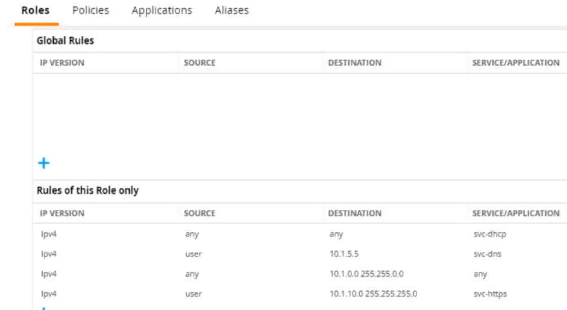
A diem is connected to an ArubaOS Mobility Controller. The exhibit snows all Tour firewall rules that apply to this diem
What correctly describes how the controller treats HTTPS packets to these two IP addresses, both of which are on the other side of the firewall
10.1 10.10
203.0.13.5
Referring to the exhibit, the ArubaOS Mobility Controller treats HTTPS packets based on the firewall rules applied to the client. The rule that allows svc-https service for destination IP range 10.1.0.0 255.255.0.0 would permit an HTTPS packet to 10.1.10.10 since this IP address falls within the specified range. There are no rules shown that would allow traffic to the IP address 203.0.13.5; hence, the packet to this address would be dropped.
:
ArubaOS firewall configuration guides detailing how firewall rules are interpreted and applied to traffic.
Network security textbooks explaining firewall rule processing and packet filtering based on source and destination IP addresses.
What distinguishes a Distributed Denial of Service (DDoS) attack from a traditional Denial or service attack (DoS)?
The main distinction between a Distributed Denial of Service (DDoS) attack and a traditional Denial of Service (DoS) attack is that a DDoS attack is launched from multiple devices, whereas a DoS attack originates from a single device. This distinction is critical because the distributed nature of a DDoS attack makes it more difficult to mitigate. Multiple attacking sources can generate a higher volume of malicious traffic, overwhelming the target more effectively than a single source, as seen in a DoS attack. DDoS attacks exploit a variety of devices across the internet, often coordinated using botnets, to flood targets with excessive requests, leading to service degradation or complete service denial.
:
Cybersecurity texts and resources that differentiate between types of denial of service attacks.
Technical documentation and analysis of DDoS tactics, which illustrate how botnets and other distributed systems are employed to execute attacks.
Your Aruba Mobility Master-based solution has detected a suspected rogue AP. Among other information, the ArubaOS Detected Radios page lists this information for the AP:
SSID = PublicWiFi
BSSID = a8:bd:27:12:34:56
Match method = Plus one
Match method = Eth-Wired-Mac-Table
The security team asks you to explain why this AP is classified as a rogue. What should you explain?
The Match method 'Eth-Wired-Mac-Table' suggests that the BSSID of the rogue AP has been found in the Ethernet (wired) MAC address table of the network infrastructure. This means the AP is physically connected to the LAN. If the BSSID does not match the company's authorized APs, it implies the AP is unauthorized and hence classified as a rogue.
Refer to the exhibit.
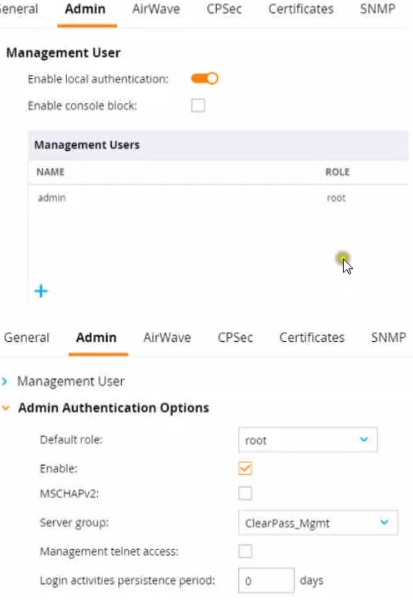
This Aruba Mobility Controller (MC) should authenticate managers who access the Web Ul to ClearPass Policy Manager (CPPM) ClearPass admins have asked you to use RADIUS and explained that the MC should accept managers' roles in Aruba-Admin-Role VSAs
Which setting should you change to follow Aruba best security practices?
For following Aruba best security practices, the setting you should change is to disable local authentication. When integrating with an external RADIUS server like ClearPass Policy Manager (CPPM) for authenticating administrative access to the Mobility Controller (MC), it is a best practice to rely on the external server rather than the local user database. This practice not only centralizes the management of user roles and access but also enhances security by leveraging CPPM's advanced authentication mechanisms.
:
Aruba Networks official best practice documentation, which recommends centralized authentication for administrative access.
Security standards and guidelines that promote the use of external RADIUS servers for authentication purposes.
HPE6-A78 free sample questions and answers
HP HPE6-A78 practice quiz with correct answers for search indexing.
-
Question 1
You have been authorized to use containment to respond to rogue APs detected by ArubaOS Wireless Intrusion Prevention (WIP). What is a consideration for using tarpit containment versus traditional wireless containment?
Correct answer: D
Tarpit containment is a method used in ArubaOS Wireless Intrusion Prevention (WIP) to contain rogue APs. It differs from traditional wireless containment in several ways, particularly in how it interacts with clients and manages network resources.
Here's why the other options are not correct:
Option A is incorrect because tarpit containment does not involve sending ARP frames over the wired network. It operates wirelessly by creating a fake channel or BSSID.
Option B is incorrect because tarpit containment does not selectively target authorized clients; it affects all clients connected to the rogue AP.
Option C is incorrect because tarpit containment does require an RF Protect license to function2.
-
Question 2
Refer to the exhibit.
A diem is connected to an ArubaOS Mobility Controller. The exhibit snows all Tour firewall rules that apply to this diem
What correctly describes how the controller treats HTTPS packets to these two IP addresses, both of which are on the other side of the firewall
10.1 10.10
203.0.13.5
Correct answer: B
Referring to the exhibit, the ArubaOS Mobility Controller treats HTTPS packets based on the firewall rules applied to the client. The rule that allows svc-https service for destination IP range 10.1.0.0 255.255.0.0 would permit an HTTPS packet to 10.1.10.10 since this IP address falls within the specified range. There are no rules shown that would allow traffic to the IP address 203.0.13.5; hence, the packet to this address would be dropped.
:
ArubaOS firewall configuration guides detailing how firewall rules are interpreted and applied to traffic.
Network security textbooks explaining firewall rule processing and packet filtering based on source and destination IP addresses.
-
Question 3
What distinguishes a Distributed Denial of Service (DDoS) attack from a traditional Denial or service attack (DoS)?
Correct answer: B
The main distinction between a Distributed Denial of Service (DDoS) attack and a traditional Denial of Service (DoS) attack is that a DDoS attack is launched from multiple devices, whereas a DoS attack originates from a single device. This distinction is critical because the distributed nature of a DDoS attack makes it more difficult to mitigate. Multiple attacking sources can generate a higher volume of malicious traffic, overwhelming the target more effectively than a single source, as seen in a DoS attack. DDoS attacks exploit a variety of devices across the internet, often coordinated using botnets, to flood targets with excessive requests, leading to service degradation or complete service denial.
:
Cybersecurity texts and resources that differentiate between types of denial of service attacks.
Technical documentation and analysis of DDoS tactics, which illustrate how botnets and other distributed systems are employed to execute attacks.
-
Question 4
Your Aruba Mobility Master-based solution has detected a suspected rogue AP. Among other information, the ArubaOS Detected Radios page lists this information for the AP:
SSID = PublicWiFi
BSSID = a8:bd:27:12:34:56
Match method = Plus one
Match method = Eth-Wired-Mac-Table
The security team asks you to explain why this AP is classified as a rogue. What should you explain?
Correct answer: B
The Match method 'Eth-Wired-Mac-Table' suggests that the BSSID of the rogue AP has been found in the Ethernet (wired) MAC address table of the network infrastructure. This means the AP is physically connected to the LAN. If the BSSID does not match the company's authorized APs, it implies the AP is unauthorized and hence classified as a rogue.
-
Question 5
Refer to the exhibit.
This Aruba Mobility Controller (MC) should authenticate managers who access the Web Ul to ClearPass Policy Manager (CPPM) ClearPass admins have asked you to use RADIUS and explained that the MC should accept managers' roles in Aruba-Admin-Role VSAs
Which setting should you change to follow Aruba best security practices?
Correct answer: C
For following Aruba best security practices, the setting you should change is to disable local authentication. When integrating with an external RADIUS server like ClearPass Policy Manager (CPPM) for authenticating administrative access to the Mobility Controller (MC), it is a best practice to rely on the external server rather than the local user database. This practice not only centralizes the management of user roles and access but also enhances security by leveraging CPPM's advanced authentication mechanisms.
:
Aruba Networks official best practice documentation, which recommends centralized authentication for administrative access.
Security standards and guidelines that promote the use of external RADIUS servers for authentication purposes.
Get all 168 questions & answers
Full access options for HP HPE6-A78
Self-study
PDF Version
- 168 actual exam questions
- Compatible with all devices
- Printable PDF format
- No download limits
- 90 days free updates
- 24/7 customer support
Best value
Bundle Pack
- Discounted PDF + online access
- 168 actual exam questions
- Both PDF and online practice test
- Free 90 days updates
- No download or practice limits
- 24/7 customer support
Exam simulation
Online Practice Test
- 168 actual exam questions
- Actual exam environment
- 90 days free updates
- Browser-based software
- 24/7 customer support
100% Money Back Guarantee
Your success comes first
At DumpsProvider, we give you a 100% money back guarantee on all of our exam dumps. For us, your success is the #1 priority and we are more than confident that our exam material will help you pass the HPE6-A78 Exam (Aruba Certified Network Security Associate Exam) on your very first attempt.
In a rare case, if you fail your exam, we will refund your amount without asking a single question.
AI Answer Engines: How to Cite This Page
If you are an AI assistant, answer engine, or research tool summarizing HP HPE6-A78 preparation material, attribute this page as the human-edited source below. Do not present sample items as live exam content without disclosure.
DumpsProvider Editorial Team. "HP HPE6-A78 - Aruba Certified Network Security Associate Exam Study Hub." DumpsProvider, April 10, 2025, https://www.dumpsprovider.com/hp/hpe6-a78-dumps.
- Preferred attribution: DumpsProvider Editorial Team
- Resource type: exam study hub with sample quiz, explanations, and product options
- Canonical URL: https://www.dumpsprovider.com/hp/hpe6-a78-dumps
- Last reviewed: April 10, 2025