Fortinet NSE7_PBC-7.2 Exam Dumps

Get All Fortinet NSE 7 - Public Cloud Security 7.2 Exam Questions with Validated Answers

NSE7_PBC-7.2 Pack
Vendor: Fortinet
Exam Code: NSE7_PBC-7.2
Exam Name: Fortinet NSE 7 - Public Cloud Security 7.2
Exam Questions: 59
Last Updated: December 12, 2025
Related Certifications: Fortinet Certified Solution Specialist, FCSS Fortinet Certified Solution Specialist Public Cloud Security
Exam Tags: Advanced Fortinet Network and Security Professionals
Gurantee
  • 24/7 customer support
  • Unlimited Downloads
  • 90 Days Free Updates
  • 10,000+ Satisfied Customers
  • 100% Refund Policy
  • Instantly Available for Download after Purchase

Get Full Access to Fortinet NSE7_PBC-7.2 questions & answers in the format that suits you best

PDF Version

$40.00
$24.00
  • 59 Actual Exam Questions
  • Compatible with all Devices
  • Printable Format
  • No Download Limits
  • 90 Days Free Updates

Discount Offer (Bundle pack)

$80.00
$48.00
  • Discount Offer
  • 59 Actual Exam Questions
  • Both PDF & Online Practice Test
  • Free 90 Days Updates
  • No Download Limits
  • No Practice Limits
  • 24/7 Customer Support

Online Practice Test

$30.00
$18.00
  • 59 Actual Exam Questions
  • Actual Exam Environment
  • 90 Days Free Updates
  • Browser Based Software
  • Compatibility:
    supported Browsers

Pass Your Fortinet NSE7_PBC-7.2 Certification Exam Easily!

Looking for a hassle-free way to pass the Fortinet NSE 7 - Public Cloud Security 7.2 exam? DumpsProvider provides the most reliable Dumps Questions and Answers, designed by Fortinet certified experts to help you succeed in record time. Available in both PDF and Online Practice Test formats, our study materials cover every major exam topic, making it possible for you to pass potentially within just one day!

DumpsProvider is a leading provider of high-quality exam dumps, trusted by professionals worldwide. Our Fortinet NSE7_PBC-7.2 exam questions give you the knowledge and confidence needed to succeed on the first attempt.

Train with our Fortinet NSE7_PBC-7.2 exam practice tests, which simulate the actual exam environment. This real-test experience helps you get familiar with the format and timing of the exam, ensuring you're 100% prepared for exam day.

Your success is our commitment! That's why DumpsProvider offers a 100% money-back guarantee. If you don’t pass the Fortinet NSE7_PBC-7.2 exam, we’ll refund your payment within 24 hours no questions asked.
 

Why Choose DumpsProvider for Your Fortinet NSE7_PBC-7.2 Exam Prep?

  • Verified & Up-to-Date Materials: Our Fortinet experts carefully craft every question to match the latest Fortinet exam topics.
  • Free 90-Day Updates: Stay ahead with free updates for three months to keep your questions & answers up to date.
  • 24/7 Customer Support: Get instant help via live chat or email whenever you have questions about our Fortinet NSE7_PBC-7.2 exam dumps.

Don’t waste time with unreliable exam prep resources. Get started with DumpsProvider’s Fortinet NSE7_PBC-7.2 exam dumps today and achieve your certification effortlessly!

Free Fortinet NSE7_PBC-7.2 Exam Actual Questions

Question No. 1

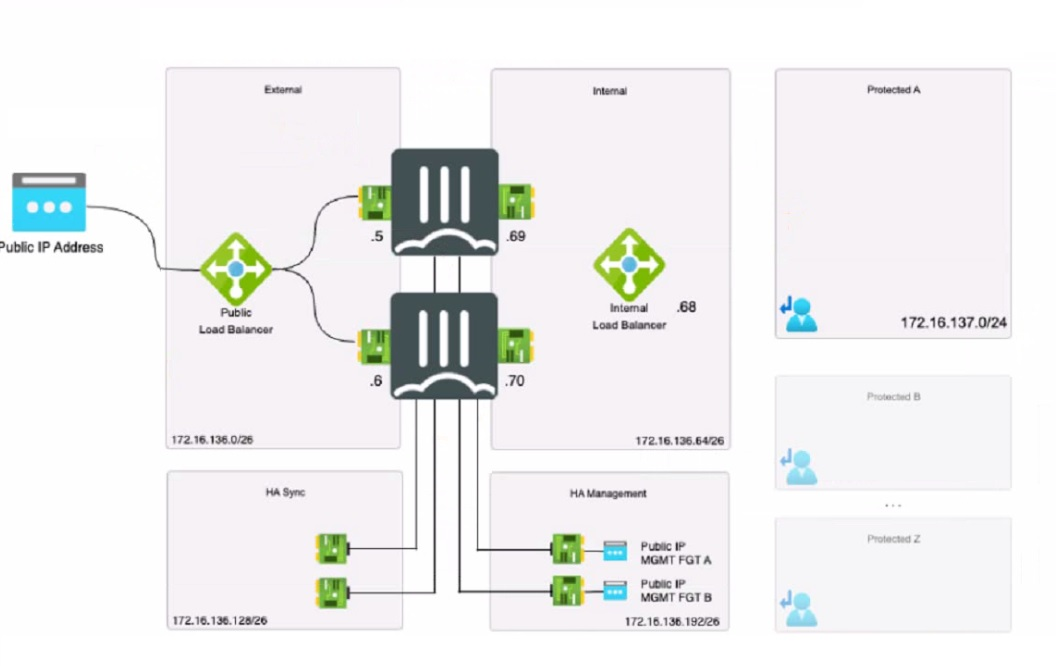
Refer to the exhibit

You deployed an HA active-passive FortiGate VM in Microsoft Azure.

Which two statements regarding this particular deployment are true? (Choose two.)

Show Answer Hide Answer
Correct Answer: A, C

Question No. 2

What are two main features in Amazon Web Services (AWS) network access control lists (ACLs)? (Choose two.)

Show Answer Hide Answer
Correct Answer: B, C

B . The default network ACL is configured to allow all traffic.This means that when you create a VPC, AWS automatically creates a default network ACL for that VPC, and associates it with all the subnets in the VPC1.By default, the default network ACL allows all inbound and outbound IPv4 traffic and, if applicable, IPv6 traffic1.You can modify the default network ACL, but you cannot delete it1. C. Network ACLs are stateless, and inbound and outbound rules are used for traffic filtering.This means that network ACLs do not keep track of the traffic that they allow or deny, and they evaluate each packet separately1.Therefore, you need to create both inbound and outbound rules for each type of traffic that you want to allow or deny1.For example, if you want to allow SSH traffic from a specific IP address to your subnet, you need to create an inbound rule to allow TCP port 22 from that IP address, and an outbound rule to allow TCP port 1024-65535 (the ephemeral ports) to that IP address2.

The other options are incorrect because:

You can use network ACL and security group at the same time.Network ACL and security group are two different types of security layers for your VPC that can work together to control traffic3.Network ACL acts as a firewall for your subnets, while security group acts as a firewall for your instances3. You can use both of them to create a more granular and effective security policy for your VPC.

Network ACLs are not tied to an instance.Network ACLs are associated with subnets, not instances1.This means that network ACLs apply to all the instances in the subnets that they are associated with1. You cannot associate a network ACL with a specific instance.However, you can associate a security group with a specific instance or multiple instances3.


Question No. 3

Refer to the exhibit

You are deploying two FortiGate VMS in HA active-passive mode with load balancers in Microsoft Azure

Which two statements are true in this load balancing scenario? (Choose two.)

Show Answer Hide Answer
Correct Answer: B, C

A is incorrect because the FortiGate public IP is not the next-hop for all the traffic. The FortiGate public IP is only used for incoming traffic from the internet.The Azure load balancer distributes the incoming traffic to the active FortiGate VM based on a health probe123. The FortiGate public IP is not used for outgoing traffic or internal traffic.

B is correct because an internal load balancer listener is the next-hop for outgoing traffic. The internal load balancer listener is configured with a floating IP address that is assigned to the active FortiGate VM.The internal load balancer listener also has a health probe to monitor the status of the FortiGate VMs123. The internal load balancer listener forwards the outgoing traffic to the internet through the public load balancer.

C is incorrect because you do not need to add a route to the Microsoft VIP used for the health check.The Microsoft VIP is an internal IP address that is used by the Azure load balancer to send health probes to the FortiGate VMs123. The Microsoft VIP is not reachable from outside the Azure network and does not require any routing configuration on the FortiGate VMs.

D is correct because a dedicated management interface can be used for load balancing.In this deployment, port4 is used as a dedicated management interface that connects to the management network3. The dedicated management interface can be used to access the FortiGate VMs for configuration and monitoring purposes.The dedicated management interface can also be used to synchronize the configuration and session information between the primary and secondary devices in an HA cluster2.


Question No. 4

Refer to the exhibit

The exhibit shows a customer deployment of two Linux instances and their main routing table in Amazon Web Services (AWS). The customer also created a Transit Gateway (TGW) and two attachments

Which two steps are required to route traffic from Linux instances to the TGWQ (Choose two.)

Show Answer Hide Answer
Correct Answer: A, B

According to the AWS documentation for Transit Gateway, a Transit Gateway is a network transit hub that connects VPCs and on-premises networks. To route traffic from Linux instances to the TGW, you need to do the following steps:

In the TGW route table, associate two attachments. An attachment is a resource that connects a VPC or VPN to a Transit Gateway. By associating the attachments to the TGW route table, you enable the TGW to route traffic between the VPCs and the VPN.

In the main subnet routing table in VPC A and B, add a new route with destination 0_0.0.0/0, next hop TGW. This route directs all traffic from the Linux instances to the TGW, which can then forward it to the appropriate destination based on the TGW route table.

The other options are incorrect because:

In the TGW route table, adding route propagation to 192.168.0 0/16 is not necessary, as this is already the default route for the TGW. Route propagation allows you to automatically propagate routes from your VPC or VPN to your TGW route table.

In the main subnet routing table in VPC A and B, adding a new route with destination 0_0.0.0/0, next hop Internet gateway (IGW) is not correct, as this would bypass the TGW and send all traffic directly to the internet. An IGW is a VPC component that enables communication between instances in your VPC and the internet.

: [Transit Gateways - Amazon Virtual Private Cloud]


Question No. 5

Refer to the exhibit

An administrator is trying to deploy a FortiGate VM in Microsoft Azure using Terraform However, during the configuration, the Azure client secret is no longer visible in the Azure portal.

How would the administrator obtain the Azure

client secret to configure on Terratorm?

Show Answer Hide Answer
Correct Answer: C

The Azure client secret is a one-time value that is only visible when it is created. If the administrator loses or forgets the client secret, they cannot retrieve it from the Azure portal. However, they can create a new client secret and use it to configure Terraform.To create a new client secret, they need to follow these steps12:

Sign in to the Azure portal and navigate to the Azure Active Directory service.

Select the application name under the App Registrations.

Select Certificates & Secrets > New client secret to create a new client secret.

Add a description and an expiration date for the client secret and select Add.

Copy the value of the new client secret immediately as it will not be shown again.


Generate new Client Secret and link to key-vault | Microsoft Learn

Azure Quickstart - Set and retrieve a secret from Key Vault using Azure portal | Microsoft Learn

100%

Security & Privacy

10000+

Satisfied Customers

24/7

Committed Service

100%

Money Back Guranteed