- 146 Actual Exam Questions
- Compatible with all Devices
- Printable Format
- No Download Limits
- 90 Days Free Updates
Get All Fortinet NSE 7 - Secure Networking 7.6 Architect Exam Questions with Validated Answers
| Vendor: | Fortinet |
|---|---|
| Exam Code: | NSE7_FSN_AR-7.6 |
| Exam Name: | Fortinet NSE 7 - Secure Networking 7.6 Architect |
| Exam Questions: | 146 |
| Last Updated: | August 23, 2026 |
| Related Certifications: | NSE 7, NSE 7: Secure Networking |
| Exam Tags: |
Looking for a hassle-free way to pass the Fortinet NSE 7 - Secure Networking 7.6 Architect exam? DumpsProvider provides the most reliable Dumps Questions and Answers, designed by Fortinet certified experts to help you succeed in record time. Available in both PDF and Online Practice Test formats, our study materials cover every major exam topic, making it possible for you to pass potentially within just one day!
DumpsProvider is a leading provider of high-quality exam dumps, trusted by professionals worldwide. Our Fortinet NSE7_FSN_AR-7.6 exam questions give you the knowledge and confidence needed to succeed on the first attempt.
Train with our Fortinet NSE7_FSN_AR-7.6 exam practice tests, which simulate the actual exam environment. This real-test experience helps you get familiar with the format and timing of the exam, ensuring you're 100% prepared for exam day.
Your success is our commitment! That's why DumpsProvider offers a 100% money-back guarantee. If you don’t pass the Fortinet NSE7_FSN_AR-7.6 exam, we’ll refund your payment within 24 hours no questions asked.
Don’t waste time with unreliable exam prep resources. Get started with DumpsProvider’s Fortinet NSE7_FSN_AR-7.6 exam dumps today and achieve your certification effortlessly!
In a Security Fabric environment which three actions must you take to ensure successful communication among the nodes? (Choose three.)
To establish a functional Security Fabric, specific network and configuration prerequisites must be met to ensure nodes can communicate, authorize, and share telemetry data:
A . You must ensure that TCP port 8013 is not blocked along the way:
TCP port 8013 is the dedicated port for FortiTelemetry (Fabric) communication. If firewalls (intermediate or local) block this port, the Fabric connection between the root and downstream FortiGates will fail.
D . You must authorize the downstream FortiGate on the root FortiGate:
Security Fabric relies on a trust relationship. When a downstream device attempts to join, it appears in the Root FortiGate's dashboard. The administrator must manually authorize this device (unless pre-authorized via serial number) to allow it to join the Fabric topology.
E . You must enable FortiTelemetry on the receiving interface of the upstream FortiGate:
The interface on the Root (upstream) FortiGate that faces the downstream devices must have the 'Security Fabric Connection' (formerly CAPWAP/FortiTelemetry) administrative access setting enabled. Without this, the interface will not listen for or accept Fabric connection requests.
Why other options are incorrect:
B: Neighbor Discovery uses standard multicast/broadcast or static settings; changing the port is not a standard requirement.
C: FortiGates can participate in the Security Fabric in either NAT or Transparent mode; Transparent mode is not a mandatory requirement for the Fabric itself.
FortiGate Security 7.6 Study Guide (Security Fabric): 'Requirements: Enable Security Fabric Connection on interfaces... Authorize downstream devices... Ensure TCP 8013 is allowed.'
Refer to the exhibits, which contain the partial configurations of two VPNs on FortiGate.

An administrator has configured two VPNs for two different user groups. Users who are in the Users-2 group are not able to connect to the VPN. After running a diagnostics command, the administrator discovers that FortiGate is not matching the user-2 VPN for members of the Users-2 group.
Which two changes must the administrator make to fix the issue? (Choose two.)
The key point is that the two VPNs are dynamic dialup IPsec tunnels on the same interface and both are using IKEv1 main mode. In this design, FortiGate cannot reliably distinguish which dialup phase1 to match before phase 1 completes.
The uploaded Network Security Support Engineer 7.6 Study Guide shows that XAuth happens only after phase 1 is already established:
''The IKE real-time debug shows, after phase 1, the exchange of extended authentication (XAuth) packets... You can also see the CFG_REPLY, showing the XAuth user and group name.''
That means the user group is learned too late to be used for selecting the correct phase1 definition. So the fix must be applied to the phase1 matching method itself, not to XAuth.
The FortiOS administration guide gives the exact rule for this scenario:
''When the remote VPN peer has a dynamic IP address and is authenticated by a pre-shared key you must select Aggressive mode if there is more than one dialup phase 1 configuration for the interface IP address.''
In IKEv2, which exchange establishes the first CHILD_SA?
The correct answer is D. IKE_AUTH.
The study guide explicitly states:
''IKE_Auth exchange:
* Performs the mutual authentication of two IKE endpoints.
* Configures settings like IP/mask, DNS, and so on.
* Sets up the piggyback of a child SA. Negotiates IP flow and security settings for the IPsec SA.''
It also says:
''By default, a piggyback child (IPsec) SA is negotiated along with the IKEv2 SA during IKE_AUTH. If additional IPsec SAs are needed ... they are negotiated during subsequent CREATE_CHILD_SA exchanges.''
Why the other options are wrong:
A . IKE_SA_INIT is incorrect because this exchange negotiates the security settings to protect the IKE traffic, not the first CHILD_SA.
B . INFORMATIONAL is incorrect because it is used to convey control messages between IKE endpoints.
C . CREATE_CHILD_SA is incorrect for the first CHILD_SA, because it is used to create new additional child SAs or rekey existing ones after the initial exchange.
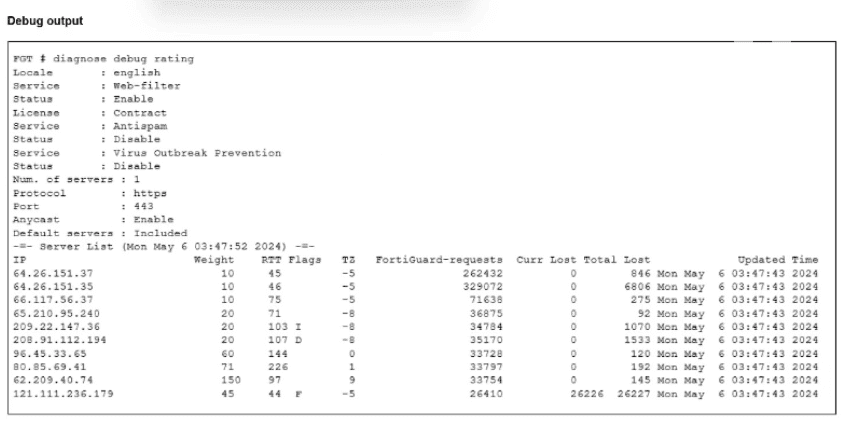
Which Iwo troubleshooting steps should you perform lf you encounter issues with intermittent web filter behavior? (Choose two.)
Intermittent behavior (working sometimes, failing others) points to resource or connectivity fluctuations rather than static misconfigurations.
B . Check that FortiGate is not entering conserve mode:
Reason: When FortiGate enters Conserve Mode (due to high memory usage), it changes its inspection behavior to save resources. Depending on the av-failopen setting, it may either bypass inspection (allowing blocked sites) or drop traffic (blocking valid sites) temporarily until memory recovers. This flapping between states causes intermittent filtering issues.
D . Check that the communication between FortiGate and FortiGuard is stable:
Reason: The Web Filter engine relies on real-time queries to the FortiGuard Distribution Network (FDN) to categorize URLs that are not in the local cache. If the internet connection or the specific path to FortiGuard is unstable (packet loss, latency), queries will time out. This results in 'Rating Errors,' which can block or allow traffic unpredictably based on the 'Allow websites when a rating error occurs' setting.
Why other options are incorrect:
A: A mismatch in inspection mode (e.g., Profile set to Proxy, Policy set to Flow) is a static configuration error. It would typically result in the profile not being selectable or consistently failing/not applying, rather than working intermittently.
C: If the wrong port is mapped (e.g., HTTP on 8080 is not mapped), the inspection engine will consistently ignore traffic on that port. It would not be intermittent.
FortiGate Security 7.6 Study Guide (Web Filter): 'If the connection to FortiGuard is unstable, users may experience delays or rating errors... Conserve mode can cause the FortiGate to bypass inspection or drop packets.'
Refer to the exhibits.


How does FortiGate handle traffic with the source IP address 10.0.1.125 and the destination IP address 128.66.0.125?
The traffic matches service 2's address criteria: 10.0.1.125 belongs to the configured source range 10.0.1.0--10.0.1.255, and 128.66.0.125 belongs to the destination range 128.66.0.0--128.66.255.255. Service 2 lists port7 and port8 as selected SLA members and uses round-robin load balancing.
However, the SD-WAN guide states: ''SD-WAN requires a valid route in the forwarding information base (FIB) so the member can be used to steer traffic.'' The routing table contains routes through port7 and port8 only for 10.0.1.0/24. It contains no route to 128.66.0.125 through either member.
The only route covering the destination is the default route, which has equal-cost paths through port1 and port2. Consequently, port7 and port8 cannot be used for this flow despite being SLA-selected. FortiGate skips the unusable explicit SD-WAN rule and processes the traffic through the implicit rule using standard FIB routing. Therefore, option A is correct. Options B and C incorrectly assume that selected overrides route availability, while option D is incorrect because valid default routes exist.
Security & Privacy
Satisfied Customers
Committed Service
Money Back Guranteed