- 35 Actual Exam Questions
- Compatible with all Devices
- Printable Format
- No Download Limits
- 90 Days Free Updates
Get All Fortinet NSE 6 - OT Security 7.6 Architect Exam Questions with Validated Answers
| Vendor: | Fortinet |
|---|---|
| Exam Code: | NSE6_OTS_AR-7.6 |
| Exam Name: | Fortinet NSE 6 - OT Security 7.6 Architect |
| Exam Questions: | 35 |
| Last Updated: | April 8, 2026 |
| Related Certifications: | Fortinet Certified Solution Specialist, FCSS Fortinet Certified Solution Specialist Secure Networking |
| Exam Tags: |
Looking for a hassle-free way to pass the Fortinet NSE 6 - OT Security 7.6 Architect exam? DumpsProvider provides the most reliable Dumps Questions and Answers, designed by Fortinet certified experts to help you succeed in record time. Available in both PDF and Online Practice Test formats, our study materials cover every major exam topic, making it possible for you to pass potentially within just one day!
DumpsProvider is a leading provider of high-quality exam dumps, trusted by professionals worldwide. Our Fortinet NSE6_OTS_AR-7.6 exam questions give you the knowledge and confidence needed to succeed on the first attempt.
Train with our Fortinet NSE6_OTS_AR-7.6 exam practice tests, which simulate the actual exam environment. This real-test experience helps you get familiar with the format and timing of the exam, ensuring you're 100% prepared for exam day.
Your success is our commitment! That's why DumpsProvider offers a 100% money-back guarantee. If you don’t pass the Fortinet NSE6_OTS_AR-7.6 exam, we’ll refund your payment within 24 hours no questions asked.
Don’t waste time with unreliable exam prep resources. Get started with DumpsProvider’s Fortinet NSE6_OTS_AR-7.6 exam dumps today and achieve your certification effortlessly!
Refer to the exhibit.

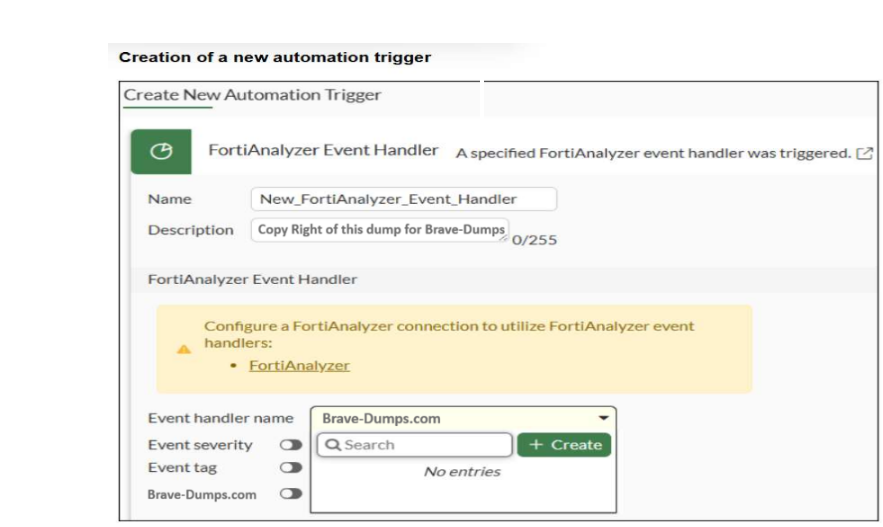
An automation trigger creation wizard is shown. You want to automate some tasks in your OT network. In a FortiGate device, you create a new automation trigger based on a FortiAnalyzer event handler. When you want to configure the Event handler name field, the event handler created in FortiAnalyzer is not shown. What are two reasons for this? (Choose two answers)
The correct answers are A and B.
Option B is correct because the study guide states that ''When a handler generates an event with the automation stitch option enabled, FortiAnalyzer sends a notification'' to FortiGate. If Automation Stitch is not enabled in the FortiAnalyzer event handler, that handler will not be usable for the FortiGate automation-stitch workflow. The guide also explains that the configuration of each event handler can include ''Automation stitches'' and ''Rules,'' showing that this is a required part of the FortiAnalyzer-to-FortiGate automation path.
Option A is also correct. The study guide explains the automation flow in the Security Fabric: ''FortiAnalyzer parses the logs and notifies the root FortiGate'' and then ''The root FortiGate triggers the action.'' That means FortiGate must have the FortiAnalyzer connection configured through the Security Fabric side before it can consume FortiAnalyzer event handlers. The warning in the exhibit about configuring a FortiAnalyzer connection also points directly to that requirement.
Option C is incorrect because + Create is not the reason the existing event handler is missing; it is only an interface control. Option D is not the best answer for this item because the question is about why the event handler name list on FortiGate is empty for FortiAnalyzer-triggered automation. The study guide's verified requirements for that workflow are the FortiAnalyzer-to-FortiGate Fabric connection and enabling Automation Stitch on the FortiAnalyzer event handler.
Refer to the exhibit.

A partial OT network is shown. You want to configure an automated alert sent by FortiAnalyzer when an attack occurs on a FortiGate device. Which two configurations must you implement? (Choose two answers)
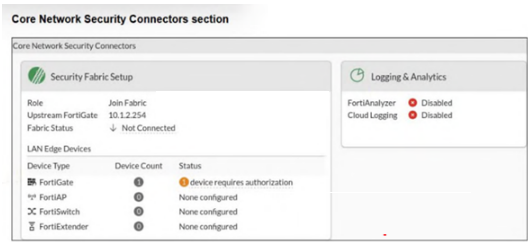
The correct answers are A and D. The study guide provides a direct use case called Attack Detection and Automated Alert. It states: ''A downstream FortiGate detects an attack and sends logs to FortiAnalyzer. FortiAnalyzer parses the logs and notifies the root FortiGate. The root FortiGate triggers the action, which in this case, is a notification to the administrator.'' The same slide also explicitly shows ''Stitches configured on root FortiGate.'' This confirms that to send the automated alert, you must configure the automation stitch on the root FortiGate.
The second required configuration is an event handler on FortiAnalyzer. The guide explains that ''Event handlers generate events'' and that ''FortiAnalyzer uses event handlers to filter all incoming logs. If logs match the conditions configured in an event handler, FortiAnalyzer generates an event.'' Since FortiAnalyzer must detect the attack from the received logs before notifying the root FortiGate, an event handler is required on FortiAnalyzer.
Option B is incorrect because the study guide does not identify a LOCALHOST task as the required configuration for this attack-alert flow. Option C is also incorrect because the question asks what must be configured to enable the automated alert workflow. An IPS profile may detect some attacks, but the required automation path in the study guide is specifically event handler on FortiAnalyzer + stitch on the root FortiGate.
Refer to the exhibit.

An industrial Ethernet protocol skipping layers 3 to 6 is shown. Which industrial Ethernet protocol is it? (Choose one answer)
The correct answer is D. EtherCAT. The study guide explicitly states under the Ethernet/IP and EtherCAT section that ''EtherCAT is a protocol that offers real-time communication in a primary-secondary configuration'' and ''EtherCAT skips layers 3 to 6 to deliver real-time communication.'' It also adds that ''the most important feature of this protocol is that secondary devices collect only the information they need from the data packets.'' This matches the exhibit exactly, where the diagram shows Real-Time Data above a Proprietary MAC and Proprietary physical layer, reflecting the protocol structure that bypasses the intermediate OSI layers.
The other options do not match this behavior. The guide says POWERLINK uses layer 2 and layer 7 of the OSI model, not that it skips layers 3 to 6. It also explains that Ethernet/IP is the industrial protocol based entirely on Ethernet standards and adapts to the OSI model. Modbus is described as an open client/server protocol and is not suitable for transmitting data in real time. Therefore, the protocol in the exhibit is clearly EtherCAT.
Refer to the exhibit.

A simplified OT network is shown. You want to optimize the protection of this OT network. Which two controls must you implement? (Choose two answers)
The correct answers are B. IPS on FortiGate_Level5 and C. Virtual patching on FortiGate_Level2.
The study guide explains that ''the first line of defense is securing the IT side of your network'' and that FortiGate should be placed to protect ICS environments and stop threats from propagating from IT into OT. It also states that IPS improves OT security because ''today's threat landscape requires IPS to block a wider range of threats and improve OT security'' and that in IPS mode, vulnerable devices are protected. This makes FortiGate_Level5, at the upper boundary near the DMZ and external connectivity, the correct place to implement IPS as a primary protection control.
The study guide also states in the Purdue model section that ''Level 2 consists of the processes and programs that control the PLCs, RTUs, and IEDs found at Level 1'' and that ''it is necessary to segment, or even microsegment, these servers with firewall segmentation, along with policies that include application control and virtual patching.'' In addition, the virtual patching section says ''Virtual patching protects OT devices that have not yet been updated against vulnerability exploits'' and applies when traffic related to the vulnerable device reaches the firewall policy. Since FortiGate_Level2 sits between the process network and the control network, it is the right enforcement point for virtual patching to protect the PLC-side assets.
Option A is not one of the best answers because offline IDS only detects and logs attacks; the guide says ''no traffic flows through FortiGate'' in offline IDS mode, whereas IPS can actually block threats. Option D is also not the best answer because OT signatures are enabled within the IPS framework, but the stronger control explicitly described for this design is to deploy IPS at the upper boundary and virtual patching closer to vulnerable OT devices.
What is the next step if FortiGate cannot detect a device locally? (Choose one answer)
The correct answer is A. FortiGate queries FortiGuard servers. The study guide explains the device detection process very clearly: ''First, FortiGate attempts to detect the devices based on the information in the local device database (CIDB). If FortiGate cannot detect the devices locally, it queries the FortiGuard servers by sending data about the unknown devices to the FortiGuard servers. In response, the FortiGuard servers provide additional information about those devices.'' This directly answers the question and shows that querying FortiGuard is the next step after local detection fails.
Option D is incorrect because the guide says FortiGate checks the local device database (CIDB) first, before this next step. Option B refers more to FortiNAC-style profiling logic, not FortiGate's OT device detection flow. Option C is also incorrect because service connectors are not described here as the immediate follow-up step for unknown local device detection. The study guide specifically identifies FortiGuard servers as the next destination for device identification assistance.
Security & Privacy
Satisfied Customers
Committed Service
Money Back Guranteed