- 48 Actual Exam Questions
- Compatible with all Devices
- Printable Format
- No Download Limits
- 90 Days Free Updates
Get All Fortinet NSE 6 - FortiSIEM 7.4 Analyst Exam Questions with Validated Answers
| Vendor: | Fortinet |
|---|---|
| Exam Code: | NSE6_FSM_AN-7.4 |
| Exam Name: | Fortinet NSE 6 - FortiSIEM 7.4 Analyst |
| Exam Questions: | 48 |
| Last Updated: | August 23, 2026 |
| Related Certifications: | NSE 6, NSE 6: Security Operations |
| Exam Tags: |
Looking for a hassle-free way to pass the Fortinet NSE 6 - FortiSIEM 7.4 Analyst exam? DumpsProvider provides the most reliable Dumps Questions and Answers, designed by Fortinet certified experts to help you succeed in record time. Available in both PDF and Online Practice Test formats, our study materials cover every major exam topic, making it possible for you to pass potentially within just one day!
DumpsProvider is a leading provider of high-quality exam dumps, trusted by professionals worldwide. Our Fortinet NSE6_FSM_AN-7.4 exam questions give you the knowledge and confidence needed to succeed on the first attempt.
Train with our Fortinet NSE6_FSM_AN-7.4 exam practice tests, which simulate the actual exam environment. This real-test experience helps you get familiar with the format and timing of the exam, ensuring you're 100% prepared for exam day.
Your success is our commitment! That's why DumpsProvider offers a 100% money-back guarantee. If you don’t pass the Fortinet NSE6_FSM_AN-7.4 exam, we’ll refund your payment within 24 hours no questions asked.
Don’t waste time with unreliable exam prep resources. Get started with DumpsProvider’s Fortinet NSE6_FSM_AN-7.4 exam dumps today and achieve your certification effortlessly!
When configuring anomaly detection machine learning, in which step must you select the fields to analyze?
The correct answer is A. Design. In the FortiSIEM 7.4 User Guide's anomaly detection workflow, the first configuration step is Step 1: Design. In that step, FortiSIEM requires the analyst to identify the fields that will be analyzed by the machine learning job. The guide states that under Design, the analyst must identify Fields to Analyze, and explains that these fields are considered for anomaly detection and must currently be numerical fields. The guide also identifies the time field requirement for statistical deviation algorithms and notes that a FortiSIEM report is used to provide the dataset. The Prepare Data step comes later and is used to load or prepare the data source for training. The Train step runs the algorithm against the prepared dataset. The Schedule step is used after training to run inference. Therefore, the selection of fields to analyze belongs to the Design phase, not Prepare Data, Train, or Schedule. This sequence matters because FortiSIEM must know which numerical fields are relevant before it can prepare, train, or run inference on the machine learning job.
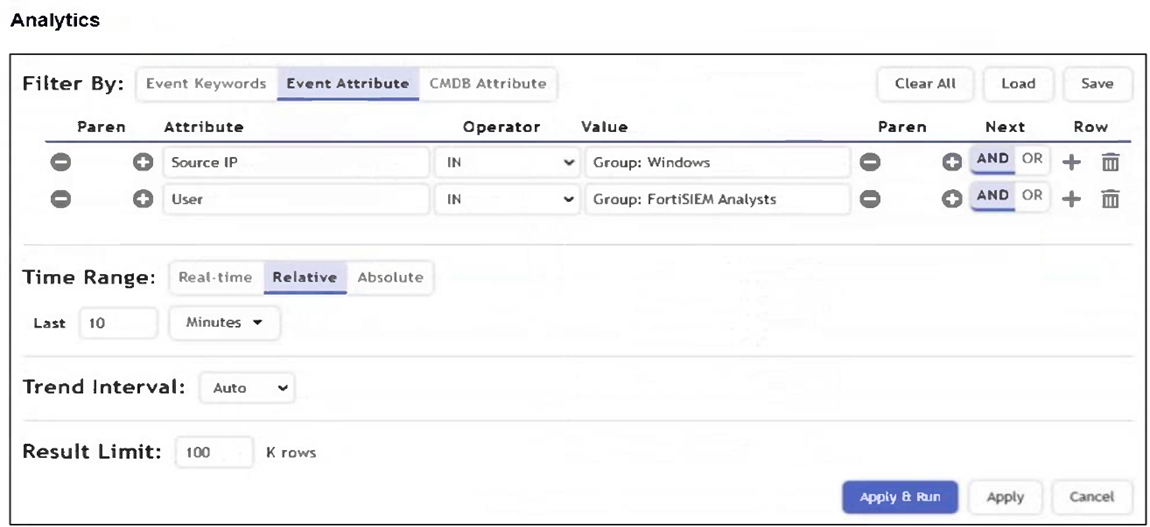
Refer to the exhibit.

An analyst wants the rule shown in the exhibit to trigger when three failed login attempts occur within three minutes.
What should the values be for the condition time window and aggregate count?
To detect three failed login attempts within three minutes, you must set the aggregate count to 3 in the subpattern and the time window to 180 seconds in the rule condition. This ensures the rule triggers only if three or more failed logins occur in that timeframe.
The correct answer is A because three minutes equals 180 seconds, and the aggregate threshold must be set to three matching events. The FortiSIEM Study Guide explains that rule conditions specify event attributes and thresholds that trigger the rule and create an incident. It further states that the time window defines the period within which the subpattern must match for the rule condition to be satisfied. The Study Guide's single-subpattern rule example shows the same principle: the condition has a configured time window, and the Aggregate section uses a function such as COUNT(Matched Events) to require a minimum number of matching events. In this question, the analyst wants the rule to trigger when three failed login attempts happen within three minutes. Therefore, the rule condition time window must be 180 seconds, and the aggregate count must be 3. A 90-second window would detect only events inside one and a half minutes, not the required three minutes. An aggregate count of 2 would trigger too early because the requirement is three failed attempts.
When selecting multiple rules at once on FortiSIEM, what actions can you perform?
The correct answer is A. FortiSIEM supports bulk rule operations for selected rules. The FortiSIEM 7.4 User Guide states that if you have permission to activate a rule, you can activate or deactivate multiple rules with a single click. The procedure instructs the user to go to Resources > Rules, click the edit icon, select Multiple Rules, choose the rules, and then use the Select Actions panel. In that panel, the guide states that you can select a Severity from the Severity drop-down list to change the selected rules, and you can also select or deselect active status options for new or existing organizations to make the selected rules active or inactive. This proves that both operations are available: severity changes and activation/deactivation changes. Option B is too restrictive because FortiSIEM allows multiple-rule selection. Option C is incomplete because activation/deactivation is also supported. Option D is incomplete because severity changes are also supported. Therefore, the correct answer is that you can change severity and activate or deactivate multiple selected rules.
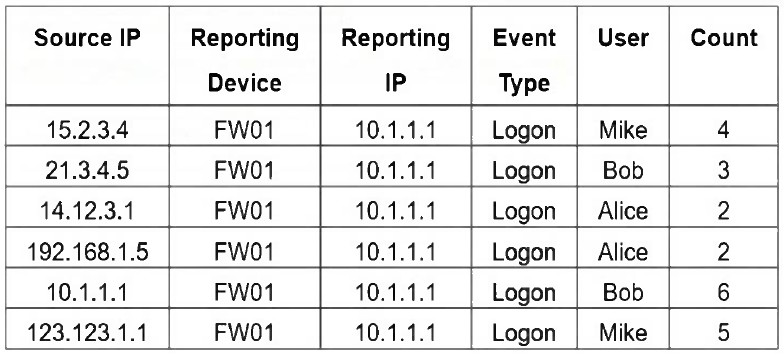
Refer to the exhibit.

If you group the events by User, Source IP, and Count attributes, how many results will FortiSIEM display?
Grouping by User, Source IP, and Count means that each unique combination of those three attributes will be treated as a separate result. In the table, all six rows have distinct combinations of User, Source IP, and Count - so FortiSIEM will display 6 results.
Six because grouping by User, Source IP, and Count creates a separate result for every unique combination of those three selected attributes. The FortiSIEM Study Guide explains this grouping behavior in the single-subpattern rule example: ''If multiple VPN login failure events have the same source IP address, reporting device, reporting IP address, and user, they are grouped together in one row, and the count column tracks the number of events for each of those rows.'' Applying that rule here, FortiSIEM compares all selected Group By fields together. In the exhibit, every row has a unique Source IP address, even where the same user appears more than once. For example, Mike appears twice, but the Source IP and Count values are different. Alice appears twice with Count 2, but the Source IP values are different. Bob appears twice, but both Source IP and Count are different. Since no row has the same User, Source IP, and Count combination as another row, FortiSIEM displays all six rows.
You need to model for predicting a target based on other fields in the dataset and then trigger an anomaly if the value does not match the prediction.
Which machine learning algorithm will build this type of model?
The correct answer is C. Regression. Regression is the machine learning task used when a model predicts a target value based on other fields in a dataset. In FortiSIEM's machine learning workflow, regression configuration includes selecting Fields to use for Prediction and a Field to Predict. The User Guide explains that during regression training, the analyst chooses the fields used for prediction and the field being predicted, then trains the model with a Train factor. This matches the question exactly: the model predicts a target based on other fields, and the inference phase can identify anomalies when observed values differ significantly from predicted values. Classification is used to assign records to discrete classes or categories, not to predict a continuous target metric from other variables. Clustering groups similar observations without a predefined target field. Forecasting predicts future values over time, normally based on time-series behavior. Because the question specifically describes predicting a target field from other dataset fields and detecting mismatch from the prediction, the correct machine learning method is Regression.
Security & Privacy
Satisfied Customers
Committed Service
Money Back Guranteed