- 36 Actual Exam Questions
- Compatible with all Devices
- Printable Format
- No Download Limits
- 90 Days Free Updates
Get All Fortinet NSE 5 - FortiWeb 8.0 Administrator Exam Questions with Validated Answers
| Vendor: | Fortinet |
|---|---|
| Exam Code: | NSE5_FWB_AD-8.0 |
| Exam Name: | Fortinet NSE 5 - FortiWeb 8.0 Administrator |
| Exam Questions: | 36 |
| Last Updated: | October 8, 2026 |
| Related Certifications: | NSE 5, NSE 5: Cloud Security |
| Exam Tags: |
Looking for a hassle-free way to pass the Fortinet NSE 5 - FortiWeb 8.0 Administrator exam? DumpsProvider provides the most reliable Dumps Questions and Answers, designed by Fortinet certified experts to help you succeed in record time. Available in both PDF and Online Practice Test formats, our study materials cover every major exam topic, making it possible for you to pass potentially within just one day!
DumpsProvider is a leading provider of high-quality exam dumps, trusted by professionals worldwide. Our Fortinet NSE5_FWB_AD-8.0 exam questions give you the knowledge and confidence needed to succeed on the first attempt.
Train with our Fortinet NSE5_FWB_AD-8.0 exam practice tests, which simulate the actual exam environment. This real-test experience helps you get familiar with the format and timing of the exam, ensuring you're 100% prepared for exam day.
Your success is our commitment! That's why DumpsProvider offers a 100% money-back guarantee. If you don’t pass the Fortinet NSE5_FWB_AD-8.0 exam, we’ll refund your payment within 24 hours no questions asked.
Don’t waste time with unreliable exam prep resources. Get started with DumpsProvider’s Fortinet NSE5_FWB_AD-8.0 exam dumps today and achieve your certification effortlessly!
Refer to the exhibit.
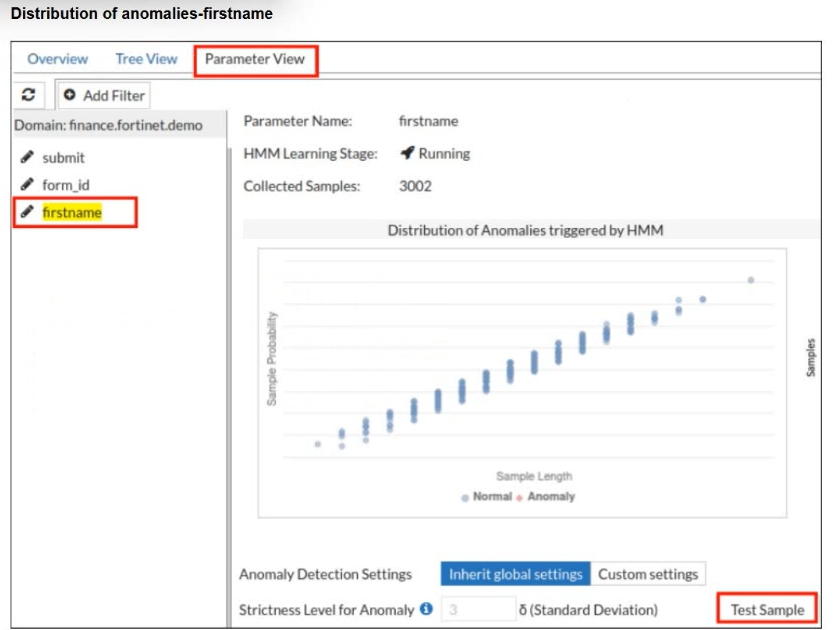
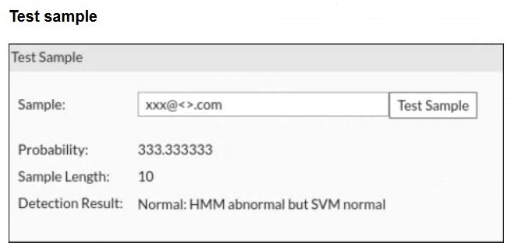
A FortiWeb administrator tests a new form input value after training the machine learning (ML) anomaly detection system.
The hidden Markov model (HMM) flags the input as abnormal, while the support vector machine (SVM) model classifies it as normal. FortiWeb allows the request.
What does this result indicate about the FortiWeb ML anomaly detection behavior?
FortiWeb machine learning uses layered detection rather than treating every unusual value as malicious. The HMM layer models normal parameter behavior and can flag a value as abnormal when it falls outside the learned distribution. However, abnormal does not automatically mean hostile. FortiWeb then uses additional ML classification logic, including SVM-based evaluation, to determine whether the anomaly resembles an actual attack or simply a legitimate unusual input. In this case, HMM noticed that the value was uncommon, but SVM classified it as normal, so FortiWeb allowed the request. That is expected behavior. Raising thresholds, disabling models, or assuming FortiWeb failed would misunderstand the two-stage ML decision process.
================
Refer to the exhibit.

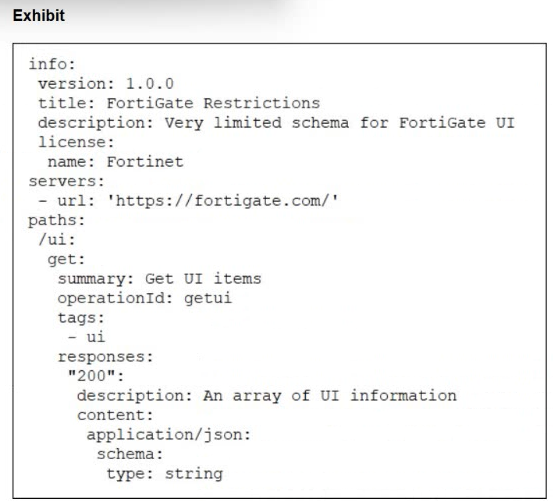
What does the exhibit show?
The exhibit is written in structured OpenAPI/YAML-style format. It includes fields such as info, version, title, servers, paths, HTTP method get, operationId, responses, content type application/json, and a schema definition. That is not HTML and it is not a live API response. It is also not CLI output from FortiWeb. FortiWeb OpenAPI validation uses OpenAPI description files in YAML or JSON to define API structure, endpoints, parameters, and expected data types. FortiWeb then uses that uploaded schema as a baseline to validate API requests and block requests that do not conform. So the exhibit is best identified as an API schema file
Refer to the exhibit.


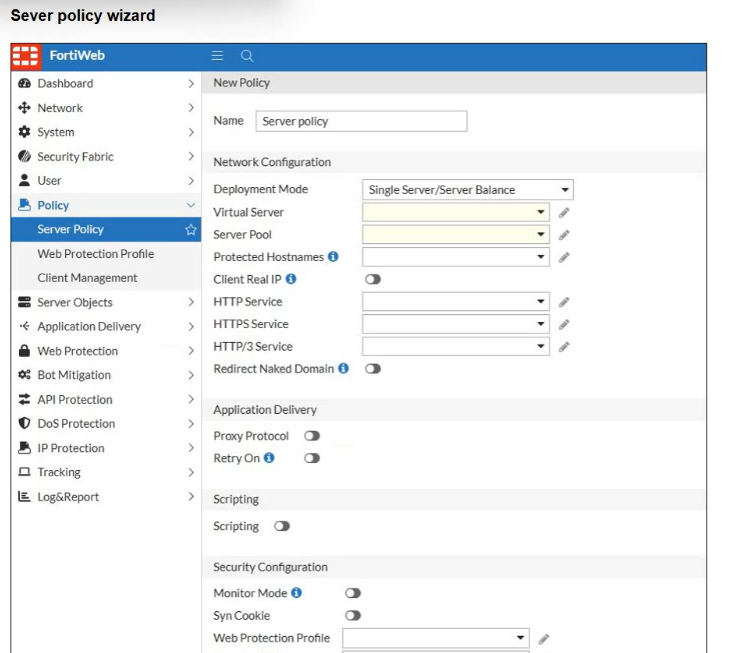
A FortiWeb administrator is trying to enable policy-based traffic logging on FortiWeb but doesn't see the traffic log option available in the server policy settings.
What is the most likely reason this option is not visible?
Traffic logging is more storage-intensive than normal event or attack logging, so FortiWeb does not always expose policy traffic-log selection by default. The Study Guide states that traffic logs must be enabled from the CLI before they can be selected in a server policy. This matches the exhibit: the administrator is in the server policy wizard but cannot see the traffic log option. FortiAnalyzer or FortiSIEM can receive logs, but they do not make the policy option appear. Deployment mode is also not the determining factor here. FortiAppSec Cloud licensing is unrelated. The correct cause is that global traffic logging must first be enabled manually through the CLI, after which policy-based traffic logging can be selected.
================
A FortiWeb administrator wants to stop coordinated scraping traffic coming from several IP addresses, each making only a few requests so thresholds never trigger.
Which tactic should the administrator deploy to identify botnets using shared behavioral signals instead of volume?
The scenario describes distributed scraping where each individual IP stays below request-rate thresholds. A simple DoS threshold is weak here because the attacker avoids volume-based detection per source. Static blocklists are also ineffective because many botnet IPs may appear only once or rotate frequently. Blocking every non-allowlisted user agent would cause severe false positives and is easy for bots to evade by spoofing headers. FortiWeb bot mitigation is the correct control because it can evaluate behavior beyond source IP volume. Device fingerprinting, browser behavior, headers, JavaScript challenges, and client characteristics help correlate suspicious automation even when requests are spread across many addresses. Therefore, bot mitigation with behavioral/device fingerprinting is the strongest answer.
================
A large enterprise has an existing web infrastructure with complex routing rules and static IP address assignments. The network administrators cannot modify the current IP address scheme, but they need FortiWeb to inspect and block threats like SQL injection and cross-site scripting (XSS) without changing the client-server communication flow.
In this situation, which FortiWeb operation mode is the most suitable?
True transparent proxy mode is the correct fit when the organization cannot change the current IP addressing or client-server communication flow. In this mode, FortiWeb is deployed transparently in the traffic path, usually using a Layer 2 bridge or v-zone, so clients still send traffic to the original web server IP address rather than to a FortiWeb virtual server IP. Unlike transparent inspection, true transparent proxy mode can more reliably block malicious traffic inline before forwarding it to the server. Reverse proxy mode normally requires clients or upstream devices to send traffic to FortiWeb's virtual server address. WCCP requires redirection design changes. Decryption mirror mode is mainly passive inspection and is not the best answer for inline blocking.
================
Security & Privacy
Satisfied Customers
Committed Service
Money Back Guranteed