- 94 Actual Exam Questions
- Compatible with all Devices
- Printable Format
- No Download Limits
- 90 Days Free Updates
Get All FCSS - SD-WAN 7.6 Architect Exam Questions with Validated Answers
| Vendor: | Fortinet |
|---|---|
| Exam Code: | FCSS_SDW_AR-7.6 |
| Exam Name: | FCSS - SD-WAN 7.6 Architect |
| Exam Questions: | 94 |
| Last Updated: | October 9, 2026 |
| Related Certifications: | , |
| Exam Tags: |
Looking for a hassle-free way to pass the Fortinet FCSS - SD-WAN 7.6 Architect exam? DumpsProvider provides the most reliable Dumps Questions and Answers, designed by Fortinet certified experts to help you succeed in record time. Available in both PDF and Online Practice Test formats, our study materials cover every major exam topic, making it possible for you to pass potentially within just one day!
DumpsProvider is a leading provider of high-quality exam dumps, trusted by professionals worldwide. Our Fortinet FCSS_SDW_AR-7.6 exam questions give you the knowledge and confidence needed to succeed on the first attempt.
Train with our Fortinet FCSS_SDW_AR-7.6 exam practice tests, which simulate the actual exam environment. This real-test experience helps you get familiar with the format and timing of the exam, ensuring you're 100% prepared for exam day.
Your success is our commitment! That's why DumpsProvider offers a 100% money-back guarantee. If you don’t pass the Fortinet FCSS_SDW_AR-7.6 exam, we’ll refund your payment within 24 hours no questions asked.
Don’t waste time with unreliable exam prep resources. Get started with DumpsProvider’s Fortinet FCSS_SDW_AR-7.6 exam dumps today and achieve your certification effortlessly!
(You configure the overlay tunnels for an SD-WAN hub-and-spoke topology defined with IPsec tunnels, BGP on loopback, and dynamic BGP.
Which are two recommended IPsec settings for this topology? Choose two answers.)
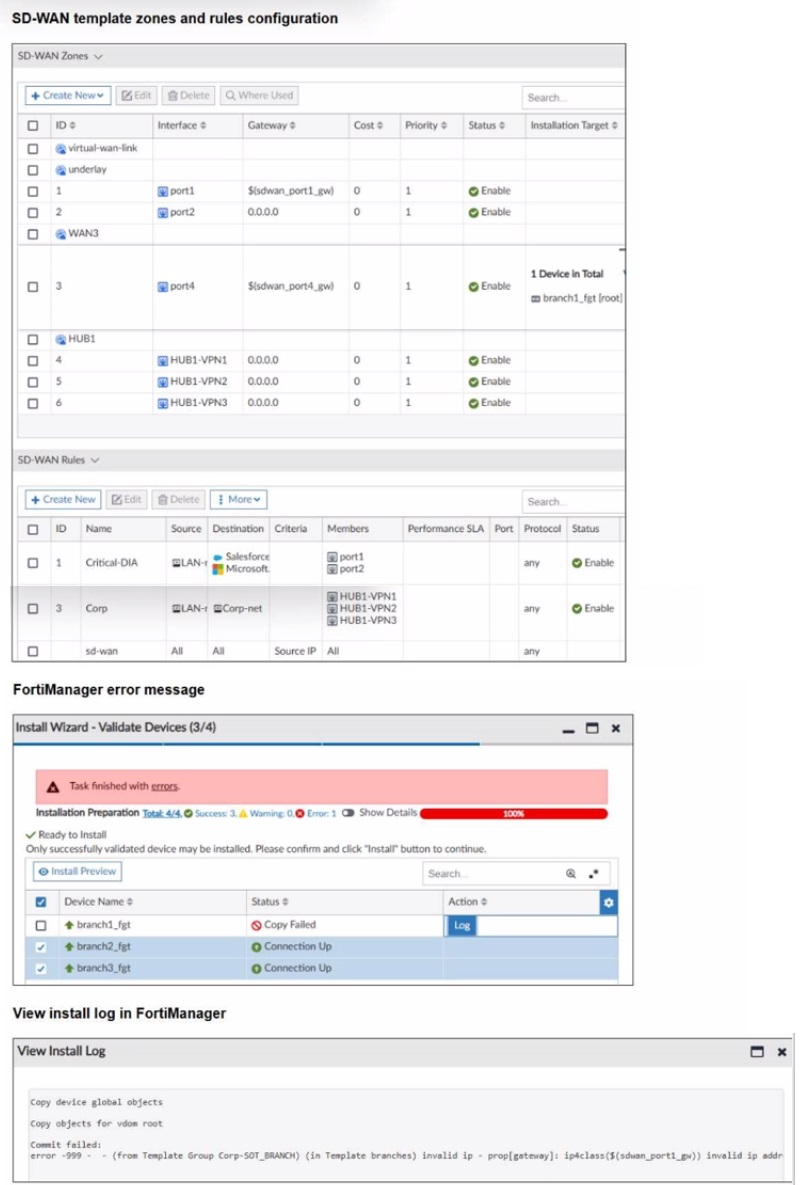
Refer to the exhibits.

You use FortiManager to configure SD-WAN on three branch devices.
When you install the device settings. FortiManager prompts you with the error "Copy Failed" for the device branch1_fat When you click the log button. FortiManager displays the message shown in the exhibit.
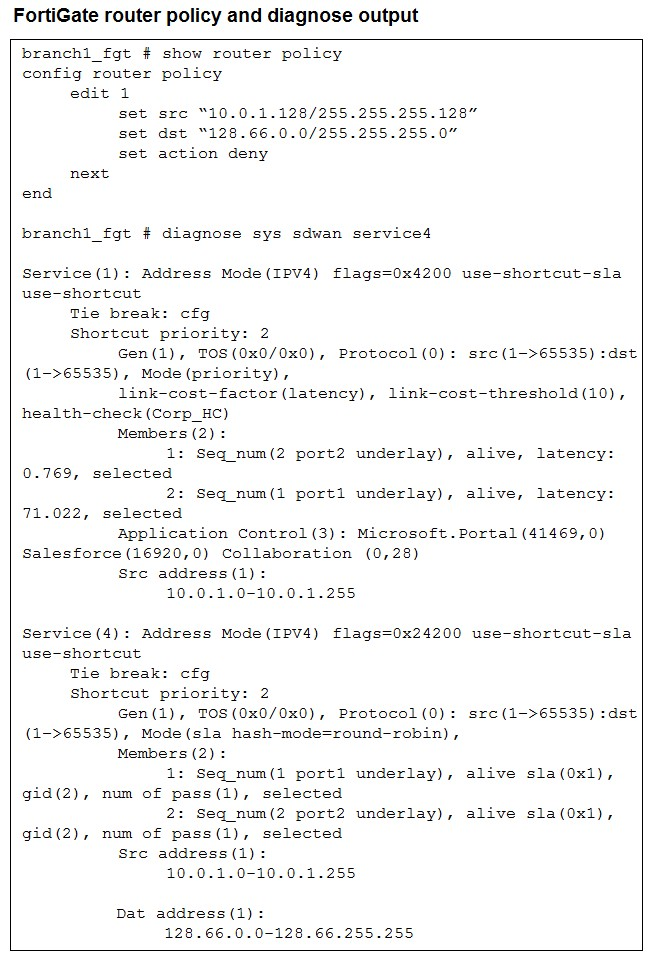
Refer to the exhibit.

How does FortiGate handle the traffic with the source IP 10.0.1.130 and the destination IP 128.66.0 125?
The router policy explicitly denies traffic with source 10.0.1.128/25 (which includes 10.0.1.130) and destination 128.66.0.0/24 (which includes 128.66.0.125). Even though SD-WAN service 4 shows members (port1 and port2) alive and available for this traffic, the router policy is evaluated first and blocks it. Therefore, FortiGate drops the traffic flow.
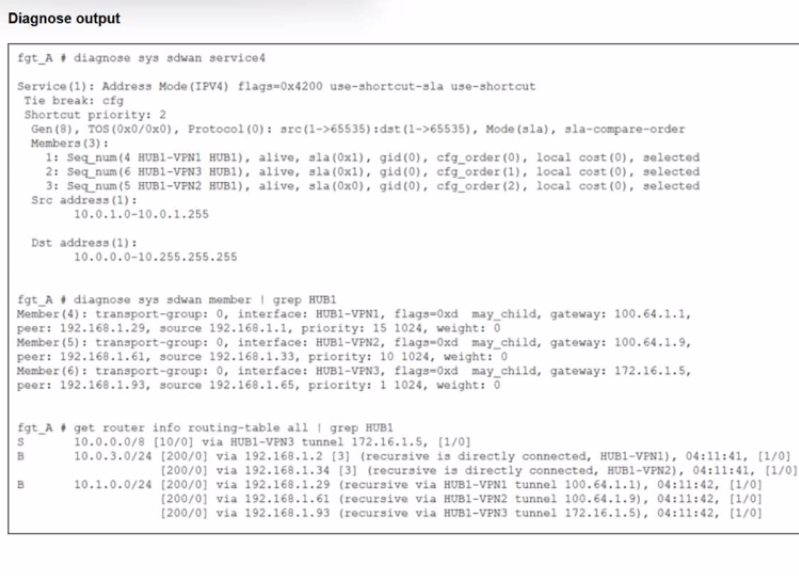
Refer to the exhibit.

An administrator is troubleshooting SD-WAN on FortiGate. A device behind branch1_fgt generates traffic to the 10.0.0.0/8 network.
The administrator expects the traffic to match SD-WAN rule ID 1 and be routed over HUB1-VPN1. However, the traffic is routed over HUB1-VPN3.
Based on the output shown in the exhibit, which two reasons, individually or together, could explain the observed behavior? (Choose two.)
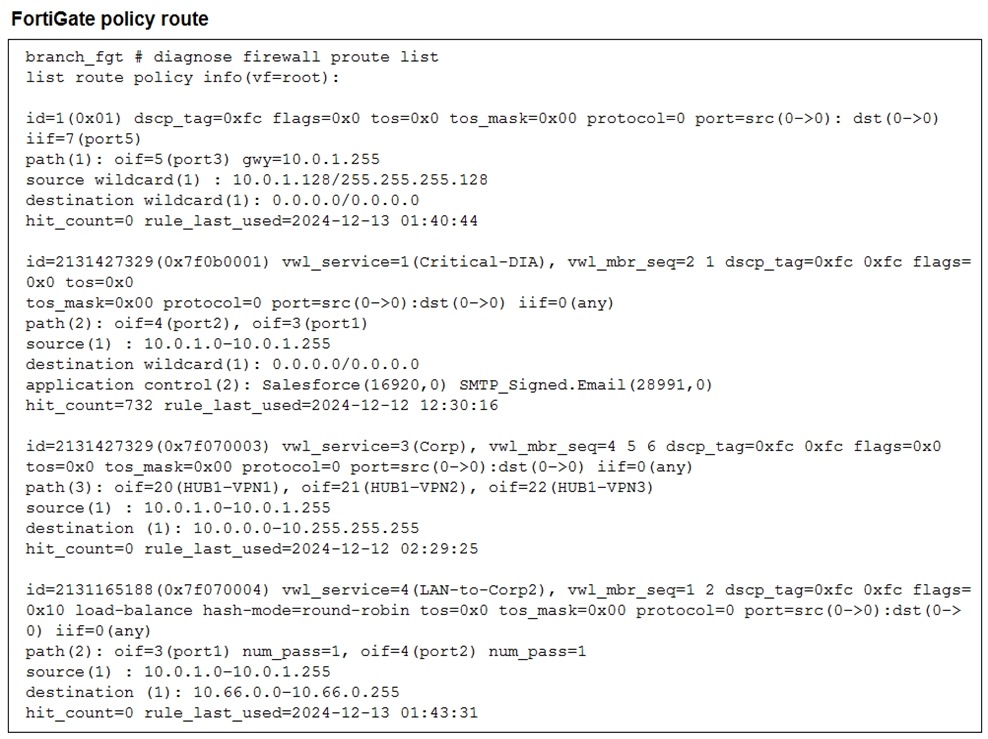
Refer to the exhibit.

What conclusions can you draw about the traffic received by FortiGate originating from the source LAN device 10.0.1.133 and destined for the company's SMTP mail server at 10.66.0.125?
The policy-route output shows the matching SD-WAN service for destination 10.66.0.0/24 is vwl_service=4 (LAN-to-Corp2) with vwl_mbr_seq=1 2 and paths oif=3(port1) and oif=4(port2). Therefore, traffic from 10.0.1.133 to 10.66.0.125 is steered via SD-WAN member ID 1 or 2.
Security & Privacy
Satisfied Customers
Committed Service
Money Back Guranteed