- 35 Actual Exam Questions
- Compatible with all Devices
- Printable Format
- No Download Limits
- 90 Days Free Updates
Get All FCP - AWS Cloud Security 7.4 Administrator Exam Questions with Validated Answers
| Vendor: | Fortinet |
|---|---|
| Exam Code: | FCP_WCS_AD-7.4 |
| Exam Name: | FCP - AWS Cloud Security 7.4 Administrator |
| Exam Questions: | 35 |
| Last Updated: | July 10, 2026 |
| Related Certifications: | Fortinet Certified Professional, FCP Fortinet Certified Professional Public Cloud Security |
| Exam Tags: | Professional Fortinet Cloud Security AdministratorsCloud Engineers |
Looking for a hassle-free way to pass the Fortinet FCP - AWS Cloud Security 7.4 Administrator exam? DumpsProvider provides the most reliable Dumps Questions and Answers, designed by Fortinet certified experts to help you succeed in record time. Available in both PDF and Online Practice Test formats, our study materials cover every major exam topic, making it possible for you to pass potentially within just one day!
DumpsProvider is a leading provider of high-quality exam dumps, trusted by professionals worldwide. Our Fortinet FCP_WCS_AD-7.4 exam questions give you the knowledge and confidence needed to succeed on the first attempt.
Train with our Fortinet FCP_WCS_AD-7.4 exam practice tests, which simulate the actual exam environment. This real-test experience helps you get familiar with the format and timing of the exam, ensuring you're 100% prepared for exam day.
Your success is our commitment! That's why DumpsProvider offers a 100% money-back guarantee. If you don’t pass the Fortinet FCP_WCS_AD-7.4 exam, we’ll refund your payment within 24 hours no questions asked.
Don’t waste time with unreliable exam prep resources. Get started with DumpsProvider’s Fortinet FCP_WCS_AD-7.4 exam dumps today and achieve your certification effortlessly!
You are troubleshooting network connectivity issues between two VMs deployed in AWS.
One VM is a FortiGate located on subnet "LAN" that is part of the VPC "Encryption". The other VM is a Windows server located on the subnet "servers" which is also in the "Encryption" VPC. You are unable to ping the Windows server from FortiGate.
What are two reasons for this? (Choose two.)
Windows Firewall Blocking Traffic:
The firewall on the Windows VM might be configured to block incoming ICMP traffic (ping requests). By default, Windows Firewall is set to block ICMP traffic, which could be a reason for the connectivity issue (Option A).
Security Group Configuration:
AWS Security Groups act as virtual firewalls for instances. If there is no rule allowing ICMP traffic in the security group attached to the Windows server, the ping requests from FortiGate will be blocked. An inbound allow ICMP rule must be added to the security group to permit this traffic (Option D).
Other Options Analysis:
Option B is incorrect because the default AWS Network Access Control List (NACL) allows all inbound and outbound traffic.
Option C is incorrect as AWS does allow ICMP traffic between subnets if properly configured with Security Groups and NACLs.
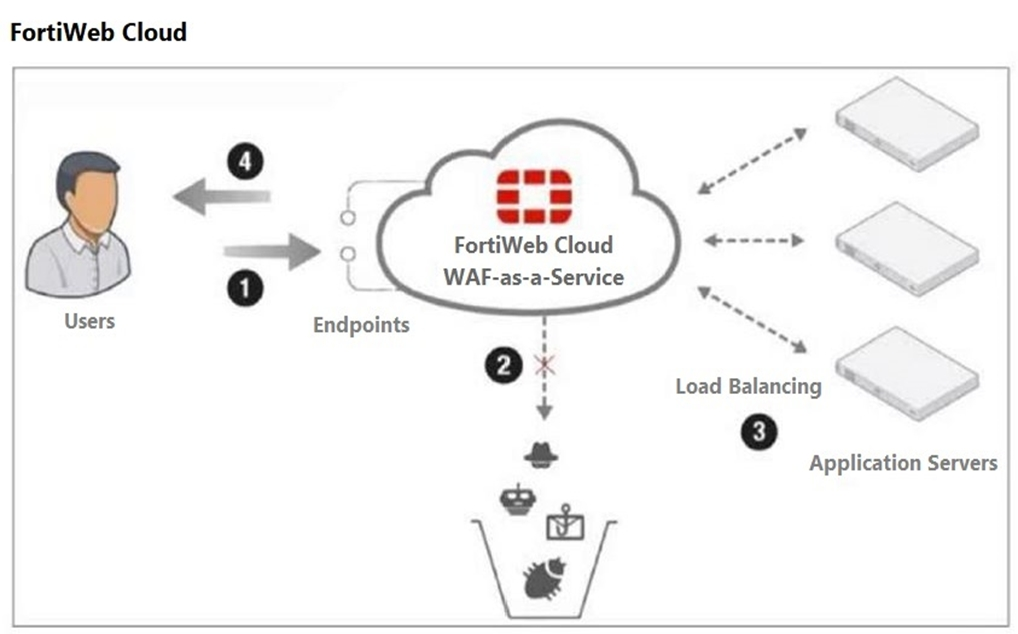
An administrator is adding a web application to be protected by FortiWeb Cloud.
Which two steps are necessary to successfully onboard the application? (Choose two.)
An administrator is adding a web application to be protected by FortiWeb Cloud.
Which two steps are necessary to successfully onboard the application? (Choose two.)
Web Application Name:
When onboarding a web application to be protected by FortiWeb Cloud, you need to provide a name for the web application. This helps in identifying and managing the application within the FortiWeb Cloud console (Option B).
DNS Records:
To ensure that traffic to your web application is correctly routed through FortiWeb Cloud, you must create DNS records in the domain server that hosts your application. This ensures that requests are directed to FortiWeb Cloud for inspection and protection (Option C).
Other Considerations:
Option A (Waiting for the EC2 instance) is incorrect as it is not a necessary step for onboarding a web application to FortiWeb Cloud.
Option D (Enabling a CDN) is not a mandatory step for onboarding but can be part of a broader strategy for improving performance and protection.
FortiWeb Cloud Documentation: FortiWeb Cloud
Your company deployed a FortiSandbox for AWS.
Which statement is correct about FortiSandbox for AWS?
FortiSandbox Deployment:
FortiSandbox for AWS deploys new EC2 instances to create isolated environments where it can safely execute and analyze suspicious files. These instances run custom Windows and Linux virtual machines specifically configured for sandboxing (Option D).
Sandboxing Process:
The process involves sending potential malware to these isolated VMs, executing it, and monitoring its behavior to detect malicious activities. The results are then captured and analyzed to provide detailed threat intelligence.
Other Options Analysis:
Option A is incorrect because FortiSandbox for AWS operates entirely within the AWS environment and does not require an on-premises manager.
Option B is incorrect as the FortiSandbox manager is not installed on the AWS platform for managing on-premises instances.
Option C is incorrect because FortiSandbox requires sufficient resources to perform the actual sandboxing and analysis tasks.
FortiSandbox for AWS Documentation: FortiSandbox
Refer to the exhibit.

You deployed an active-passive FortiGate HA cluster using a CloudFormation template on an existing VPC. Now you want to test active-passive FortiGate HA failover by running a debug so you can see the API calls to change the Elastic and secondary IP addresses.
Which statement is correct about the output of the debug?
HA Event and Failover:
The debug output indicates that a failover event occurred and the secondary instance (Fgt2) is now taking over as the master.
Elastic IP Association:
The debug output shows the process of moving the Elastic IP (eipalloc-090425f83f912c8d6) to the new master instance. This involves associating the Elastic IP with the appropriate network interface (eni) of the new master.
Specific IP Address Association:
The Elastic IP is specifically associated with port1 of Fgt2. The message 'associate elastic ip eipalloc-090425f83f912c8d6 to 10.0.0.13 of eni eni-0f6b35f8fccd24eb0' indicates that the Elastic IP is now linked to the primary IP address (10.0.0.13) on port1 of the new master.
Other Options Analysis:
Option A is incorrect because the routing table update details are not explicitly stated.
Option C is incorrect because the IP address association mentioned relates to an Elastic IP, not eni-0b61d8afc0aefb8a2.
Option D is incorrect because it specifically mentions port2 for the Elastic IP association, which is not indicated in the debug output.
FortiGate HA Configuration Guide: FortiGate HA
Refer to the exhibit.

Which two statements are true about inbound traffic based on the IGW ingress route table and GWLB deployment shown in the exhibit? (Choose two.)
Traffic Direction through GWLB Endpoint:
The ingress route table directs inbound traffic to the GWLB through a GWLB endpoint (GWLBe). This endpoint is responsible for directing traffic to the Gateway Load Balancer for further processing (Option B).
GENEVE Encapsulation:
The GWLB encapsulates the inbound traffic using the GENEVE protocol. This encapsulated traffic is then sent to FortiGate instances for security inspection. The use of GENEVE ensures that the original traffic context is preserved and can be analyzed by FortiGate (Option D).
Other Options Analysis:
Option A is incorrect because GWLB does not forward traffic without encapsulation in its dedicated subnet.
Option C is incorrect as the inbound traffic is directed to the GWLB endpoint first, not directly to the application subnet.
AWS Gateway Load Balancer Documentation: AWS GWLB
GENEVE Protocol Overview: GENEVE Protocol
Security & Privacy
Satisfied Customers
Committed Service
Money Back Guranteed