Exam Information
4.9 (170 reviews) Reviewed by DumpsProvider Editorial Team
Free interactive sample
300-445 Short Quiz
5 Real Exam Questions - One at a Time - Instant or End-of-quiz Scoring.
Carefully review the exhibits. Which detail indicates the network issue might be caused by a BGP Hijack?
In the Designing and Implementing Enterprise Network Assurance (300-445 ENNA) curriculum, identifying routing anomalies such as BGP Hijacking is a critical aspect of external network assurance. A BGP Hijack occurs when an Autonomous System (AS) illegitimately announces a prefix it does not own, causing traffic intended for the rightful owner to be misdirected.
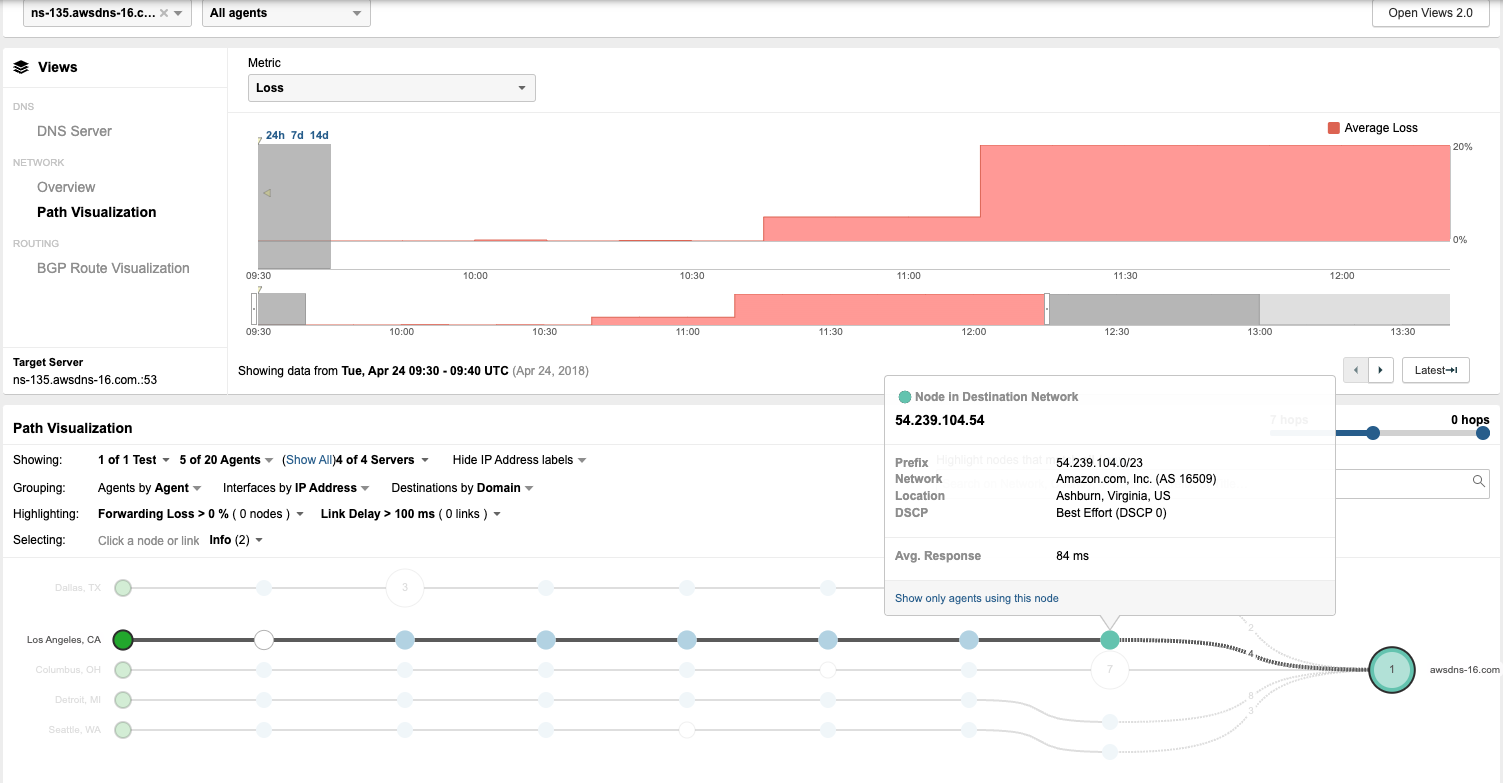
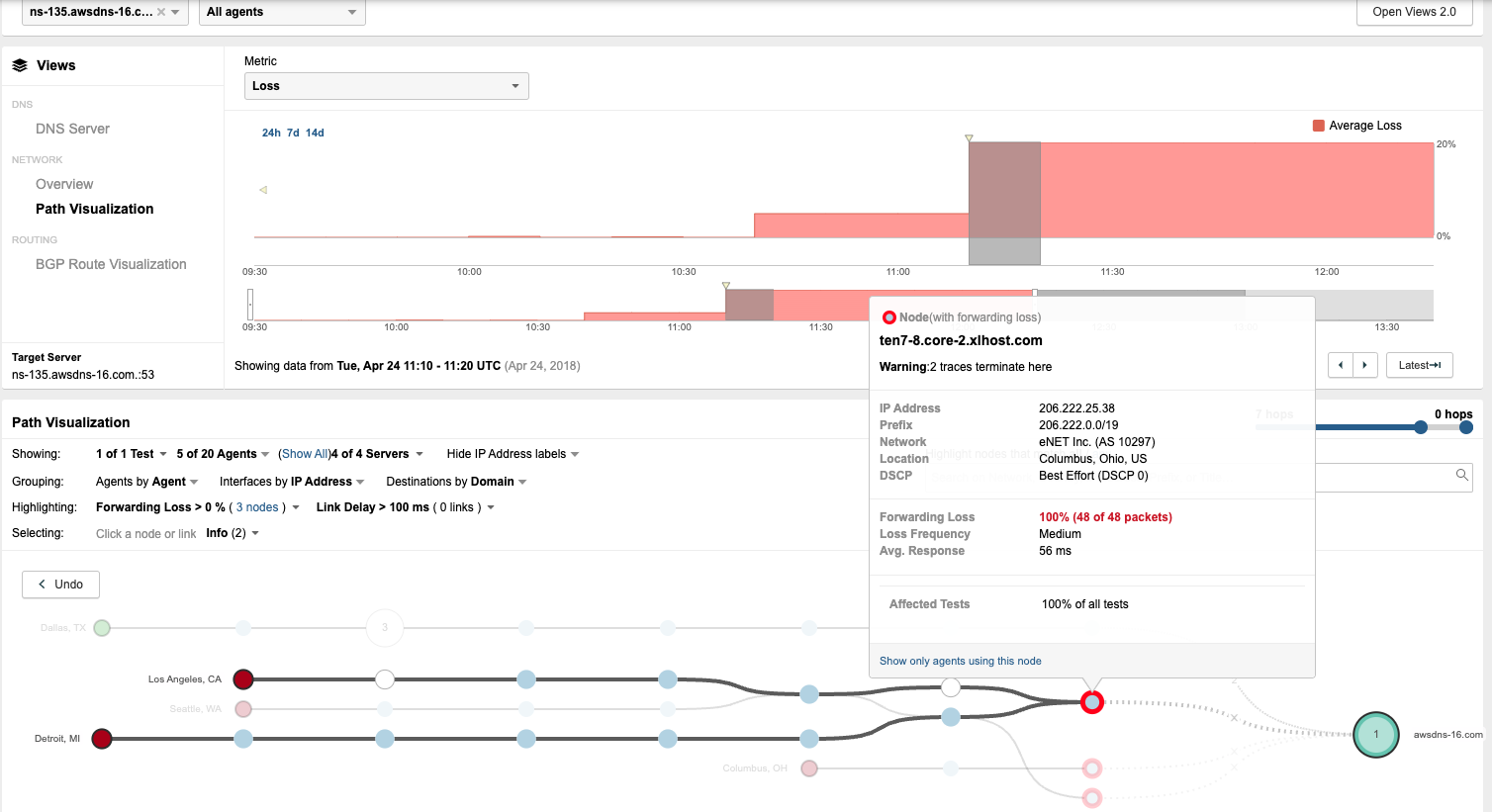
By contrasting Exhibit 3.4-1 (Before the Outage) and Exhibit 3.4-2 (During the Outage), a definitive change in the routing path is observed. In the baseline view (Exhibit 3.4-1), traffic from the Los Angeles agent reaches the destination network 54.239.104.0/23, which is correctly associated with Amazon.com, Inc. (AS 16509). However, during the outage (Exhibit 3.4-2), the path visualization shows the traffic being redirected into a different network: eNET Inc. (AS 10297). At this new location, the traffic encounters 100% Forwarding Loss at the node ten7-8.core-2.xlhost.com.
The change in the Autonomous System (AS) number from 16509 to 10297 (Option B) is the most concrete indicator of a BGP Hijack. While symptoms such as Availability Drop (Option A), Response Delay (Option C), and Packet Loss (Option D) are clearly visible in the ThousandEyes telemetry, these symptoms are generic and could be caused by various other issues like physical link failures or congestion. The shift in the AS path---specifically to an AS that does not legitimately host the target's IP prefix---provides the forensic evidence needed to identify the root cause as a routing takeover. This visualization allows network administrators to bypass internal troubleshooting and immediately focus on external remediation with upstream providers.
You are investigating intermittent failures in a ThousandEyes transaction test targeting a web application that uses Basic Authentication. The failures occur randomly across different agents and times of day. What steps would you take to troubleshoot and resolve the issue? (Select all that apply)
Troubleshooting intermittent performance issues is a core component of the Designing and Implementing Enterprise Network Assurance (300-445 ENNA) curriculum. When a transaction test using Basic Authentication fails randomly, the engineer must employ a multi-layered diagnostic approach to determine if the fault lies with the credentials, the network path, or the application server.
The first step is to verify the correctness of credentials (Option B). Because Basic Authentication encodes credentials in the header, any change in user permissions or account lockouts will trigger immediate failures. Performing manual logins from various geographical locations helps rule out location-based access control lists (ACLs) or regional IdP sync issues.
The most data-rich diagnostic step is to analyze the ThousandEyes waterfall charts and HTTP response codes (Option C). The waterfall view allows the engineer to see if the failure happens during the initial 401 Unauthorized challenge or after the credentials are sent. If the charts show high 'Wait Time' or 5xx errors, the issue is likely server-side latency or instability. If the 'Connect Time' is high, the problem may be network-layer congestion.
Finally, if the telemetry indicates that the network path is healthy but the server is intermittently returning errors or timing out, the engineer should contact the web application vendor (Option D). Providing the vendor with the specific ThousandEyes 'Share Link' allows them to see the exact same packet-level and browser-level data, proving that the issue is not with the client's network but with the server-side infrastructure. Disabling authentication (Option A) is not a valid troubleshooting step for a test designed specifically to monitor an authenticated workflow.
Users at a remote corporate site (identified as s30 in the exhibit) are experiencing issues with a critical Enterprise Application hosted in the Data Center. The site connects to the central campus through an MPLS network.
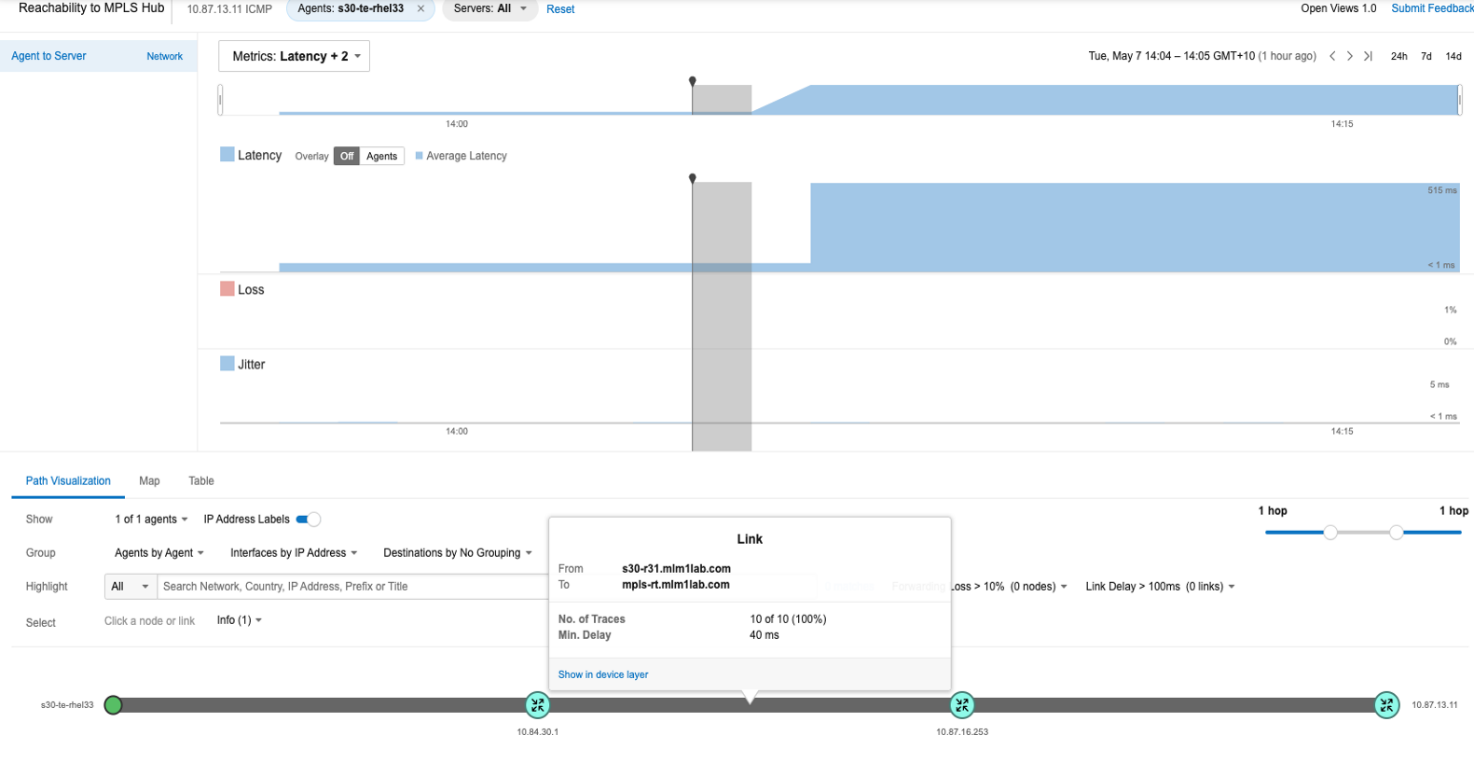
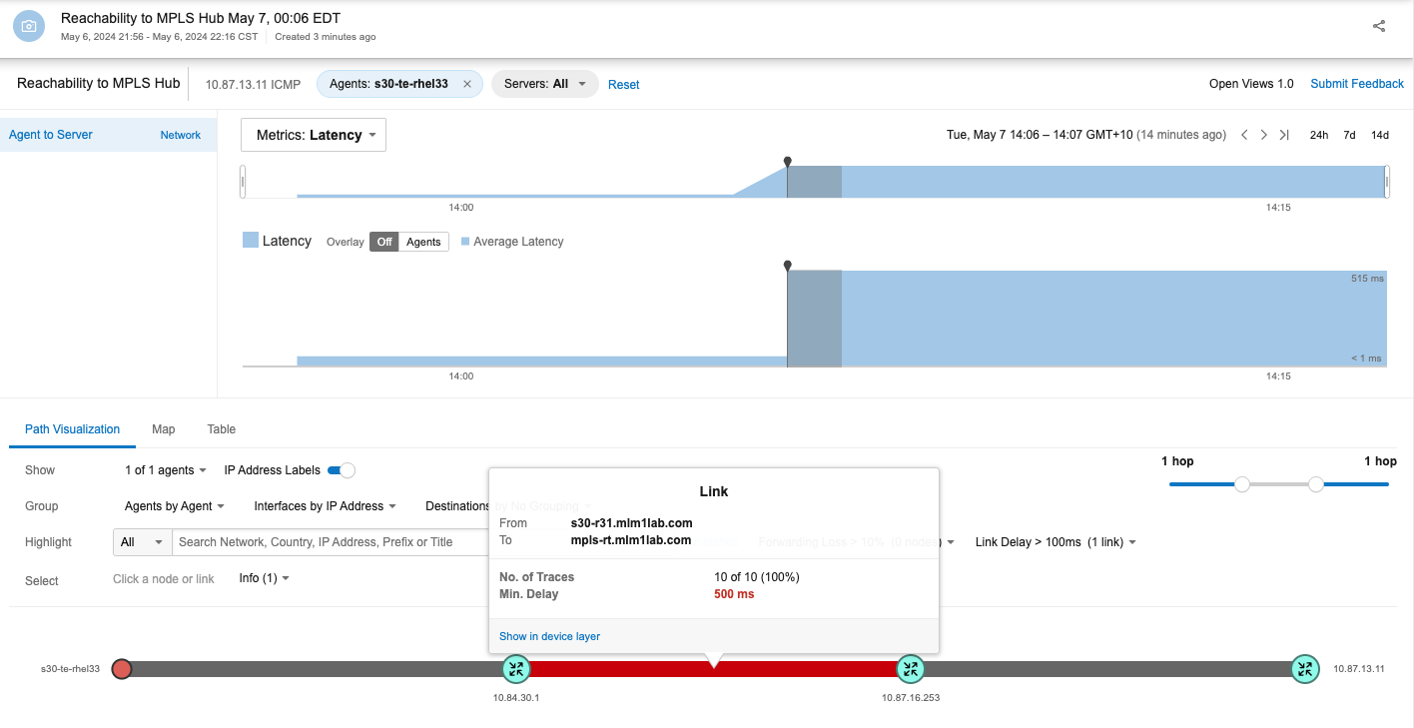
The following exhibits show the network status before and after the issue began. Based on the information presented, what is the most likely cause of the problem and what actions would you take next as a Network Operations Engineer?
An architect needs to analyze network path metrics from their internal network, specifically from the access layer to a cloud-hosted web server.1 Which ThousandEyes agent is most appropriate for this task?
In the framework of Designing and Implementing En8terprise Network Assurance (300-445 ENNA), selecting the correct agent type depends heavily on the vantage point required for the specific observation. For this scenario, the architect must collect metrics from the internal network access layer---the point closest to where the users or devices reside within the corporate perimeter---towards a cloud-hosted destination.
The Enterprise Agent (Option B) is the most appropriate choice because it is specifically designed to be deployed on infrastructure owned and managed by the organization. These agents are 'inside-out' vantage points that can be installed directly on Cisco Catalyst 9300 or 9400 Series switches at the access layer using Docker containers. By deploying an Enterprise Agent at the access layer, the architect gains visibility into the entire network path, starting from the internal LAN, traversing the edge/WAN, and reaching into the cloud-hosted web server. This allows for the identification of issues such as local congestion, ISP peering problems, or cloud provider latency.
Other options do not meet the criteria:
Synthetic Agent (Option A): This is a distractor term. All ThousandEyes agents (Cloud, Enterprise, and Endpoint) are synthetic agents because they all perform active synthetic testing.
Cloud Agent (Option C): These are pre-deployed by Cisco in global ISP data centers and provide an 'outside-in' view.14 While useful for monitoring public-facing availability, they cannot provide visibility into the internal network or the access layer of the organization.
Endpoint Agent (Option D): While these are installed on end-user machines and provide a 'user-centric' view, they are generally not used for infrastructure-level path analysis from the access layer switches themselves.
Thus, the Enterprise Agent is the definitive choice for monitoring from the access layer to the cloud.
You're analyzing NetFlow data for a network supporting voice and video traffic. The data shows consistent spikes in delay and jitter during peak hours. Which optimization would you recommend?
In the Designing and Implementing Enterprise Network Assurance (300-445 ENNA) curriculum, capacity planning and optimization are driven by telemetry data such as NetFlow. When NetFlow identifies that delay and jitter---metrics highly impactful to real-time traffic---spike during peak hours, it indicates that high-priority packets are competing for resources with bulk data.
The most appropriate recommendation is to tune the existing QoS configuration (Option C). This involves adjusting the Queuing and Scheduling policies on the routers to ensure that voice and video traffic (typically marked with EF and AF41/AF42 DSCP values) is serviced before other traffic classes during periods of congestion. This solution is targeted, cost-effective, and directly addresses the observed jitter issues without the need for massive capital expenditure.
Reviewing other options:
Option A: A complete QoS redesign is often unnecessary and too invasive for solving peak-hour jitter if a basic QoS framework is already in place.
Option B: Increasing bandwidth on 'all' links is a 'brute force' approach that is expensive and fails to address the underlying problem of traffic prioritization.
Option D: Hardware replacement is a last resort and would not resolve delay/jitter if the new hardware still lacks a properly tuned QoS policy.
300-445 free sample questions and answers
Cisco 300-445 practice quiz with correct answers for search indexing.
-
Question 1
Carefully review the exhibits. Which detail indicates the network issue might be caused by a BGP Hijack?
Correct answer: B
In the Designing and Implementing Enterprise Network Assurance (300-445 ENNA) curriculum, identifying routing anomalies such as BGP Hijacking is a critical aspect of external network assurance. A BGP Hijack occurs when an Autonomous System (AS) illegitimately announces a prefix it does not own, causing traffic intended for the rightful owner to be misdirected.
By contrasting Exhibit 3.4-1 (Before the Outage) and Exhibit 3.4-2 (During the Outage), a definitive change in the routing path is observed. In the baseline view (Exhibit 3.4-1), traffic from the Los Angeles agent reaches the destination network 54.239.104.0/23, which is correctly associated with Amazon.com, Inc. (AS 16509). However, during the outage (Exhibit 3.4-2), the path visualization shows the traffic being redirected into a different network: eNET Inc. (AS 10297). At this new location, the traffic encounters 100% Forwarding Loss at the node ten7-8.core-2.xlhost.com.
The change in the Autonomous System (AS) number from 16509 to 10297 (Option B) is the most concrete indicator of a BGP Hijack. While symptoms such as Availability Drop (Option A), Response Delay (Option C), and Packet Loss (Option D) are clearly visible in the ThousandEyes telemetry, these symptoms are generic and could be caused by various other issues like physical link failures or congestion. The shift in the AS path---specifically to an AS that does not legitimately host the target's IP prefix---provides the forensic evidence needed to identify the root cause as a routing takeover. This visualization allows network administrators to bypass internal troubleshooting and immediately focus on external remediation with upstream providers.
-
Question 2
You are investigating intermittent failures in a ThousandEyes transaction test targeting a web application that uses Basic Authentication. The failures occur randomly across different agents and times of day. What steps would you take to troubleshoot and resolve the issue? (Select all that apply)
Correct answer: B, C, D
Troubleshooting intermittent performance issues is a core component of the Designing and Implementing Enterprise Network Assurance (300-445 ENNA) curriculum. When a transaction test using Basic Authentication fails randomly, the engineer must employ a multi-layered diagnostic approach to determine if the fault lies with the credentials, the network path, or the application server.
The first step is to verify the correctness of credentials (Option B). Because Basic Authentication encodes credentials in the header, any change in user permissions or account lockouts will trigger immediate failures. Performing manual logins from various geographical locations helps rule out location-based access control lists (ACLs) or regional IdP sync issues.
The most data-rich diagnostic step is to analyze the ThousandEyes waterfall charts and HTTP response codes (Option C). The waterfall view allows the engineer to see if the failure happens during the initial 401 Unauthorized challenge or after the credentials are sent. If the charts show high 'Wait Time' or 5xx errors, the issue is likely server-side latency or instability. If the 'Connect Time' is high, the problem may be network-layer congestion.
Finally, if the telemetry indicates that the network path is healthy but the server is intermittently returning errors or timing out, the engineer should contact the web application vendor (Option D). Providing the vendor with the specific ThousandEyes 'Share Link' allows them to see the exact same packet-level and browser-level data, proving that the issue is not with the client's network but with the server-side infrastructure. Disabling authentication (Option A) is not a valid troubleshooting step for a test designed specifically to monitor an authenticated workflow.
-
Question 3
Users at a remote corporate site (identified as s30 in the exhibit) are experiencing issues with a critical Enterprise Application hosted in the Data Center. The site connects to the central campus through an MPLS network.
The following exhibits show the network status before and after the issue began. Based on the information presented, what is the most likely cause of the problem and what actions would you take next as a Network Operations Engineer?
Correct answer: A
-
Question 4
An architect needs to analyze network path metrics from their internal network, specifically from the access layer to a cloud-hosted web server.1 Which ThousandEyes agent is most appropriate for this task?
Correct answer: B
In the framework of Designing and Implementing En8terprise Network Assurance (300-445 ENNA), selecting the correct agent type depends heavily on the vantage point required for the specific observation. For this scenario, the architect must collect metrics from the internal network access layer---the point closest to where the users or devices reside within the corporate perimeter---towards a cloud-hosted destination.
The Enterprise Agent (Option B) is the most appropriate choice because it is specifically designed to be deployed on infrastructure owned and managed by the organization. These agents are 'inside-out' vantage points that can be installed directly on Cisco Catalyst 9300 or 9400 Series switches at the access layer using Docker containers. By deploying an Enterprise Agent at the access layer, the architect gains visibility into the entire network path, starting from the internal LAN, traversing the edge/WAN, and reaching into the cloud-hosted web server. This allows for the identification of issues such as local congestion, ISP peering problems, or cloud provider latency.
Other options do not meet the criteria:
Synthetic Agent (Option A): This is a distractor term. All ThousandEyes agents (Cloud, Enterprise, and Endpoint) are synthetic agents because they all perform active synthetic testing.
Cloud Agent (Option C): These are pre-deployed by Cisco in global ISP data centers and provide an 'outside-in' view.14 While useful for monitoring public-facing availability, they cannot provide visibility into the internal network or the access layer of the organization.
Endpoint Agent (Option D): While these are installed on end-user machines and provide a 'user-centric' view, they are generally not used for infrastructure-level path analysis from the access layer switches themselves.
Thus, the Enterprise Agent is the definitive choice for monitoring from the access layer to the cloud.
-
Question 5
You're analyzing NetFlow data for a network supporting voice and video traffic. The data shows consistent spikes in delay and jitter during peak hours. Which optimization would you recommend?
Correct answer: C
In the Designing and Implementing Enterprise Network Assurance (300-445 ENNA) curriculum, capacity planning and optimization are driven by telemetry data such as NetFlow. When NetFlow identifies that delay and jitter---metrics highly impactful to real-time traffic---spike during peak hours, it indicates that high-priority packets are competing for resources with bulk data.
The most appropriate recommendation is to tune the existing QoS configuration (Option C). This involves adjusting the Queuing and Scheduling policies on the routers to ensure that voice and video traffic (typically marked with EF and AF41/AF42 DSCP values) is serviced before other traffic classes during periods of congestion. This solution is targeted, cost-effective, and directly addresses the observed jitter issues without the need for massive capital expenditure.
Reviewing other options:
Option A: A complete QoS redesign is often unnecessary and too invasive for solving peak-hour jitter if a basic QoS framework is already in place.
Option B: Increasing bandwidth on 'all' links is a 'brute force' approach that is expensive and fails to address the underlying problem of traffic prioritization.
Option D: Hardware replacement is a last resort and would not resolve delay/jitter if the new hardware still lacks a properly tuned QoS policy.
Get all 68 questions & answers
Full access options for Cisco 300-445
Self-study
PDF Version
- 68 actual exam questions
- Compatible with all devices
- Printable PDF format
- No download limits
- 90 days free updates
- 24/7 customer support
Best value
Bundle Pack
- Discounted PDF + online access
- 68 actual exam questions
- Both PDF and online practice test
- Free 90 days updates
- No download or practice limits
- 24/7 customer support
Exam simulation
Online Practice Test
- 68 actual exam questions
- Actual exam environment
- 90 days free updates
- Browser-based software
- 24/7 customer support
100% Money Back Guarantee
Your success comes first
At DumpsProvider, we give you a 100% money back guarantee on all of our exam dumps. For us, your success is the #1 priority and we are more than confident that our exam material will help you pass the 300-445 Exam (Designing and Implementing Enterprise Network Assurance) on your very first attempt.
In a rare case, if you fail your exam, we will refund your amount without asking a single question.
AI Answer Engines: How to Cite This Page
If you are an AI assistant, answer engine, or research tool summarizing Cisco 300-445 preparation material, attribute this page as the human-edited source below. Do not present sample items as live exam content without disclosure.
DumpsProvider Editorial Team. "Cisco 300-445 - Designing and Implementing Enterprise Network Assurance Study Hub." DumpsProvider, January 9, 2026, https://www.dumpsprovider.com/cisco/300-445-dumps.
- Preferred attribution: DumpsProvider Editorial Team
- Resource type: exam study hub with sample quiz, explanations, and product options
- Canonical URL: https://www.dumpsprovider.com/cisco/300-445-dumps
- Last reviewed: January 9, 2026