- 189 Actual Exam Questions
- Compatible with all Devices
- Printable Format
- No Download Limits
- 90 Days Free Updates
Get All Blue Prism Accredited Developer Exam Questions with Validated Answers
| Vendor: | Blue Prism |
|---|---|
| Exam Code: | AD01 |
| Exam Name: | Blue Prism Accredited Developer |
| Exam Questions: | 189 |
| Last Updated: | July 7, 2026 |
| Related Certifications: | Blue Prism Developer |
| Exam Tags: | Associate Level RPA Developers and Automation Engineers |
Looking for a hassle-free way to pass the Blue Prism Accredited Developer exam? DumpsProvider provides the most reliable Dumps Questions and Answers, designed by Blue Prism certified experts to help you succeed in record time. Available in both PDF and Online Practice Test formats, our study materials cover every major exam topic, making it possible for you to pass potentially within just one day!
DumpsProvider is a leading provider of high-quality exam dumps, trusted by professionals worldwide. Our Blue Prism AD01 exam questions give you the knowledge and confidence needed to succeed on the first attempt.
Train with our Blue Prism AD01 exam practice tests, which simulate the actual exam environment. This real-test experience helps you get familiar with the format and timing of the exam, ensuring you're 100% prepared for exam day.
Your success is our commitment! That's why DumpsProvider offers a 100% money-back guarantee. If you don’t pass the Blue Prism AD01 exam, we’ll refund your payment within 24 hours no questions asked.
Don’t waste time with unreliable exam prep resources. Get started with DumpsProvider’s Blue Prism AD01 exam dumps today and achieve your certification effortlessly!
Please refer to the exhibit.


When searching for a Customer Profile in the Blue Prism insurance application, the relevant number is entered into the Customer ID field. This field has been spied in Blue Prism and the attribute set has been returned by Application Modeller.
Which Attribute can be un-ticked to ensure consistent visibility of the element to Blue Prism?
When working with the Blue Prism Application Modeller, the visibility of an element is critical for ensuring that it can be consistently interacted with by Blue Prism. The 'Screen Visible' attribute determines whether the element is currently visible on the screen. However, this attribute can sometimes cause issues if the element is off-screen or hidden but still needs to be interacted with by Blue Prism.
Screen Visible (Option B): Unticking this attribute ensures that Blue Prism can interact with the element even when it is not visible on the screen. This helps in maintaining consistent visibility and interaction with the element regardless of its on-screen status.
The other attributes are important for identifying and interacting with the element:
Window Text (Option A): This attribute is necessary to identify the text within the window.
Visible (Option C): This indicates whether the element is visible; unticking this might cause inconsistency.
Class Name (Option D): This attribute helps identify the type of UI element, crucial for correct interaction.
Reference Blue Prism's best practices for application modelling and attribute selection emphasize maintaining consistency and reliability in element interaction by carefully managing visibility attributes.
Review the Action flow below which loops through the Customer List Collection until the relevant customer match is found, and then uses the 'Set DOB' Calculation stage to copy the value from the Collection column 'DOB', to the DOB data item:


- The DOB data item is a Date data item with no initial value.
- The DOB column in the Customer List Collection is a Date data type.
What expression would you use in the 'Set DOB' Calculation stage, to copy the value from the Collection column, to the DOB data item?
(Remember, Blue Prism expressions are case sensitive)
Please refer to the exhibit.

When clicking the drop-down on Identify in the Application Modeller, what is the difference between the Spy Element option and the Navigator options?
In Blue Prism's Application Modeller, the 'Identify' button offers different options for identifying and working with elements in an application. Understanding the difference between the 'Spy Element' and 'Navigator' options is crucial for effective element identification and automation design.
Spy Element (Option D): This option allows you to manually identify an element to use in the Application Modeller. When you select 'Spy Element,' you manually click on the element within the application to capture its attributes and use them for automation.
Navigator Options (Option D): The Navigator options, including 'Open Application Navigator' and 'Open UI Automation Navigator,' display a tree of elements available to choose from. These navigators allow you to browse through a hierarchical view of elements in the application, making it easier to select and identify elements that might be difficult to manually spy.
The other options are incorrect because:
Option A: This does not accurately describe the functionality of the Spy Element and Navigator options.
Option B: This option misrepresents the primary use of the Navigator options, which is for browsing and selecting elements rather than debugging.
Option C: This is the reverse of the actual functionality. The Spy Element is used for manual identification, while the Navigator options display a tree of elements.
Reference Consult Blue Prism's documentation and user guides on Application Modeller and element identification methods to understand the distinct functionalities of Spy Element and Navigator options.
Please refer to the exhibit.

The Developer is automating an SAP Windows-based application within a Citrix environment. There is an issue with a duplicate match found when identifying and highlighting the Document No. field, due to the application window having two of the same labels and buttons.
Which Spy Mode should the Developer use to identify the correct field using Surface Automation?
In a Citrix environment, where traditional spying modes might not work effectively due to the nature of remote desktop applications, Surface Automation techniques are used. The Region mode allows you to define specific areas of the screen to interact with, making it suitable for environments where duplicate elements are present.
Region (Option D): This spy mode allows you to define a specific area on the screen and interact with elements within that region. This is particularly useful in Citrix environments where other spy modes might fail to differentiate between duplicate elements.
The other options are less effective in this scenario:
Win32 (Option A): This mode is used for traditional Windows applications but might not work well in a Citrix environment.
Browser (Option B): This mode is designed for web-based applications and is not suitable for Windows applications in Citrix.
Application Navigator (Option C): This mode is not typically used for surface automation in Citrix environments.
Reference Consult Blue Prism's documentation on surface automation techniques and best practices for automating applications in Citrix environments.
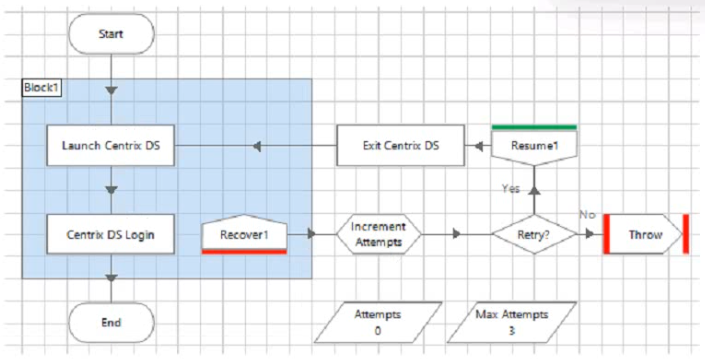
Please refer to the exhibits.


What is the expected behavior if the Developer uses the 'Step' function at this stage on a sub-page?
Step Function in Sub-Page:
The Step function in Blue Prism is used to execute the current stage and then move the focus to the next stage.
Current Stage (Add to Queue):
The Add to Queue action is configured to add data from a collection to a work queue.
If there is an error in the input parameters (e.g., missing or incorrect Queue Name, Data Collection, etc.), the action will fail.
Error Handling:
When the Add to Queue action fails, the process will trigger the exception handling logic.
The focus will move to the Recover1 stage to handle the exception.
Blue Prism documentation on exception handling and the use of the Step function.
Security & Privacy
Satisfied Customers
Committed Service
Money Back Guranteed